
What's inside
- Quick choices by acrylic thickness and workload
- Best CO₂ laser types for cutting acrylic
- Cast versus extruded acrylic
- Edge quality, speed, and expected results
- Ventilation is part of the machine choice
- Decision matrix for choosing a CO₂ acrylic cutting machine
- Setup details that protect edge quality
- Ownership costs and maintenance
- Bottom line
- Related Guides
As an Amazon Associate I earn from qualifying purchases. This post may contain affiliate links at no extra cost to you.
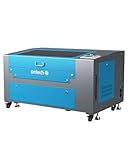
For most makers, a 50–60W CO₂ laser with a 20 × 28 in (500 × 700 mm) working area is the best all-round choice for cutting acrylic: it handles 3–10 mm sheet efficiently, fits common sign and craft projects, and produces cleaner edges than a diode laser.
The right CO₂ laser for cutting acrylic depends less on maximum wattage than on three matching decisions: the acrylic thickness you use most, the largest sheet or project you need to fit, and whether your workshop can safely exhaust fumes outdoors. A compact 40–55W machine is sufficient for signs, ornaments, display parts, and prototypes; frequent production work benefits from 80–100W and a larger bed.
As an Amazon Associate we earn from qualifying purchases at no extra cost to you.


Quick choices by acrylic thickness and workload
| Typical work | Recommended laser | Useful bed size | Practical acrylic range | What to expect |
|---|---|---|---|---|
| Small crafts and occasional parts | 40–55W CO₂ | 12 × 20 to 20 × 28 in | 1/16–1/4 in (1.5–6 mm) | Low purchase and power cost; slower on thick sheet |
| Signs, retail displays, regular workshop use | 55–80W CO₂ | 20 × 28 to 24 × 36 in | 1/8–3/8 in (3–10 mm) | Good balance of speed, capacity, and edge quality |
| Production batches or large signage | 80–130W CO₂ | 24 × 36 to 32 × 48 in | 1/4–1/2 in (6–12 mm) | Faster cuts and fewer passes; higher ventilation and service demands |
| Precision professional work | 60–100W RF or sealed CO₂ | 20 × 28 to 24 × 36 in | 1/16–3/8 in (1.5–10 mm) | Consistent beam quality and motion; substantially higher cost |
These are planning ranges, not guaranteed settings. Acrylic color, brand, masking, focus, air pressure, lens choice, and tube condition all change the result. A 60W machine with good optics can outperform a poorly aligned 100W machine.
Best CO₂ laser types for cutting acrylic
Best value: 50–60W glass-tube machines
A conventional 50–60W sealed glass-tube machine is usually the sensible CO₂ laser cutter for acrylic when budget matters. Models in this class commonly offer a bed around 20 × 28 in, water cooling, a honeycomb or knife-blade table, and a working height suitable for sheet stock.
They cut 3 mm acrylic quickly and can cut 6 mm in one pass after dialing in the material. Their drawbacks are larger footprints, more involved alignment, less polished software, and glass tubes that gradually lose power. The tube, mirrors, lens, water pump, exhaust fan, and air-assist pump are all ownership items rather than permanent components.
Best convenience: enclosed desktop CO₂ systems
Enclosed machines such as the xTool P2 and P2S occupy the more convenient end of the market. Their approximately 55W CO₂ sources and camera-assisted positioning make them attractive for a small shop or a user who wants less manual alignment. A bed around 26 × 14 in suits many plaques, panels, and layered signs, although it is not equivalent to a full 24 × 36 in industrial bed.
This category is a strong CO₂ laser cutter for acrylic choice for mixed materials and repeatable workflow. Check the machine’s maximum pass-through dimensions if you cut long strips. Enclosures reduce exposure to the beam and help contain smoke, but they do not eliminate the need for a properly ducted exhaust system.
Best for production: 80–130W machines
Higher-power machines from manufacturers such as OMTech, Thunder Laser, Epilog, and Trotec are aimed at users who cut thick sheet frequently or need a larger work area. A 100W source is not automatically better for thin acrylic: excessive power can widen the heat-affected zone, melt small details, and leave more residue. Its main advantage is maintaining useful speed on 6–12 mm material and reducing the need for repeated passes.
Professional systems typically offer better motion control, autofocus, cooling protection, software support, and service documentation. You pay for those ownership advantages as much as for the laser tube. General market pricing ranges from roughly $2,000–$5,000 for many imported 50–100W machines, $4,000–$10,000 for more refined enclosed systems, and well above $10,000 for established professional platforms with advanced motion and service support.
Cast versus extruded acrylic
For laser work, cast acrylic is usually the safer default. It tends to produce a more polished flame-like edge, engraves with better contrast, and is available in a wide variety of opaque, translucent, fluorescent, and specialty colors. It is often more expensive and can vary slightly in thickness across a sheet.
Extruded acrylic is generally less expensive and has more consistent thickness, making it useful for production parts. However, laser-cut edges are more likely to look slightly melted, cloudy, or burred, particularly on thicker sheet or at slow settings. It can still be an excellent material when cost and dimensional consistency matter more than a premium edge.
Clear acrylic deserves special attention. A CO₂ laser cutter for clear acrylic can cut it effectively because acrylic absorbs the CO₂ wavelength, unlike many transparent materials that pass visible light. Keep the protective paper or laser-safe masking in place where possible, use strong air assist, and clean the finished edge with a suitable plastic cleaner. Do not assume every clear plastic is acrylic: polycarbonate and PVC require different safety decisions, and PVC should not be laser cut because it releases corrosive, hazardous gases.
Edge quality, speed, and expected results
| Material | Thickness | Typical machine | Starting speed range | Likely result |
|---|---|---|---|---|
| Cast acrylic | 3 mm | 40–60W | 18–30 mm/s | Clean, glossy edge in one pass |
| Cast acrylic | 6 mm | 55–80W | 8–18 mm/s | Good edge with correct focus and air assist |
| Extruded acrylic | 3 mm | 40–60W | 22–35 mm/s | Fast cut; edge may be more visibly melted |
| Cast acrylic | 10 mm | 80–130W | 3–9 mm/s | Possible in one pass, but kerf and taper need checking |
Use these figures only as test-grid starting points. Power percentages are not standardized between machines, and a tube’s rated wattage is not always its actual optical output. For small parts, a slower speed may improve separation but worsen melting. For large outlines, a slightly faster setting with adequate air assist can produce a cleaner edge.
Ventilation is part of the machine choice
Acrylic produces irritating vapor and smoke when cut. An indoor filter box is not a substitute for a properly designed exhaust system unless the manufacturer specifically rates it for the material and installation. Plan for a rigid or well-supported duct, a short route where possible, an exhaust fan appropriate to the duct length, and a safe outdoor discharge point that does not send fumes toward windows or neighboring workspaces.
A 50–60W desktop machine may need roughly 300–600 cubic feet per minute of effective extraction, while a larger production enclosure can require more depending on leakage, ducting, and enclosure design. The fan’s advertised free-air rating is not the airflow you will get through bends, filters, and a long duct. Excessive negative pressure can also disturb thin sheet or pull flame toward unsuitable parts of the enclosure.
Decision matrix for choosing a CO₂ acrylic cutting machine
| Your situation | Best fit | Why | Accept the trade-off |
|---|---|---|---|
| Under $3,000, occasional use, limited space | 40–60W enclosed or compact glass-tube machine | Enough for 3–6 mm acrylic and small signs | Slower thick-sheet cutting and smaller bed |
| Beginner wanting simple setup | Camera-equipped enclosed 50–60W system | Easier positioning and fewer alignment tasks | Less open-bed flexibility and higher price |
| Weekly orders using 6–10 mm sheet | 80–100W, 24 × 36 in class | Better cycle time and sheet utilization | More floor space, cooling, and exhaust capacity |
| Fine detail and long service life | Professional RF or well-supported sealed CO₂ platform | Stable beam delivery and stronger service ecosystem | Much higher purchase and repair cost |
Setup details that protect edge quality
- Confirm the material. Look for acrylic or PMMA identification, not just “clear plastic.” Remove unknown protective films and reject PVC-containing sheet.
- Run a test grid. Test several speeds and power levels on the exact color, thickness, and brand. Record the result in a material library.
- Focus accurately. Incorrect focus is a common cause of wide kerfs, rough bottoms, and incomplete cuts. Thick acrylic may need a focus position recommended by the machine or lens supplier.
- Use air assist. A controlled air stream reduces flare-ups and helps clear vapor from the cut. Too much airflow can cool the cut excessively or move lightweight pieces.
- Inspect the underside. A clean honeycomb, knife table, or raised support reduces flashback and prevents smoke marks. Keep masking on the side that needs protection.
Ownership costs and maintenance
The parts that usually wear first are the exhaust fan, air-assist pump, water pump, lens, mirrors, belts, and—eventually—the laser tube. Clean optics regularly with the manufacturer-approved method; smoke residue absorbs energy and can damage a lens. Keep cooling water clean and at the recommended temperature, inspect hoses for leaks, and verify that door interlocks and emergency stops work.
As a simple capacity calculation, a 24 × 36 in sheet contains 864 square inches. A 20 × 28 in bed covers 560 square inches, so it cannot process that sheet in one placement even though both dimensions may look close. If your regular stock is 24 × 36 in, choose a bed with at least one 24-inch dimension or plan on a reliable pass-through workflow. That decision can save more time than upgrading from 60W to 80W.
Bottom line
Choose a 50–60W CO₂ laser for acrylic cutting when you mainly use 3–6 mm sheet and want a manageable general-purpose machine. Move to 80–100W when thick acrylic, large beds, or repeated orders justify the additional ventilation, cooling, and maintenance. Favor cast acrylic for the cleanest polished edges, use extruded acrylic when lower cost and uniform thickness matter, and treat ventilation and material identification as essential parts of the purchase—not optional accessories.