As an Amazon Associate I earn from qualifying purchases. This post may contain affiliate links at no extra cost to you.
Buying an Ender 3 in 2026 is really a decision about how much of the old Ender experience you want to keep. The name now covers several generations that share a badge and a build plate size more than they share parts: the current V3 family adds auto leveling, direct drive extrusion and far higher speeds, while the original machine is still a manual kit that expects you to level the bed yourself and enjoy the tinkering that comes with it.
This roundup is for woodworkers adding a printer for jigs, templates and dust-collection adapters, for hobbyists printing cosplay and tabletop pieces, and for parents or students who want a first machine that works without a weekend of assembly. Every model below is an Ender 3 variant taken from its Amazon product title and listing details, so the speeds, volumes and features quoted are the ones the listing itself states.
Quick Picks
As an Amazon Associate we earn from qualifying purchases
The generations split cleanly on this point. The original Ender 3 arrives as a DIY kit with manual bed leveling, so your first evening goes into assembly and tramming the bed with paper. The V3 SE, V3 KE, V3 and V3 Plus all list automatic leveling or auto calibration, which removes the step that causes most failed first layers for new owners. If the printer is a tool for the workshop rather than a hobby in itself, pick one of the auto-leveling models and save your patience for the projects.
Match print speed claims to the motion system
Listing speeds climb from 250mm/s on the V3 SE to 500mm/s on the V3 KE and 600mm/s on the CoreXZ V3 models. Those numbers describe the motion system, not a promise that every print finishes proportionally faster, because acceleration and part geometry matter as much as top speed. The V3 KE adds an X-axis linear rail for smoother travel at pace, while the CoreXZ design on the V3 and V3 Plus ties the X and Z axes together for quicker response. For mostly small parts, the SE pace is rarely the bottleneck.
Check the extruder and hotend temperature
Every V3 variant here uses a Sprite direct extruder, which feeds flexible filament more reliably than the Bowden tube setup on the original Ender 3. The KE and the CoreXZ models raise the ceiling further with hotends rated to 300 degrees, opening the door to filaments that need more heat than standard PLA. If you only print PLA and PETG for jigs and organizers, the SE hotend is enough. If you plan on abrasive or high-temperature materials later, the 300-degree listings give you headroom without a hotend swap.
Confirm the build volume fits your largest part
Four of the five machines share roughly the same footprint of work space at 220 x 220 mm, with heights between 240 and 250 mm. That suits brackets, knobs, small enclosures and most tabletop prints. The V3 Plus is the outlier at 300 x 300 x 330 mm, which matters when a dust hood, helmet or long template would otherwise need splitting into glued sections. Measure the biggest thing you realistically plan to print, add clearance, and let that decide whether the Plus earns its larger desk footprint.
The 5 Best Options
Creality Ender 3 V3 SE
Top Pick
Creality Ender 3 V3 SE
Best for: Beginners and workshop users who want the Ender 3 name without manual leveling.
Build volume: 220 x 220 x 250 mm (8.66 x 8.66 x 9.84 inches)
Maximum print speed: 250mm/s
Leveling: CR Touch automatic bed leveling
Extruder: Sprite direct extruder with auto filament load and unload
The V3 SE is the Ender 3 most people should start with now. It keeps the familiar 220 x 220 x 250 mm build area but replaces the fiddly parts of the original with CR Touch auto leveling, a Sprite direct extruder and automatic filament loading, so the first print is a calibration exercise rather than a troubleshooting session. Its listed 250mm/s top speed will not win races against its siblings, yet it is a large step up from the older generation and plenty for workshop parts, organizers and gifts.
Creality Ender 3 V3 KE
Runner-Up
Creality Ender 3 V3 KE
Best for: Experienced hobbyists who want speed and high-temperature filament support in the standard Ender footprint.
Build volume: 220 x 220 x 240 mm (8.66 x 8.66 x 9.44 inches)
Maximum print speed: 500mm/s, 8000mm/s squared acceleration
Leveling: CR Touch automatic bed leveling
Extruder: Sprite direct extruder, supports printing up to 300 degrees
The KE is the SE concept pushed harder. The listing doubles the headline speed to 500mm/s with acceleration of 8000mm/s squared, adds an X-axis linear rail and dual cooling fans, and fits a 60W ceramic heater hotend that reaches 300 degrees for a wider filament range. It suits makers who have outgrown a first printer and now queue up functional parts, as well as anyone printing PETG or ABS regularly who wants the hotter hotend from the factory instead of as an upgrade project.
Creality Ender 3 V3
Creality Ender 3 V3
Best for: Designers and prototypers who print daily and value the fastest standard-size Ender 3.
Build volume: 220 x 220 x 250 mm
Maximum print speed: 600mm/s, 20,000mm/s squared acceleration
Motion system: CoreXZ with auto-tensioned XZ belts
Leveling: integrated automatic leveling and auto calibration
The plain V3 is the flagship of the standard-size line, built around a CoreXZ motion system where the X and Z axes move together on shared belts. The listing claims 600mm/s with acceleration up to 20,000mm/s squared, a clog-free direct extrusion path, a 60W hotend heater reaching 300 degrees, a quick-swap tri-metal nozzle and full auto calibration. Choose it if you iterate designs often and want each revision back on the desk quickly, or if input shaping and self-checks appeal more than saving a little on the SE.
Creality Ender 3 V3 Plus
The Plus stretches the V3 formula into a noticeably bigger machine. Its 300 x 300 x 330 mm build volume swallows parts that would need splitting on the other four printers here, such as full-size helmets, large dust-collection hoods and long workshop templates. It keeps the CoreXZ structure, the listed 600mm/s top speed and the 300-degree direct drive extruder, and adds dual Y motors plus a hardened tri-metal nozzle. For woodworkers printing big jigs or cosplayers printing wearables in one piece, this is the Ender 3 that removes the size compromise.
Specs
Build volume: 300 x 300 x 330 mm (11.8 x 11.8 x 13.0 inches)
Maximum print speed: 600mm/s, 20,000mm/s squared acceleration
Motion system: CoreXZ, dual Y-axis motors
Leveling: full automatic calibration
Extruder: direct drive with hardened tri-metal nozzle, up to 300 degrees
Frame: stable all-metal build
Best for: Makers whose parts regularly exceed a 220 mm square footprint.
Watch out for: The larger frame needs more bench space and the extra travel means big prints still run for many hours despite the speed rating.
ASIN: B0F8QQZ4QM
Creality Ender 3
Creality Ender 3
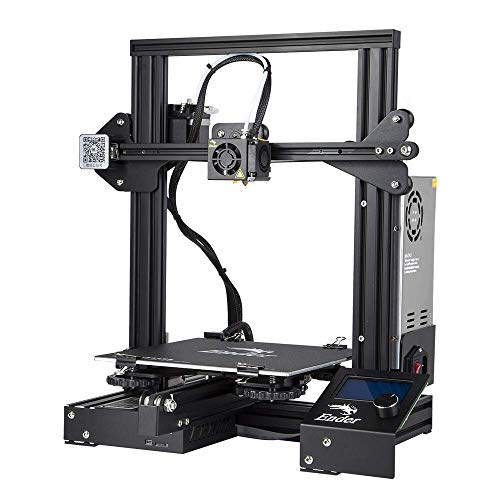
Best for: Hobbyists who want the lowest entry point into the Ender ecosystem and enjoy manual setup.
Build volume: 220 x 220 x 250 mm (8.66 x 8.66 x 9.84 inches)
Printing technology: FDM, DIY kit assembly
Leveling: manual bed leveling
Features: resume printing after power loss, stable power supply
The original Ender 3 remains on sale as the line’s budget time capsule. It is a DIY kit with V-slot rails, a resume printing function that recovers from power loss, and the same 220 x 220 x 250 mm build area that made the name famous. There is no auto leveling and no direct drive, so expect manual bed tramming and a Bowden extruder. It still makes sense for tinkerers who enjoy upgrading a machine piece by piece, and for classrooms teaching how a printer actually works rather than hiding it behind automation.
Which One Fits Your Situation
You want a first printer for workshop jigs and adapters
Start with the V3 SE. Auto leveling and automatic filament loading remove the two frustrations that make new owners abandon a first printer, and the 220 mm build area covers dust ports, router templates and tool holders comfortably. Its moderate speed is fine when a jig prints once and then works for years.
You print functional parts every week
The V3 KE earns its place through pace and temperature range. The linear rail, dual fans and 300-degree hotend suit repeated PETG brackets, enclosures and mechanical parts, while 500mm/s keeps iteration cycles short. Pick it over the SE when the printer is a production tool rather than an occasional helper.
Your parts are simply too big for a standard bed
Go straight to the V3 Plus. A 300 x 300 x 330 mm volume means helmets, hoods and long templates print in one piece instead of glued sections, and the CoreXZ system keeps that larger gantry moving at the listed 600mm/s. Measure your bench first, because the frame is substantially larger than its siblings.
You enjoy building and upgrading the machine itself
The original Ender 3 is your blank canvas. The manual kit teaches assembly, leveling and extrusion by making you do all three, and the huge community knowledge base around this exact model means every upgrade path is documented in detail. Choose it knowingly: the savings buy you homework, not automation.
Common Mistakes
Assuming every Ender 3 shares parts and firmware, when the V3 generation differs substantially from the original design.
Comparing headline speeds only, and ignoring acceleration and the motion system behind the number.
Buying the standard 220 mm models for a project that actually needs the V3 Plus build volume.
Expecting the original Ender 3 to level itself, then blaming the printer for first-layer failures.
Forgetting filament, since some listings ship the printer alone and a first spool is a separate purchase.
Frequently Asked Questions
Which Ender 3 is easiest for a complete beginner?
The V3 SE is the gentlest starting point in this lineup. Its listing includes CR Touch auto leveling, a direct extruder and automatic filament loading, which removes the manual steps behind most failed first prints. The original Ender 3 can also be a first printer, but expect an evening of assembly and manual bed leveling before printing.
Is the Ender 3 V3 KE worth it over the V3 SE?
It depends on how often you print and what you print. The KE doubles the listed top speed to 500mm/s, adds an X-axis linear rail and raises the hotend ceiling to 300 degrees, which helps with PETG and hotter filaments. Occasional PLA users will rarely feel the SE holding them back.
Can these printers handle flexible filament?
The four V3 variants use a Sprite direct extruder, which feeds flexible filament more consistently than the Bowden setup on the original Ender 3. Listings for the KE and CoreXZ models also cite 300-degree hotends, widening the filament range further. Always confirm the exact filament types named on the listing before ordering specialty material.
What is the difference between the Ender 3 V3 and V3 Plus?
Size and reinforcement. Both list CoreXZ motion at 600mm/s with auto calibration, but the Plus grows the build volume from 220 x 220 x 250 mm to 300 x 300 x 330 mm and adds dual Y motors with a hardened tri-metal nozzle. Choose the Plus when your parts outgrow the standard bed, not for everyday speed.
J
JD's Woodworks Editorial Team
We compare specs, warranty terms, long-term owner feedback and street pricing before anything earns a spot. Rankings are never paid.
Affiliate disclosure. As an Amazon Associate we earn from qualifying purchases at no extra cost to you. Prices accurate as of the date shown.
Compare the best dewalt portable air compressor picks for trim, framing and finish work, the 6-gallon pancake, cordless FlexVolt and quiet trim models.
Compare the best cup laser engraver picks with rotary chucks and rollers for tumblers, mugs and glasses, from enclosed diode machines to open-frame models.
Compare the best cnc systems sold as complete packages — machine, controller and software in one box — by work area, spindle, drive and control ecosystem.
Find the best bandsaw light for your saw: magnetic gooseneck LED machine lights that aim at the blade, from a 2,000-lumen work light to cordless picks.
Miter saw vs table saw: compare crosscuts, rip cuts, accuracy, space, and value to choose the right saw for your shop and your first woodworking projects.
Compare five solar portable generators for shops, campsites, and outages, covering battery size, output, solar charging, outlets, and what to check first.
The best portable CNC machines for small shops and shared spaces, compared by footprint, weight, work area, and setup. Compact benchtop picks for wood, acrylic, and soft metal.


 Creality Ender 3