5 Best Laser Cutter Tables for Woodworking Shops (November 2026)
Find the best laser cutter table for your woodworking shop: five honeycomb beds compared by size, material, and machine fit for diode and CO2 engravers.
Find the best laser cutter table for your woodworking shop: five honeycomb beds compared by size, material, and machine fit for diode and CO2 engravers.
As an Amazon Associate I earn from qualifying purchases. This post may contain affiliate links at no extra cost to you.
As an Amazon Associate I earn from qualifying purchases.
The Short Answer
A laser cutter table is the honeycomb bed that sits under your laser engraver, not a laser cutter itself. It holds sheet material flat, lets the beam pass through the cut instead of scorching the bench underneath, and gives smoke and heat somewhere to go. If you cut plywood, MDF, acrylic, or leather on an open-frame diode engraver or a desktop CO2 machine, a honeycomb table is the single accessory that most improves cut quality on thin sheet goods.
For most woodworking shops, the Longer Honeycomb Laser Bed in the 440 x 440 mm size is the best laser cutter table to buy first. It covers the working area of the common 400 mm class diode engravers, it ships with an aluminum protection panel, and its iron and aluminum build suits diode, CO2, and fiber machines. If you regularly cut full 500 mm sheet stock, step up to the Creality Honeycomb Working Table in 500 x 500 mm instead. If bench space is tight and you move the table in and out of a shared workspace, the Ortur Laser Engraving Platform is the lightest pick here. Measure your engraver bed before ordering any table, because a bed that is wider than your machine frame is wasted money and a bed that is too small leaves sheet edges unsupported.
Our Top Picks
Top Pick
Our Top Picks
Longer Honeycomb Laser Bed 440 x 440 mm — Best all-around pick for most 400 mm class engravers. See it on Amazon
Creality Honeycomb Working Table 500 x 500 mm — Best large-format pick for full sheet work. See it on Amazon
xTool Honeycomb Working Table 500 x 500 mm — Best pick for xTool D1 Pro owners and large diode machines. See it on Amazon
Ortur Laser Engraving Platform — Best lightweight pick for portable setups and shared benches. See it on Amazon
The most common buying error is ordering a table by its headline size without checking the machine it must sit under. A 500 x 500 mm table needs a gantry frame wide enough to straddle it, and an enclosed machine needs enough interior height for the table plus the material. Measure the clear area inside your engraver frame, then compare it with the table footprint and the table height. The Longer bed suits the 400 mm class of diode engravers that dominate home woodworking shops. The Creality and xTool 500 mm tables suit larger diode machines and desktop CO2 machines with room to spare. The Ortur platform is narrower, at 400 x 448 mm, which helps it fit machines where a square 500 mm bed would not.
Understand what the honeycomb does
A honeycomb bed supports sheet material on a grid of thin walls with open cells beneath. When the laser beam cuts through the material, it passes into the open cells instead of hitting a solid surface and bouncing back into the underside of the sheet. That is why cut edges come out cleaner and the underside shows less scorching. The open structure also lets smoke and hot air escape downward instead of pooling under the sheet, which keeps thin plywood and veneer from darkening and warping mid-cut. A slat bed does a similar job with parallel bars, but honeycomb supports small cut pieces better, because a small part can rest across several cells instead of falling between two slats.
Iron core or aluminum core
Honeycomb tables use either an iron core or an aluminum core, and the difference matters for how you hold material down. An iron honeycomb lets you use magnets to pin thin sheet flat, which is a real advantage when cutting warped plywood or thin veneer that lifts at the corners. The Longer bed, the xTool table, and the Creality 500 mm table all use iron in the honeycomb. An aluminum honeycomb is lighter and will not rust, but magnets will not grip it. The Tyvok modular bed is aluminum throughout. If you already own magnetic hold-down pins, pick an iron-core bed.
Height and focus
Every honeycomb table adds height between the bench and the material, and that changes the distance from the laser head to the work surface. Most tables in this guide are around 22 mm tall, while the Tyvok modular bed is slimmer at about 0.8 inches and the Ortur platform is lower still at about 0.47 inches. On an open-frame diode engraver you can usually refocus by lowering the laser module, but on an enclosed machine with a fixed bed height you may lose clearance for thicker material. Recheck focus after installing any new table.
The protection panel underneath
A honeycomb bed on its own still lets the beam reach whatever sits below it. That is why most of these tables ship with a flat metal panel that sits under the honeycomb and shields the bench. The Longer, Creality, and xTool picks all include an aluminum or steel panel in the box, the Ortur platform includes a protective backing board, and the Tyvok bed has an integrated base. Never run a laser over a bare wooden bench.
Holding material flat
Thin sheet goods rarely arrive perfectly flat, and a sheet that bows upward changes the focus distance across the cut. Magnetic pins are the simplest fix on iron-core beds, and the xTool table’s iron honeycomb accepts separately purchased magnetic pins for this purpose. The Ortur platform uses movable metal fixtures that slide to any position and clamp the edges of the sheet. The Tyvok modular bed lets you rearrange panels around the workpiece. Whichever system you use, hold the sheet down at the corners before starting a long cut, and confirm on the listing what hold-down hardware is included.
Modularity against simplicity
A one-piece table is ready to use the moment you set it down, and for most shops that is the right answer. A modular bed, like the Tyvok, trades some of that simplicity for flexibility: four panels can be arranged as a small surface or combined into a full 400 x 400 mm bed, and a single worn panel can be swapped without replacing the whole table. That flexibility pays off if you cut many different sizes, but it adds setup time to every job.
The Picks in Detail
1. Longer Honeycomb Laser Bed 440 x 440 mm
The Longer bed is the most balanced table in this guide, and it is the one to buy if you own a 400 mm class diode engraver such as a Longer RAY5 or a similar open-frame machine. The 440 x 440 mm working area gives you a little margin around a 400 mm bed, so full-size sheet stock sits fully supported. The honeycomb is iron and aluminum, so magnetic hold-downs grip it, and the included aluminum panel protects the bench beneath. The listed weight is 6.8 pounds, and the listing states compatibility with diode, CO2, and fiber engravers.
Pros:
440 x 440 mm area suits the most common diode engraver size
Iron honeycomb works with magnetic hold-downs
Aluminum protection panel included
Listed for diode, CO2, and fiber machines
Cons:
Too small for full 500 mm sheet work
At 6.8 pounds it is heavier than the lightest options here
Hold-down pins are not listed as included, so confirm on the listing
The Creality 500 mm table is the pick for shops that cut large sheet stock and want the biggest single-piece bed in this guide. The working area is 500 x 500 mm with a stated maximum cutting size of 456 x 456 mm, and the 8 mm honeycomb aperture moves heat and smoke away from the material quickly. The build is a thick all-metal structure with an iron honeycomb core, a metal frame, and an included steel protection sheet. At 8.8 pounds it is the heaviest table here, and the listed height is about 2.4 inches, so check your machine clearance before ordering.
The xTool table is the natural match for the xTool D1 Pro and for other large open-frame diode engravers. The panel measures 500 x 500 x 22 mm, with an iron and aluminum honeycomb, an aluminum panel beneath, and four corner protectors. Its iron honeycomb works with separately purchased magnetic pins, so thin material can be held flat, and confirm on the listing whether alignment scales are printed on the sides. The listed weight is 8.54 pounds, and the listing states that it fits the D1 Pro and most laser engraver and cutter machines.
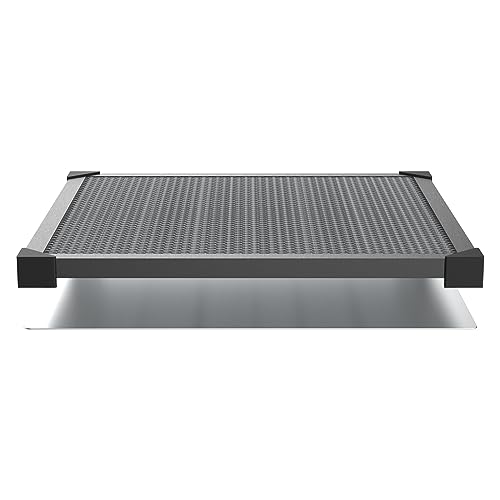
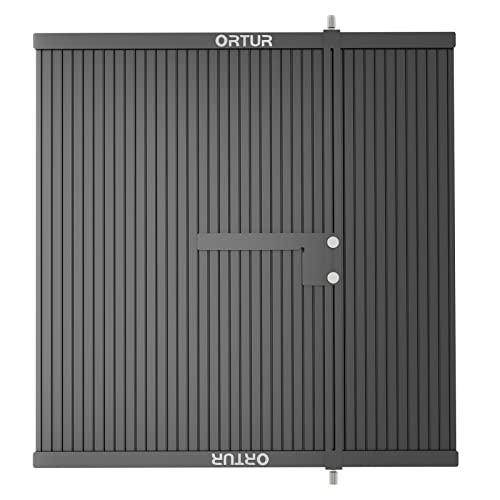
The Ortur platform is the lightest and lowest table in this guide, and it is the best choice when the table must be easy to move or store. It weighs 4.6 pounds and measures 400 x 448 x 12 mm, so it sits low on the bench and leaves more focus clearance than the taller honeycomb beds. The build is high-strength steel with a square-notch grid instead of a traditional hexagonal honeycomb. The panels are spliceable, so two can be joined for a larger working area, and movable fixtures slide to any position to hold material. A protective backing board is included.
The Tyvok bed is the flexible option in this guide. It is built from four aluminum panels, each 400 x 100 mm, that combine into a working area up to 400 x 400 mm. You can use fewer panels for a small job, rearrange them around an offcut, or replace a single worn panel instead of buying a whole new bed. The bed stands about 0.8 inches tall, and the integrated base protects the bench. The listing states compatibility with CO2, diode, and fiber lasers.
If you own a 400 mm class diode engraver and want one table that simply works, buy the Longer 440 mm bed. It is the right size for the most common machines, it takes magnetic hold-downs, and it includes the protection panel. If you cut full 500 mm sheet stock on a larger machine, buy the Creality 500 mm table for the biggest working area, or the xTool 500 mm table if you run a D1 Pro and want an iron-core bed that takes magnetic pins. If your bench is shared with other work and the table must come off between jobs, buy the Ortur platform for its low weight and low height. If you cut many different sizes and like to reconfigure your setup, buy the Tyvok modular bed.
Common Mistakes
The most common mistake is buying a table that is wider than the engraver frame, so the gantry cannot pass over it and the table is useless. Measure the clear width inside the frame, not the outside of the machine. The second mistake is forgetting focus: a 22 mm tall table raises the material by nearly an inch, and on a machine with limited Z travel the laser head may not reach focus on thin sheet. Recheck focus after installing any new table. The third mistake is running the laser without a protection panel under the honeycomb, which scorches the bench. The fourth mistake is skipping hold-downs on thin plywood, which bows as it heats and drifts out of focus mid-cut. The fifth mistake is assuming every bed is magnetic: aluminum honeycomb will not hold magnets, so check the core material if you rely on magnetic pins. Finally, do not store a honeycomb bed where it can be bent or dropped; a warped bed holds material unevenly.
FAQ
What is a laser cutter table?
A laser cutter table is a honeycomb bed or working platform that sits under a laser engraver. It supports sheet material while the beam cuts through, lets smoke and heat escape below the material, and shields the bench from the beam. It is an accessory for a laser cutter, not a laser cutter on its own.
Do I need a honeycomb table for my laser engraver?
You can engrave without one, but cutting is a different matter. Without a bed, the beam hits the bench under the sheet, which scorches the underside of the material and traps smoke beneath it. A honeycomb table gives cleaner cut edges and less underside darkening on plywood, MDF, acrylic, and leather.
What size laser cutter table should I buy?
Match the table to the clear area inside your engraver frame. A 440 mm bed suits most 400 mm class diode engravers. A 500 mm bed suits larger diode machines and desktop CO2 machines with the frame width to straddle it. Measure the inside of the frame and the focus clearance before ordering.
Iron or aluminum honeycomb: which is better?
Iron honeycomb works with magnetic hold-downs, which is a real advantage for thin or warped sheet stock. Aluminum honeycomb is lighter and will not rust, but magnets will not grip it. Pick iron if you use magnetic pins, and aluminum if you move the table often and weight matters more.
Can one table fit diode, CO2, and fiber lasers?
Most of the tables in this guide are listed for all three types, because the bed itself does not care what makes the beam. What matters is size and height: the table must fit inside the machine frame and leave enough focus clearance. Check the machine fit on the listing rather than the laser type.
How do I keep thin plywood flat on a honeycomb table?
Use magnetic pins on an iron-core bed, or the movable fixtures that come with tables like the Ortur platform. Hold the sheet at the corners before starting the cut, and keep the sheet pressed flat while you align it. If a sheet is badly warped, cut it into smaller pieces or flatten it under weight before it goes on the bed.
Conclusion
The best laser cutter table is the honeycomb bed that fits your machine, holds your material flat, and protects your bench. For most woodworking shops that means the Longer 440 mm bed, with the Creality or xTool 500 mm tables for larger machines, the Ortur platform for portable setups, and the Tyvok modular bed for workshops that reconfigure often. Measure your engraver frame, check your focus clearance, and confirm on the listing that the protection panel and hold-down hardware you need are included.
J
JD's Woodworks Editorial Team
We compare specs, warranty terms, long-term owner feedback and street pricing before anything earns a spot. Rankings are never paid.
Affiliate disclosure. As an Amazon Associate we earn from qualifying purchases at no extra cost to you. Prices accurate as of the date shown.
Table saws under the 1500 mark compared: the Grizzly G0771Z and Shop Fox W1837 hybrid saws with cast iron tables, 2 HP motors and T-square fences, specs from their listings.
Table saws for fine woodworking compared: the SawStop Professional Cabinet Saw and Powermatic PM1000, judged on fence precision, table flatness and vibration from listing specs.
Table saw combos explained: saws sold with a stand and accessories in one listing, what to check in the box, and which bundle fits your shop or jobsite.
Compare the best planer digital thickness gauges and digital readout kits for portable planers, with fit, resolution and mounting checks before you buy.
Model table saws for scale modelling and hobby work compared: the precision Proxxon FET 37070 and the compact Saker mini table saw, with specs taken from their Amazon listings.
Three CoreXY 3D printers for product development, each with the architecture stated on its listing: an enclosed multicolor machine, a large-format enclosed model and a heated-chamber model.



 4. Ortur Laser Engraving Platform
 5. Tyvok Modular Honeycomb Laser Bed









