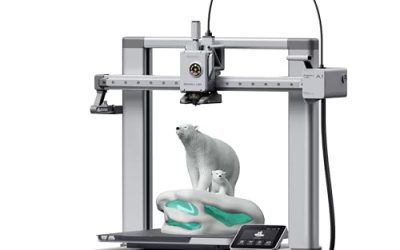
3 Best CoreXY 3D Printers for Product Work (November 2026)
Three CoreXY 3D printers for product development, each with the architecture stated on its listing: an enclosed multicolor machine, a large-format enclosed model and a heated-chamber model.
Three CoreXY 3D printers for product development, each with the architecture stated on its listing: an enclosed multicolor machine, a large-format enclosed model and a heated-chamber model.
As an Amazon Associate I earn from qualifying purchases. This post may contain affiliate links at no extra cost to you.
Product development printing is an iteration business. The machine that matters is the one that turns a revised CAD file into a physical part you can hold, test and break before the next revision meeting, and CoreXY architecture earns its place here because the stationary motors keep moving mass low at the speeds iteration demands. Every printer in this guide has CoreXY stated on its own Amazon listing, which is the hard filter for this roundup.
The three picks serve different development styles. One is an enclosed multicolor machine for presentation-ready prototypes, one is a large enclosed platform for full-size parts and batch layouts, and one adds an actively heated chamber for functional parts in engineering materials. Specs below come from the listings themselves, so the comparison reflects what each manufacturer actually claims in writing.
Quick Picks
As an Amazon Associate we earn from qualifying purchases.
Product
Best for
Key spec from title
Bambu Lab P1S Combo
Fast enclosed iteration with color
CoreXY, AMS included, 256 x 256 x 256 mm
Creality K1 Max
Large enclosed development platform
Core XY structure, 300 x 300 x 300 mm, AI LiDAR
QIDI Q1 Pro
Heated-chamber functional prototypes
CoreXY structure, 60 C chamber heat, 350 C extruder
How to Choose
Confirm CoreXY on the listing, not in the marketing
Plenty of fast printers use a bed-slinger layout, where the heavy bed moves back and forth, and their speed figures can look similar on paper. For product development the difference shows up in tall parts and rapid direction changes, where a moving bed works against surface quality. This guide only includes machines whose Amazon listing states CoreXY or Core-XY in the title or description. When you compare other models, search the listing text for the architecture itself. If the listing never states it, assume the machine is not CoreXY regardless of how the photos look.
Match build volume to your prototype envelope
Development parts are rarely as large as the biggest machine available, but enclosures, housings and ergonomic mock-ups regularly exceed a 220 mm cube. A 256 mm machine covers most handheld product work, while a 350 mm class machine lets you print full enclosures in one piece instead of splitting and bonding them. Splitting is sometimes the right answer for strength or orientation, but it should be a choice, not a constraint. Measure your largest recurring part, add room for supports and brims, and buy the smallest machine that fits it comfortably.
Weigh enclosure and chamber heat against your materials
Appearance prototypes in PLA and PETG print well on almost anything, but functional development quickly reaches ABS, ASA and filled materials that warp without controlled air temperature. A passive enclosure slows cooling; an actively heated chamber holds a set temperature and gives more consistent results across a long print. If your development work includes snap-fits, ducts or parts that will be tested outdoors, chamber control is a functional requirement. If your parts are form studies and visual models, spend the same money on the color system instead.
Decide how much you want to modify the machine
Open-source platforms invite upgrades: different hotends, custom firmware, community modifications. That flexibility suits development teams who treat the printer as part of the experiment. Sealed ecosystems take the opposite position, trading modification for consistency between prints and between machines. Neither is better in the abstract. A team printing the same test geometry fifty times benefits from consistency, while a team exploring materials and processes benefits from openness. Be honest about which kind of development your shop actually does before choosing a side. Budget also plays a part: an open platform spreads its cost across later upgrades you choose yourself, while a sealed machine charges once for a finished, supported configuration.
The 3 Best Options
Bambu Lab P1S Combo
Top Pick
Bambu Lab P1S Combo
Best for: Development teams that iterate daily and need color for labels, coding and presentation parts
The P1S Combo is the iteration workhorse of this group. Its listing states the CoreXY architecture, an enclosed frame and the AMS color unit included in the box, so multicolor prototypes and labeled parts come off one machine without manual swaps. Automatic bed leveling and a 256 mm build cube fit the rhythm of daily development work: revise in the morning, print over lunch, handle the part in the afternoon. It is the pick for teams who want the printer to disappear into the process and simply produce consistent parts revision after revision.
Creality K1 Max
Runner-Up
Creality K1 Max
Best for: Teams that print large enclosures or batch layouts in one run
Teams that print large enclosures or batch layouts in one run
Watch out for
The chamber is passive rather than actively heated, so the most warp-prone engineering materials still belong on the Q1 Pro; a refreshed version of this model also circulates, so confirm the listing tied to this ASIN
The K1 Max is the large-format pick. Its listing states a Core XY structure with a 300 x 300 x 300 mm build volume, a maximum speed of 600 mm/s and hands-free auto leveling, inside an enclosed frame. AI LiDAR scanning checks the first layer and an AI camera watches for failures mid-print, which matters more as parts grow, because a failed large print wastes the most material and time. The hotend reaches 300 C for filled and engineering filaments. Choose it when enclosures, housings and multi-part layouts regularly outgrow a 256 mm cube and you want them printed in one piece instead of split and bonded.
QIDI Q1 Pro
QIDI Q1 Pro
Best for: Functional prototypes in ABS, ASA and carbon-fiber blends
Functional prototypes in ABS, ASA and carbon-fiber blends
Watch out for
Stock signals for this listing were mixed across sources at check time, and a second ASIN circulates for the model, so verify availability on this exact ASIN before ordering
The Q1 Pro is the functional-prototype pick. Its listing describes a CoreXY structure with independent dual Z motors, an actively heated chamber reaching 60 C and a 350 C direct extruder that supports carbon-fiber filaments. That combination targets the parts development teams actually break: brackets, housings and fittings in materials that need heat to print without warping. The 245 mm build cube is the smallest here, which is the honest trade for the chamber and hotend at this size class. Pick it when your prototypes are tested mechanically rather than just looked at.
Which One Fits Your Situation
You revise and reprint the same product daily
Choose the Bambu Lab P1S Combo. The enclosed CoreXY frame, included AMS and automatic leveling make it the most predictable machine here, and predictable is what an iteration loop needs. Parts come off the plate ready to measure, photograph and hand to a client.
You print full enclosures and multi-part layouts
Choose the Creality K1 Max. The 300 mm cube is the deciding factor: full enclosures and multi-part layouts print in one piece instead of being split and bonded. The AI LiDAR first-layer scan and camera monitoring guard the long prints a big bed invites, and the enclosed frame keeps drafts off ABS and ASA work.
Your prototypes are load-bearing test parts
Choose the QIDI Q1 Pro. The heated chamber and 350 C extruder exist for the engineering materials that functional testing demands. Accept the smaller build volume as the price of printing those materials reliably in a desktop footprint.
You are equipping a small development bench from scratch
Start with the P1S Combo for daily work and add the Q1 Pro when a project demands engineering materials. The K1 Max joins the bench when part size, not material or color, becomes the recurring constraint. Buying in that order covers the most common development jobs first.
Common Mistakes
Comparing speed figures between CoreXY and bed-slinger machines as if the architectures were equivalent.
Buying a large-volume machine for prototypes that would fit a 256 mm cube, then fighting its longer warm-up and larger footprint.
Printing ABS or ASA functional parts without chamber heat and recording the warped results as design failures.
Ordering the wrong variant of a model that shares one page across combo, plain and regional listings.
Assuming AI monitoring replaces first-layer checks on a large bed, when a failed first layer on a 300 mm plate wastes the most material and time.
Frequently Asked Questions
Why does CoreXY matter for product development specifically?
Iteration speed is only useful if the parts stay accurate, and CoreXY keeps the heavy motors stationary so the toolhead can accelerate hard without shaking the frame or dragging a heavy bed. That shows up as cleaner walls on tall parts and more consistent dimensions across revisions. For development work, where each print is compared against the last, that consistency is the real benefit.
Can these machines print engineering filaments?
The QIDI Q1 Pro is the clearest yes: its listing states a 350 C extruder, carbon-fiber filament support and a heated chamber. The K1 Max also lists a 300 C hotend and an enclosed frame, which covers many filled and engineering materials, though its passive chamber limits the most warp-prone ones. The P1S prints ABS and ASA inside its enclosure, but demanding high-temperature polymers belong on the Q1 Pro.
Is the AMS worth it for prototype work?
For development, color is functional more often than decorative. Teams color-code revisions, print labels and markings directly into parts, highlight changed geometry in a contrasting filament, and produce client-ready appearance models without painting. The P1S Combo includes the AMS in the box, which makes that capability available from the first print rather than as a later accessory decision.
Which machine needs the least tinkering?
The P1S Combo. Its enclosed ecosystem is designed around automatic setup and repeatable output, and the listing emphasizes automatic leveling rather than adjustment. The K1 Max sits at the other end: it arrives assembled and self-monitoring, but it expects more operator judgment on materials and profiles than the Bambu asks for. The Q1 Pro falls between them, with automatic leveling but a materials focus that assumes an experienced operator.
J
JD's Woodworks Editorial Team
We compare specs, warranty terms, long-term owner feedback and street pricing before anything earns a spot. Rankings are never paid.
Affiliate disclosure. As an Amazon Associate we earn from qualifying purchases at no extra cost to you. Prices accurate as of the date shown.
Table saws under the 1500 mark compared: the Grizzly G0771Z and Shop Fox W1837 hybrid saws with cast iron tables, 2 HP motors and T-square fences, specs from their listings.
Table saws for fine woodworking compared: the SawStop Professional Cabinet Saw and Powermatic PM1000, judged on fence precision, table flatness and vibration from listing specs.
Table saw combos explained: saws sold with a stand and accessories in one listing, what to check in the box, and which bundle fits your shop or jobsite.
Compare the best planer digital thickness gauges and digital readout kits for portable planers, with fit, resolution and mounting checks before you buy.
Model table saws for scale modelling and hobby work compared: the precision Proxxon FET 37070 and the compact Saker mini table saw, with specs taken from their Amazon listings.
Three consumer grade 3D printers for home users: a fully automatic Bambu Lab, an open-frame Creality for tinkerers and an enclosed high-speed Creality K1C.