As an Amazon Associate I earn from qualifying purchases. This post may contain affiliate links at no extra cost to you.
A molded look means a part that could pass for injection molded: smooth faces, layer lines you have to hunt for, and crisp edges that need no heavy sanding. The real decision is not which printer is fastest on paper, but which printing method and which machine settings get you that finish with the least post-processing. Resin printers win on raw surface detail, while well-tuned enclosed filament printers win on size, strength, and convenience for everyday parts.
This guide is for hobbyists printing display pieces, woodworkers prototyping molded-style fittings and hardware, and small sellers who want finished-looking parts straight off the build plate. The five printers below were chosen from the names and specifications shown on their Amazon product pages, covering resin detail, quiet open-frame filament printing, and enclosed high-speed machines.
Quick Picks
As an Amazon Associate we earn from qualifying purchases
Product
Best for
Key spec
Bambu Lab A1
Quiet home printing with fine layers
256 x 256 x 256 mm build volume
Creality Ender-3 V3 SE
Budget first printer for smooth small parts
250 mm/s maximum print speed
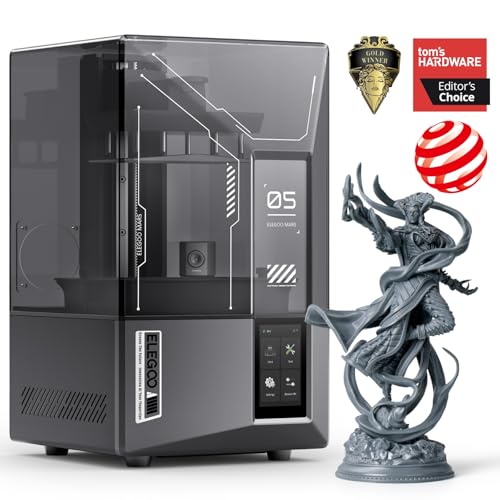
ELEGOO Mars 5 Ultra
Near-invisible layers on detailed models
7-inch 9K mono LCD
Bambu Lab P1S
Enclosed printing for warp-free smooth parts
500 mm/s fast printing
FLASHFORGE Adventurer 5M Pro
Enclosed high-speed printing with monitoring
600 mm/s high-speed printing
How to Choose
Resin or filament for the finish you want
Resin printing cures liquid resin in very thin layers, so the surface comes out far smoother than most filament prints and fine details stay sharp. That makes resin the natural choice for figurines, jewelry masters, and small detailed parts where a molded look matters most. Filament printing lays down melted plastic in thicker layers, so layer lines are more visible, but a good machine with fine layer settings, a stable frame, and the right filament can still produce clean, presentable parts. Choose resin when detail is the priority and the parts are small; choose filament when you need larger parts, tougher materials, or a simpler workflow.
Layer height and resolution
Layer height is the single biggest lever on visible layer lines. A resin printer with an 18-micron XY resolution and thin layers produces surfaces that look cast rather than printed. On a filament machine, look for automatic bed leveling and flow compensation, because an uneven first layer and inconsistent extrusion show up as ridges across the whole part. Printers that hold tight dimensional accuracy, such as the plus or minus 0.01 mm accuracy stated for one model below, make it easier to dial in thin layers without failed prints. Finer layers take longer, so weigh the finish you need against the time each part takes.
Enclosure and temperature stability
An enclosed printer holds warm air around the part while it prints, which reduces warping, corner lifting, and the uneven cooling that leaves a rough, wavy surface. That matters most with materials that shrink as they cool, and it also keeps drafts in a workshop from spoiling a smooth wall. Open-frame printers are fine for basic filaments in a stable room, but if your workspace has cold air, open windows, or a fan blowing across the bench, an enclosed machine will give you a more consistent molded look. A built-in camera and filtration are useful extras in an enclosed design.
Build volume and material range
Build volume decides the largest part you can print in one piece, and a part printed in one piece always looks more molded than one glued together from sections. A 256 mm cube suits most decorative objects and fittings, while a compact resin build volume suits miniatures and masters. Also check which materials the printer handles: standard PLA prints cleanly and finishes well, while PETG and ABS add toughness but demand more temperature control. Pick a machine whose volume and material range match the parts you actually plan to make, not the biggest machine you can imagine.
The 5 Best Options
Bambu Lab A1
Top Pick
Bambu Lab A1
Best for: Home workshops where quiet operation and consistent smooth prints matter.
The Bambu Lab A1 is a strong pick for anyone who wants smooth filament prints without a complicated setup. Full-auto calibration and active flow rate compensation keep extrusion consistent, which is exactly what a molded look depends on: even walls, no blobs, and layer lines that stay subtle. It runs quietly, so it fits in a home workshop or spare room, and the generous build volume handles display pieces and practical fittings in a single print. Beginners get a machine that is ready to use, while experienced makers get a reliable workhorse for clean everyday parts.
Creality Ender-3 V3 SE
Runner-Up
Creality Ender-3 V3 SE
Best for: Beginners on a budget who want smooth small parts and a quick setup.
The Creality Ender-3 V3 SE is the budget route to a molded look, and it earns its place with features that directly improve surface quality. CR Touch auto leveling and a strain sensor for automatic Z-offset keep the first layer even, while the Sprite direct extruder feeds filament steadily for clean walls. It prints at up to 250 mm/s, so fine-layer jobs finish in reasonable time, and the dual Z-axis keeps the gantry stable across tall prints. Assembly takes about 20 minutes in three steps, which makes it a friendly first machine for makers who want to learn finishing as they go.
ELEGOO Mars 5 Ultra
ELEGOO Mars 5 Ultra
Best for: Detailed miniatures and masters where a flawless, cast-like surface is the priority.
The ELEGOO Mars 5 Ultra is the pick when the molded look itself is the whole point. Its 7-inch 9K mono LCD cures resin at 18-micron XY resolution, which produces surfaces so smooth that layer lines are practically invisible and tiny details stay crisp. Automatic leveling removes the fiddliest part of resin setup, while the AI camera watches prints and the WiFi connection supports cluster printing for repeat jobs. The build volume suits miniatures, jewelry masters, and detailed prototypes, and the tilt release system helps parts come off the film cleanly.
Bambu Lab P1S
Bambu Lab P1S
Best for: Makers who want fast, warp-free prints with a smooth finish in a stable chamber.
The Bambu Lab P1S pairs high speed with a fully enclosed chamber, a combination that serves the molded look well. The enclosure holds temperature steady, so walls stay smooth and corners stay flat instead of lifting, while the CoreXY motion system and auto bed leveling keep each layer placed precisely. It prints at up to 500 mm/s and supports multi-material and multi-color printing, which lets you print a part in its final color instead of painting over layer lines. The result is a machine that produces clean, finished-looking parts quickly, with less fiddling between jobs.
FLASHFORGE Adventurer 5M Pro
FLASHFORGE Adventurer 5M Pro
Best for: Workshops that want enclosed, monitored, high-speed printing with a clean finish.
The FLASHFORGE Adventurer 5M Pro is an enclosed high-speed printer built around consistency, which is what a molded finish really requires. It prints at up to 600 mm/s on a CoreXY structure, with one-click auto leveling and a quick-detachable nozzle that reaches 280 degrees Celsius for a wider material range. Dual filtration keeps the chamber air cleaner, and the built-in camera lets you watch the first layers without opening the door and disturbing the temperature. The 220 mm cube build volume covers most decorative and functional parts in one piece.
Which One Fits Your Situation
You print detailed miniatures and display models
Pick the ELEGOO Mars 5 Ultra. Resin at 18-micron XY resolution gives you the smoothest surface in this roundup, and fine details like facial features, textures, and thin edges come out crisp instead of stepped. The automatic leveling and AI camera reduce failed prints, which matters when a single miniature can take hours. Just accept the wash-and-cure routine as part of the hobby, and keep resin supplies and ventilation in mind before you commit.
You want smooth parts with the least fuss
Pick the Bambu Lab A1. Full-auto calibration and active flow compensation do the tuning for you, and quiet operation means it can run in a living space without dominating the room. The large build volume handles most home and workshop parts in one piece, and the ready-to-use design means you are printing the same day. It is the easiest path to clean filament parts for someone who would rather print than tinker.
You need strong parts that still look finished
Pick the Bambu Lab P1S. The enclosed chamber keeps temperature stable so parts stay flat and smooth, and the 500 mm/s CoreXY system keeps jobs moving. Multi-color support means you can print in the final color, avoiding paint that can highlight layer lines. It suits functional fittings, brackets, and enclosures that will be handled daily but still need to look like a bought product.
You want an enclosed printer on a tighter budget
Pick the FLASHFORGE Adventurer 5M Pro or the Creality Ender-3 V3 SE, depending on your space. The Adventurer 5M Pro gives you a full enclosure, camera monitoring, and very fast printing for a workshop that values consistency. The Ender-3 V3 SE costs less and still delivers smooth small parts with auto leveling and a direct extruder, as long as you give it a draft-free corner and slow down for show pieces.
Common Mistakes
Printing at the thickest layer height to save time, then wondering why layer lines are so visible on the finished part.
Placing an open-frame printer next to a window, door, or fan, where drafts cool one side of the part and leave wavy walls.
Skipping bed leveling and first-layer checks, which turn small errors into ridges across the whole print.
Choosing a printer with too small a build volume, then gluing sections together and leaving visible seams.
Expecting a filament print to look molded with no finishing at all, instead of planning light sanding or a thin primer coat for show pieces.
Frequently Asked Questions
Can a 3D printed part really look injection molded?
Yes, with the right machine and settings. Resin printers come closest, because their thin layers leave almost no visible stepping. Filament printers can get near that look with fine layer heights, stable temperatures, and light post-processing such as sanding and primer. No printer will match a steel mold exactly, but a well-tuned machine produces parts that look bought rather than printed.
Is resin or filament better for a molded look?
Resin is better for small, detailed parts where surface smoothness is everything, while filament is better for larger or tougher parts. Resin needs washing, curing, and careful handling, so it adds steps to every job. Filament is simpler and cheaper per part, and an enclosed filament printer with fine layers can still produce a clean, finished-looking surface.
What layer height should I use for smooth parts?
Use the finest layer height you can tolerate for the part in question. On a resin printer, thin layers are the default and the finish is smooth by nature. On a filament printer, dropping to fine layers makes a visible difference on curved and sloped surfaces, though it adds print time. For show pieces, accept the slower print; for hidden or structural parts, thicker layers are fine.
Do I need an enclosed printer for a smooth finish?
Not always, but an enclosure helps a lot. It keeps the temperature around the part stable, which reduces warping and uneven cooling that roughen the surface. In a warm, draft-free room, an open-frame printer can still produce smooth parts. In a cold or drafty workshop, an enclosed printer like the P1S or the Adventurer 5M Pro is the safer choice.
J
JD's Woodworks Editorial Team
We compare specs, warranty terms, long-term owner feedback and street pricing before anything earns a spot. Rankings are never paid.
Affiliate disclosure. As an Amazon Associate we earn from qualifying purchases at no extra cost to you. Prices accurate as of the date shown.
Table saws under the 1500 mark compared: the Grizzly G0771Z and Shop Fox W1837 hybrid saws with cast iron tables, 2 HP motors and T-square fences, specs from their listings.
Table saws for fine woodworking compared: the SawStop Professional Cabinet Saw and Powermatic PM1000, judged on fence precision, table flatness and vibration from listing specs.
Table saw combos explained: saws sold with a stand and accessories in one listing, what to check in the box, and which bundle fits your shop or jobsite.
Compare the best planer digital thickness gauges and digital readout kits for portable planers, with fit, resolution and mounting checks before you buy.
Model table saws for scale modelling and hobby work compared: the precision Proxxon FET 37070 and the compact Saker mini table saw, with specs taken from their Amazon listings.
Three CoreXY 3D printers for product development, each with the architecture stated on its listing: an enclosed multicolor machine, a large-format enclosed model and a heated-chamber model.


 Bambu Lab P1S
 FLASHFORGE Adventurer 5M Pro









