
Key takeaways
- A guide to the best 60w laser cutter for wood, acrylic, leather and glass: four sixty-watt CO2 cabinet machines compared on bed size, focus and software.
What's inside
As an Amazon Associate I earn from qualifying purchases. This post may contain affiliate links at no extra cost to you.
A sixty-watt laser cutter sits in a useful middle ground for a home workshop or a small production shop. It is strong enough to cut plywood, acrylic, leather and fabric in a single pass at sensible settings, and it engraves wood, glass, acrylic and coated metal with clean detail. It is also the point where the machines stop being desktop gadgets and become cabinet machines that need floor space, water cooling and a proper exhaust run. This guide covers four sixty-watt CO2 cabinet cutters that are listed on Amazon US, and it compares them on the things that matter in daily use: bed size, focus, pass-through, software and cooling.
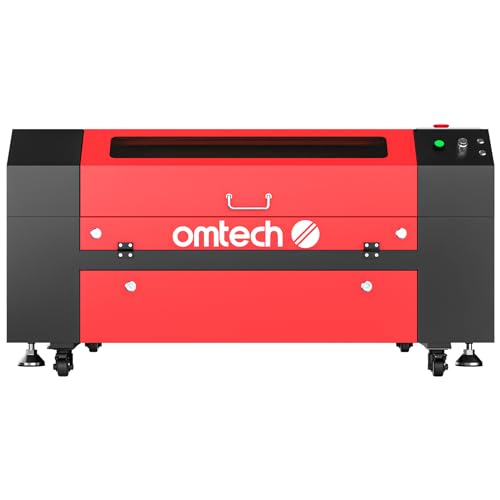
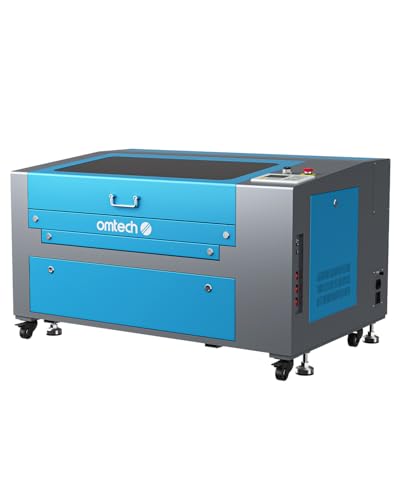
One thing to state plainly at the top: every machine in this roundup is a CO2 cabinet cutter. At the sixty-watt level, the Amazon US market is dominated by CO2 cabinets from OMTech and VEVOR, and no diode machine at this wattage with a verified Amazon US listing was found during research. That is not a gap in the guide. It is what the sixty-watt class actually looks like on Amazon US right now. If you want a desktop diode engraver, you are shopping in a lower wattage class, and a different guide covers that.
This roundup is also distinct from the site’s wood-specific CO2 roundups. Those guides pick machines for woodwork alone. This guide picks by wattage class, so it covers the full material range a sixty-watt CO2 tube handles: wood, acrylic, leather, fabric, paper, cardboard, glass engraving and coated metal engraving. A sixty-watt CO2 tube does not cut bare metal. No machine here claims to do that, and this guide does not claim it either. If cutting bare metal sheet is the job, a fiber laser is the right tool, not a CO2 cutter.
What to Look For
Bed size decides what fits. The four machines here come in two bed sizes: 16 by 24 inches and 28 by 20 inches. A 16 by 24 inch bed takes a half sheet of plywood with room to spare and fits most signs, plaques, boxes and panels. A 28 by 20 inch bed takes larger panels and longer boards, and it suits batch work where several pieces are laid out at once. Measure the largest piece you plan to cut, then add room for clamps and hold-downs. A bed that is only just big enough for your largest piece will slow every job down.
Pass-through matters more than it sounds. A two-way pass-through lets long material slide through the front and back of the machine, so a board longer than the bed can still be cut in sections. A four-way pass-through adds the left and right sides, which helps with wide panels and with feeding long stock from either direction. If you cut cabinet panels, long signs or full-length boards, four-way pass-through is worth having. If your work is mostly plaques, ornaments and small panels, two-way pass-through is enough.
Focus: manual, autofocus or autolift. Manual focus means you set the lens height by hand, usually with a focus gauge, before each job. It works fine and it never breaks, but it adds a step every time the material thickness changes. Autofocus uses a sensor to set the lens height for you. Autolift goes further: the whole bed moves up and down at the touch of a button, which makes it easy to load thick material and to switch between engraving flat stock and taller objects. For a shop that changes material often, autofocus or autolift saves real time across a week of jobs.
Software: LightBurn or RDWorks. LightBurn is the most widely used control software for CO2 lasers, and it is bundled with one machine here. RDWorks is the maker’s own control software and ships with the other OMTech machines. Both drive the same hardware and both handle vector cutting and raster engraving. LightBurn is the easier program to learn and the one most tutorials use, so a bundled LightBurn license is a genuine advantage for a first-time buyer. Check the listing for exactly which software is bundled before you buy, because bundles differ between listings of the same machine.
Cooling is not optional. A CO2 glass tube needs water cooling while it runs. Some machines in this roundup bundle a water pump, and some are sold in bundles that add an industrial water chiller. A pump and a bucket of water will run a tube, but a chiller holds the water temperature steady, which protects tube life. Read the listing carefully to see what cooling is included, and budget for a chiller if the listing does not include one.
Tube life is a consumable, not a promise. OMTech lists tube life of up to 1,000 hours for its sixty-watt tubes, with longer life at lower power settings. Treat that figure as a maker figure, not a guarantee. Running a tube at full power on every job wears it out sooner. Keeping the water cool and the optics clean matters as much as the hour count. A replacement tube is a normal running cost for a CO2 machine, and it is worth knowing the replacement route before you buy.
Weight and floor space. These are cabinet machines, not benchtop tools. The largest machine here weighs 223 pounds and measures about 49 by 34 by 26 inches. Plan a solid floor spot, a path to get the crate through the door, and room beside the machine for the exhaust hose and the cooling unit. The machines ship in large crates, and moving one alone is a two-person job at least.
Ventilation. Every CO2 cutter needs an exhaust run to the outside. Cutting wood, acrylic and leather makes smoke and fumes, and acrylic in particular needs good extraction. A window vent kit is the minimum. A dedicated duct run with an inline fan is better, and it is what most small shops end up installing.
OMTech Maker CO2 Laser Engraver and Cutter with LightBurn
The OMTech Maker with LightBurn is the most complete sixty-watt package in this roundup. It pairs a 16 by 24 inch bed with a LightBurn license in the box, so the software most makers already know is included from the beginning. The machine engraves up to 0.4 inch deep on wood, glass, acrylic and more, and it runs at speeds up to 23.6 inches per second. A two-way pass-through handles long boards, and air assist keeps smoke and debris away from the cut line while the machine works.
What makes this pick stand out is the bundle. LightBurn is the control program most CO2 owners end up using, and buying it separately is an extra step and an extra outlay. Having it in the box means the machine is ready to run with the software the tutorials use. The 16 by 24 inch bed is the smaller of the two bed sizes in this guide, but it covers signs, plaques, boxes, panels and most craft and small-business work. If your largest pieces are bigger than a half sheet of plywood, look at the 28 by 20 inch machine below instead.
The listing is a Maker-series machine with model number RYGEL-USB0604US and LightBurn, sold by OMTech. The listing names wood, glass, acrylic, leather, fabric and cardboard among the materials it handles, and it describes the machine as a commercial-grade cutter and engraver. It is a cabinet machine with a digital control panel and RDWorks compatibility alongside LightBurn. Check the listing for the cooling setup included with your bundle, because the Maker line is sold in several bundle forms and the cooling gear differs between them.
OMTech CO2 Laser Engraver with Autolift, 28 by 20 Inch Bed
The OMTech Autolift machine is the large-format pick in this roundup. Its 28 by 20 inch bed is the biggest work area here, and it comes with a motorized autolift bed, a four-way pass-through, air assist and a water pump in the box. The bed moves up and down at the touch of a button, which makes loading thick material and switching between flat stock and taller objects quick and easy. The machine weighs 223 pounds and measures about 49 by 34 by 26 inches, in black and red.
The larger bed is the reason to choose this machine. It takes bigger panels, longer boards and more pieces per batch than the 16 by 24 inch machines. The four-way pass-through means long material can feed from any side, which helps with cabinet panels and long signs. The listing names wood, glass, leather and more among the materials it handles, and it includes honeycomb and blade beds, so the work surface suits both cutting and engraving jobs. The maker lists tube life of up to 1,000 hours and engraving speed up to 23.6 inches per second, both maker figures.
This is the machine to buy if the work is production-sized: signs, panels, batch runs and cabinet parts. It is also the heaviest machine here, so plan the floor spot and the delivery path before it arrives. The listing states the machine is not discontinued by the maker, and a mirror of the listing checked one day before this guide was written showed it in stock.
OMTech CO2 Laser Engraver, 16 by 24 Inch Bed, RDWorks
The OMTech 16 by 24 inch machine with RDWorks is the straightforward pick in this roundup: the same sixty-watt tube and the same 16 by 24 inch bed as the LightBurn bundle above, with RDWorks as the bundled control software and a two-way pass-through. It engraves up to 0.4 inch deep, runs at speeds up to 23.6 inches per second, and uses a digital control panel with air assist. The listing names wood, glass, acrylic, leather, fabric, cardboard and more among the materials it handles, and it describes dual 16 by 24 inch workbeds.
The difference between this machine and the LightBurn bundle is software, and that difference is worth understanding. RDWorks drives the machine well, and it handles vector cutting and raster engraving without trouble. LightBurn is the easier program to learn, and most online tutorials use it. If you already use LightBurn, or you want the program the tutorials use, the LightBurn bundle is the better buy. If you are comfortable learning RDWorks, or you already run it on another machine, this listing gives you the same cutting hardware with the maker’s own software.
One caution belongs with this pick. The oldest saved copy of the Amazon listing, about 317 days old, reads an empty buy box, while a roundup checked on November 27, 2026 lists the same machine as available on Amazon. The two snapshots disagree, and only a live click on the link settles which one is current. Check the listing live before buying, and if the buy box is empty, take the LightBurn bundle or the Autolift machine instead.
VEVOR CO2 Laser Engraver, 24 by 16 Inch Bed, Four-Way Pass
The VEVOR machine is the non-OMTech pick in this roundup, and it brings a different balance of features. Its work area is 24 by 16 inches, it has a four-way pass-through, air assist and manual focus, and it works with LightBurn, CorelDRAW and RDWorks. The listing says the machine cuts acrylic up to 10 mm thick and handles wood designs, acrylic, glass, leather and fabric. Manual focus means setting the lens height by hand before each job, which is slower than autofocus when material thickness changes often, but it is simple and it never needs a sensor repair.
VEVOR is the value brand in this class, and the machine is the one to look at if the budget is tight and the four-way pass-through matters. The four-way pass-through is a real advantage at this level: long stock feeds from any side, which helps with panels and long signs. The listing is sold by VEVOR, and a roundup checked within the last day lists the machine as an Amazon option, while the maker’s own store page for the same model is live.
The same caution applies here as with the RDWorks OMTech above. The oldest saved copy of the Amazon listing, about 201 days old, reads an empty buy box. A fresh roundup lists the machine as available on Amazon, and the maker’s own store shows the model in its catalog. Only a live click settles the current state of the Amazon listing, so check it live before buying. If the Amazon buy box is empty, the machine is still sold through the maker’s own store, but this guide only counts Amazon US listings.
Comparison Table
| Machine | Bed | Focus | Pass-through | Software | Cooling |
|---|---|---|---|---|---|
| OMTech Maker with LightBurn | 16 by 24 in | Manual | Two-way | LightBurn, RDWorks | Check listing |
| OMTech Autolift | 28 by 20 in | Autolift bed | Four-way | LightBurn, RDWorks | Water pump included |
| OMTech RDWorks | 16 by 24 in | Manual | Two-way | RDWorks | Check listing |
| VEVOR | 24 by 16 in | Manual | Four-way | LightBurn, CorelDRAW, RDWorks | Check listing |
Frequently Asked Questions
Can a sixty-watt laser cutter cut metal?
A sixty-watt CO2 laser cutter does not cut bare metal. It engraves coated and painted metal, anodized aluminum and marked stainless steel with the help of a marking spray, and it cuts wood, acrylic, leather, fabric, paper and cardboard. It engraves glass, stone and ceramic tile. If the job is cutting bare metal sheet, a fiber laser is the right tool. No machine in this roundup claims to cut bare metal, and a listing that seems to claim it is describing engraving, not cutting.
How thick can a sixty-watt laser cutter cut?
It depends on the material. The VEVOR listing says its machine cuts acrylic up to 10 mm thick, and the OMTech listings say their machines engrave up to 0.4 inch deep. Plywood cuts in one pass at moderate thickness and in two passes when the sheet is thicker. Acrylic cuts cleanly at the listed thickness with the right speed and air assist. Hardwoods cut slower than softwoods, and dense material needs more passes. The honest way to read any thickness figure is as a rough guide: run a small sample cut on scrap from the same batch before committing to a full sheet.
What else do I need besides the machine?
Water cooling, ventilation and software. The Autolift machine includes a water pump; the other machines need you to check what cooling the listing bundles, and a chiller is worth budgeting for if none is included. Every machine needs an exhaust run to the outside, because cutting wood, acrylic and leather makes smoke and fumes. LightBurn is bundled with two machines here and RDWorks with the OMTech machines, so check the listing for exactly which program is included. You will also want spare lenses, a honeycomb bed if one is not included, and a fire extinguisher kept within reach, because a laser cutter is a heat source working on flammable material.
How to Choose
Choose by bed size first. If your largest pieces fit a 16 by 24 inch bed, the OMTech Maker with LightBurn is the most complete package here, because the software is in the box and the bed covers most sign, plaque and panel work. If your pieces are bigger, or you run batches, the OMTech Autolift with its 28 by 20 inch bed, motorized bed and four-way pass-through is the production pick, and it is the only machine here with a water pump included.
Choose by software second. LightBurn is the program most tutorials use, and it is bundled with the Maker machine and supported by the VEVOR machine. RDWorks is the maker’s own program and it works well, but it has a steeper learning curve. If you already run one program on another machine, staying with it is the sensible choice.
Choose by pass-through third. Four-way pass-through matters if you cut long boards and wide panels. Two-way pass-through is enough for plaques, ornaments, boxes and small panels. Manual focus is fine for a shop that cuts one material thickness all day; autofocus or autolift earns its keep in a shop that changes material often.
Finally, check the listing live before you buy. Two machines in this roundup have old saved copies that read an empty buy box, while fresh roundups list them as available. The live link is the only thing that settles it. If a listing is empty, take the next machine on this list rather than hunting for a substitute that has not been checked. All four machines here are sixty-watt CO2 cabinet cutters with verified Amazon US listings, and any of them will cut and engrave the materials named in this guide.
Disclosure: As an Amazon Associate, we may earn a commission from qualifying purchases made through links in this article, at no additional cost to you.
Related guides
More from Amazon
Programs that pair well with the guide above. Offers and eligibility are set by Amazon and may change.
A free business account with business pricing and bulk-buying tools for work, shop or home office.
Create a business accountFree shipping on eligible items, Prime Video and more. Eligible new members can start with a free trial.
Start a Prime free trialAudiobooks and podcasts to listen to on the go. Eligible new members can start with a free trial.
Try Audible freeAd-free music streaming. Eligible new subscribers can start with a free trial.
Try Music Unlimited freeAs an Amazon Associate we earn from qualifying purchases.









