As an Amazon Associate I earn from qualifying purchases. This post may contain affiliate links at no extra cost to you.
A workshop desk does double duty in many homes. It holds drawings, invoices, and a laptop between projects, and it often becomes the corner where music plays while sanding, assembly, or finishing work happens nearby. Small upgrades to that desk can change how comfortable the space feels during long stretches of planning and paperwork. A vertical mouse changes the angle of the wrist, desktop speakers fill the room without headphones, a wood monitor stand lifts the screen to a natural height, and a neon sign adds a personal touch to the wall behind the bench.
OUR TOP PICK
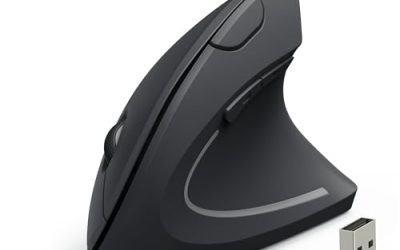
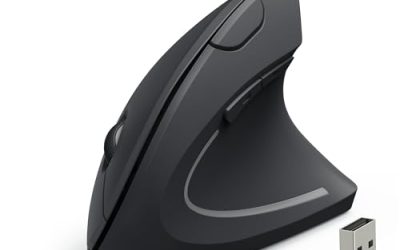
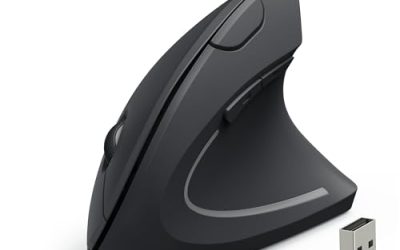
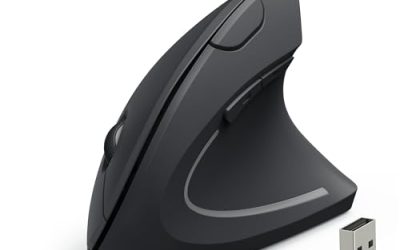
Anker 2.4G Wireless Ergonomic Mouse, Right Hand Vertical Mouse USB Receiver
This guide looks at five products that work well together in a home office or workshop corner: the Anker 2.4G Wireless Ergonomic Mouse, the Gamerneon Blue Poker Neon Sign, the Cyber Acoustics CA-2014 2.0 Computer Speakers, the GOgroove BassPULSE 2.1 Computer Speakers, and the BONTEC Wood Monitor Stand Riser. Each section covers the key specs, what the product does well, and who it suits, so it is easier to decide which pieces fit a particular desk, budget, and working style.
As an Amazon Associate, we earn from qualifying purchases.
How to Choose Desk Upgrades for a Workshop Corner
Start with how the desk is used
Think about the hours spent at the desk each week. Someone who sketches plans, answers email, and edits photos for several hours a day will notice wrist comfort and screen height more than someone who uses the desk for quick notes. A vertical mouse and a monitor stand address posture, while speakers and a neon sign shape the mood of the space. Listing the main tasks first helps narrow which upgrade matters most.
Check desk space and layout
Measure the desktop before choosing anything. A two-tier monitor stand adds storage but also takes up depth, and a 2.1 speaker set needs room for two satellite speakers plus a subwoofer that usually sits on the floor or a lower shelf. Compact 2.0 speakers fit smaller desks, and a wall-mounted neon sign uses vertical space instead of desktop space. Keeping the work surface clear matters in a workshop, where the desk may also hold calipers, notebooks, and project parts.
Match connections to existing gear
Wireless mice typically connect through a small USB receiver or Bluetooth, so confirm that a free USB port is available on the computer or a hub. Desktop speakers usually connect with a standard audio cable, and some models draw power from USB while others use a wall adapter. Checking the available ports and outlets near the desk avoids surprises on setup day.
Think about style and materials
Woodworkers often prefer natural materials, so a wood monitor stand pairs naturally with a timber desktop. Neon signs and speakers with LED lighting lean more playful and suit a game room or media corner. Mixing both styles works when colors stay consistent, for example warm wood tones with a single blue accent light rather than several competing colors.
Consider noise and shared spaces
Speakers with a subwoofer produce deeper bass that can carry through walls, which matters in apartments or shared homes. A compact 2.0 set keeps volume modest and works well for background music and video calls. Headphone users who only need occasional sound may find the smaller set sufficient, while music lovers who listen all day may prefer the fuller sound of a 2.1 system.
Plan cables, power, and cleaning
A workshop desk collects dust, so easy cleaning matters. Wireless devices reduce cable clutter, and speaker cables can run behind a monitor stand to stay out of the way. Count the outlets near the desk before adding powered speakers and a neon sign, since both may need wall power. Keeping cables off the work surface also protects them from tools, coffee cups, and project parts that move across the desk during the day. A simple cable tray or a few clips under the desktop keeps the setup tidy and makes it easier to wipe the surface clean between projects.
Anker 2.4G Wireless Ergonomic Mouse
Top Pick
Anker 2.4G Wireless Ergonomic Mouse
Connection: 2.4 GHz wireless with USB receiver
Hand orientation: right hand, vertical ergonomic shape
Power: battery powered
Compatibility: Windows and Mac computers with a USB port
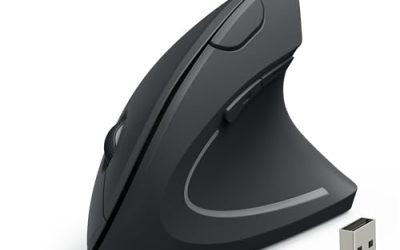
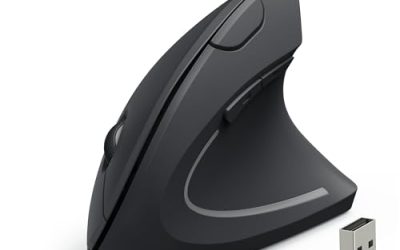
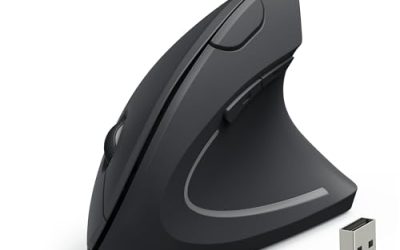
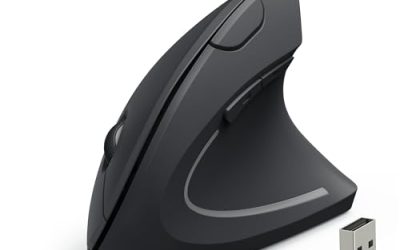
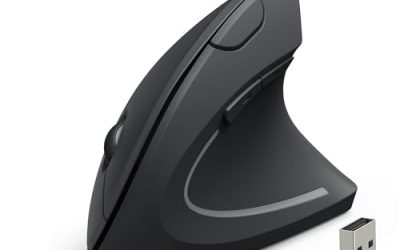
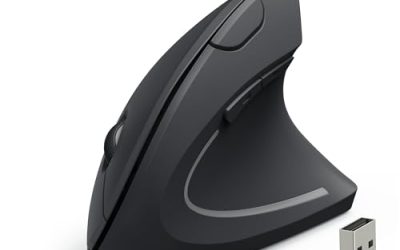
The Anker 2.4G Wireless Ergonomic Mouse is a right-hand vertical mouse designed to keep the hand in a more natural handshake position. Instead of resting flat on the desk, the palm faces sideways, which many people find easier on the wrist during long sessions of drawing, browsing, or spreadsheet work. The wireless connection uses a small USB receiver, so the desk stays free of a trailing cable.
Who It Suits
This mouse suits right-handed users who spend long hours at a desk and want to try a vertical grip without a steep learning curve. It fits workshop planning desks, home offices, and anyone who switches between a laptop and a desktop setup. Left-handed users and people who prefer a low, flat mouse shape will want a different design.
The Gamerneon Blue Poker Neon Sign features playing card artwork in a bright blue glow, made for game rooms, man caves, and entertainment corners. Mounted above a desk or on the wall behind a workbench, it adds character to a plain workshop wall and doubles as a soft accent light in the evening. The poker theme pairs well with card nights, home bars, and media rooms.
Who It Suits
This sign suits anyone decorating a leisure space who wants a playful focal point without a large framed poster. It works well above a desk used for gaming or streaming, and it makes a themed gift for poker fans. People who prefer a minimalist workshop look may find the bright color and casino theme too bold for a professional office.
The Cyber Acoustics CA-2014 is a compact 2.0 speaker set that covers everyday desk audio: music, video calls, podcasts, and tutorial videos. With 4 watts of stereo sound, it is sized for a single desk rather than a whole room, which keeps volume neighbor-friendly. The small footprint leaves room on the desktop for notebooks, tools, and project plans.
Who It Suits
This set suits small desks, students, and anyone who wants clear basic sound without a subwoofer taking up floor space. It fits workshop desks where background music plays at moderate volume and where a compact setup keeps the work surface usable. Listeners who want deep bass for movies or games will likely prefer a 2.1 system instead.
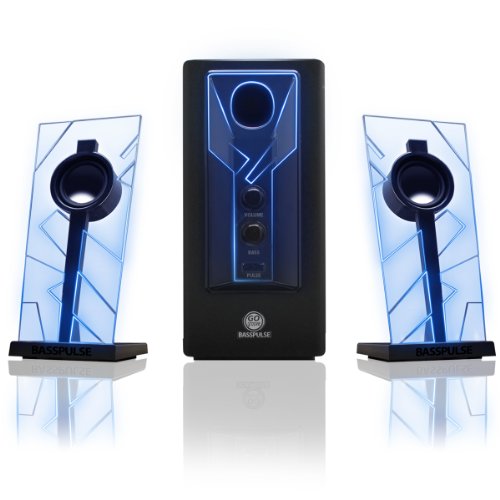
The GOgroove BassPULSE is a 2.1 speaker system with two satellite speakers, a powered subwoofer, and blue LED glow lighting. The subwoofer adds low-end depth that small speakers cannot produce, so music and game audio sound fuller. The LED lighting ties in nicely with a neon sign or other accent lighting in a game room or media corner.
Who It Suits
This system suits people who listen to music for long stretches, watch movies at the desk, or game in the evening and want stronger bass. It fits larger desks and entertainment corners where floor or shelf space is available for the subwoofer. Users in thin-walled apartments or shared offices may find the bass carries more than they want.
The BONTEC Wood Monitor Stand Riser is a two-tier desktop organizer that lifts a monitor to a more comfortable viewing height while adding storage underneath. Raising the screen reduces the need to hunch over a laptop or low monitor, and the lower tier holds a keyboard, notebooks, or small tools. The wood finish suits timber desks and workshop furniture better than plastic or metal stands.
Who It Suits
This stand suits anyone whose monitor sits too low and who wants extra storage without buying a new desk. It fits woodworking shops and home offices with wood furniture, and it helps keep the desktop clear during projects. Users with very shallow desks should measure depth first, since a two-tier stand needs room to sit flat.
Frequently Asked Questions
Is a vertical mouse hard to get used to?
Most people adjust within a few days of regular use. The hand rests in a handshake position instead of flat, so movements feel slightly different at first. Short sessions mixed with a regular mouse can ease the transition, and many users keep the vertical mouse for long workdays once the grip feels natural.
Do neon signs use much electricity?
LED neon style signs draw far less power than traditional glass neon, and they stay cool to the touch. They are suitable for evening accent lighting and can run for hours without heating the room. Always follow the mounting and power instructions included with the sign.
Should I choose 2.0 or 2.1 speakers for a workshop desk?
Choose 2.0 speakers for compact desks, moderate volume, and simple setup. Choose a 2.1 system with a subwoofer for fuller bass during music, movies, and games, provided there is space for the subwoofer and the room can handle the extra low-end sound.
How high should a monitor stand raise the screen?
A good target is eye level with the top third of the screen when sitting upright. Measure the current screen height, then pick a stand that closes the gap without forcing the head to tilt upward. Two-tier stands also add storage, so check that the keyboard still fits comfortably underneath.
Final Verdict
Each of these five products improves a different part of the desk. The Anker vertical mouse addresses wrist comfort, the BONTEC wood stand improves screen height and storage, and the two speaker sets cover compact everyday audio and fuller bass. The Gamerneon poker sign adds personality to the wall behind the desk. For a workshop corner that doubles as an office, start with posture upgrades, then add sound and lighting to match how the space is used after hours.
Product and ASIN Reference
Product
ASIN
Anker 2.4G Wireless Ergonomic Mouse, Right Hand Vertical Mouse USB Receiver
B00BIFNTMC
Gamerneon Blue Poker Neon Sign Casino Playing Cards Neon Signs for Man Cave
Compare the best vertical mice and neon signs for a warmer desk: an ergonomic wireless mouse, a poker neon sign, computer speakers, and a monitor stand.
Compare the best vertical mice, neon signs, computer speakers, and a wood monitor stand for a comfortable woodworking shop desk and design corner setup.


 GOgroove BassPULSE 2.1 Computer Speakers
 BONTEC Wood Monitor Stand Riser