As an Amazon Associate I earn from qualifying purchases. This post may contain affiliate links at no extra cost to you.
A home desk often has to serve several jobs at once. It may be a place for email and spreadsheets in the morning, a gaming corner in the evening, and a small workbench for weekend projects in between. When a desk does that much, comfort and organization matter as much as the computer itself. A vertical mouse can change the way a hand rests during long sessions, while a neon sign, speakers, and a monitor stand can turn a plain surface into a space that feels planned rather than improvised.
OUR TOP PICK
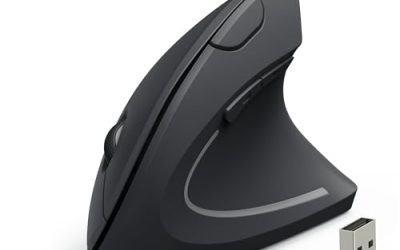
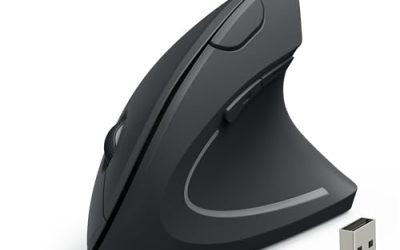
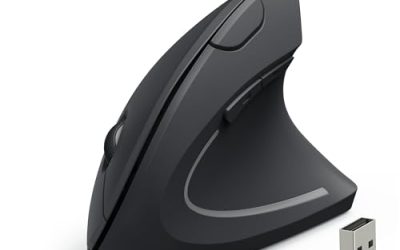
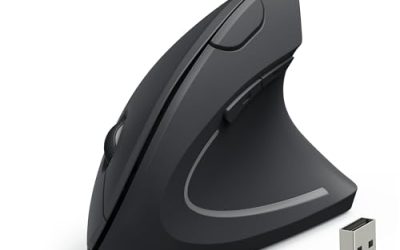
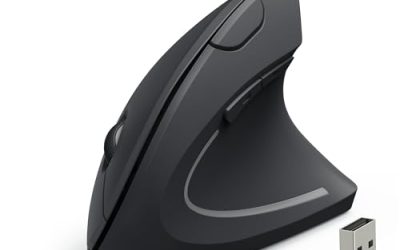
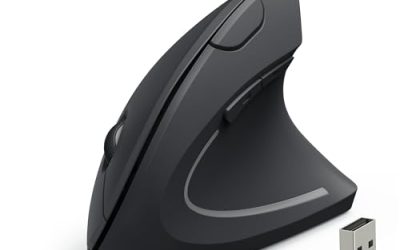
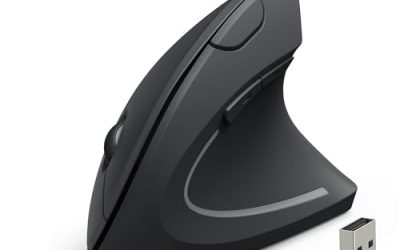
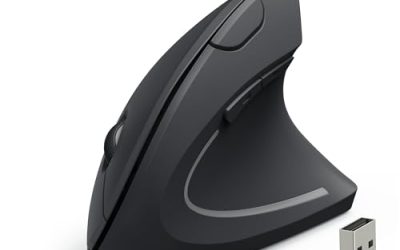
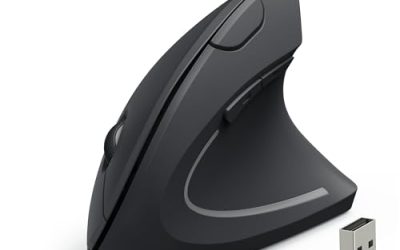
Anker 2.4G Wireless Ergonomic Mouse, Right Hand Vertical Mouse USB Receiver
This guide brings together five products that each solve a different desk problem. One focuses on ergonomic input, two focus on sound, one focuses on light and personality, and one focuses on lifting a screen and clearing space. None needs a complicated setup, and all can work in a home office, dorm room, or living room corner.
As an Amazon Associate, we earn from qualifying purchases.
How to Choose
Start with the problem that bothers you most. If your wrist feels twisted after a long day, a vertical mouse deserves attention first. Vertical designs place the hand in a more natural handshake position, which many people find easier on the forearm than a flat mouse. Check whether the mouse is made for the right or left hand, how it connects to the computer, and whether the shape fits your hand size. A mouse that is too small can cause cramping just as quickly as a flat one.
Next, think about sound. A simple two-speaker set suits everyday calls, videos, and background music. A system with a subwoofer adds depth for games and movies, but it also needs more desk or floor space and a power outlet nearby. Consider where the speakers will sit, how the volume control works, and whether cables will cross your work area. For a shared home, a headphone jack or easy mute control can be just as important as sound quality.
Lighting and decor come after comfort and sound, but they shape how the desk feels. A neon sign adds color and character, and it can also serve as a soft accent light in the evening. Look at the size, the mounting style, and whether the sign suits the room. A poker-themed sign fits a game room or man cave well, while a smaller sign may be better for a bedroom desk. Check the power source and cord length so the sign can hang where you want it without an extension cord across the floor.
Finally, consider screen height. A monitor stand can raise a display to a more comfortable viewing level and create storage space underneath for a keyboard or notebook. Wood stands bring a warm look that pairs well with other furniture, while two-tier designs add a shelf for phones or desk supplies. Measure your desk and monitor base before choosing.
Anker 2.4G Wireless Ergonomic Mouse, Right Hand Vertical Mouse USB Receiver
Top Pick
Anker 2.4G Wireless Ergonomic Mouse, Right Hand Vertical Mouse USB Receiver
Type: Wireless vertical ergonomic mouse
Hand: Right hand
Connection: 2.4 gigahertz wireless with USB receiver
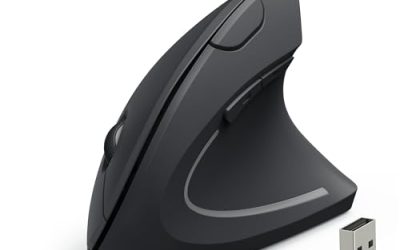
The Anker vertical mouse is built around a simple idea: let the hand rest in a natural position instead of flattening it over a low mouse. The tall, sculpted shape encourages a handshake grip, which can reduce the twisting motion that a standard mouse requires. For people who spend hours moving between documents, browser tabs, and design tools, that change in posture can make a noticeable difference in comfort over the course of a day.
Connection is handled by a small USB receiver on a 2.4 gigahertz wireless link, so there is no cable dragging across the desk. That keeps the work surface clear and makes the mouse easy to move between a desktop and a laptop. Because it is a right-hand design, left-handed users should look for a mirrored model instead. The buttons sit where fingers naturally fall on the vertical shell, and the scroll wheel remains within easy reach of the index finger.
Who It Suits
This mouse suits office workers, writers, and students who use a computer for long stretches and want a more relaxed wrist angle. It also suits anyone setting up a tidy desk, since the wireless design removes one more cable. People who play fast-paced competitive games may prefer a lighter flat gaming mouse, but for everyday work and casual use, the comfort focus is the main draw.
Gamerneon Blue Poker Neon Sign Casino Playing Cards Neon Signs for Man Cave
Runner-Up
Gamerneon Blue Poker Neon Sign Casino Playing Cards Neon Signs for Man Cave
Type: Neon-style wall sign
Theme: Poker and playing cards
Color: Blue
Suggested rooms: Man cave, game room, home bar, desk corner
A neon sign can change the mood of a room faster than almost any other decor piece. This blue poker sign from Gamerneon leans into a casino theme, with playing card imagery that fits a game room, a home bar, or a man cave. Hung above a desk, it adds color during the day and a soft glow in the evening that makes the corner feel like a dedicated space rather than a leftover table.
Modern neon-style signs are typically lighter and easier to hang than traditional glass tube signs, which makes them practical for home use. The blue light pairs well with darker walls and wood furniture, and it can complement the glow from a monitor or gaming setup without overwhelming the room. Because the sign is a decor piece first, placement matters: hang it where it will be seen from the doorway or from the main seating area, and keep the cord path tidy.
Who It Suits
This sign suits anyone building a game room or personal retreat who wants a bold focal point. It also works as a gift for poker fans and card players. Readers who prefer a minimal, neutral office may find the theme too playful for a professional backdrop, so consider how the sign will look on video calls before hanging it behind a work desk.
Not every desk needs a large sound system. The Cyber Acoustics CA-2014 speakers offer straightforward stereo sound in a compact two-speaker design. They are a practical step up from built-in monitor or laptop speakers, giving clearer dialogue for calls and videos and a fuller sound for music while you work. The small footprint leaves room for notebooks, tools, and other desk items.
A 2.0 setup means two speakers and no separate subwoofer, which keeps cables and clutter to a minimum. That simplicity is a real advantage on smaller desks and in shared spaces. The speakers suit everyday listening at moderate volume, and their compact size makes them easy to place on either side of a monitor or on a shelf above the desk.
Who It Suits
These speakers suit students, home office users, and anyone who wants better sound than a laptop provides without adding a subwoofer. They are a sensible choice for calls, online classes, and casual listening. Readers who want deep bass for movies and games should look at a 2.1 system instead.
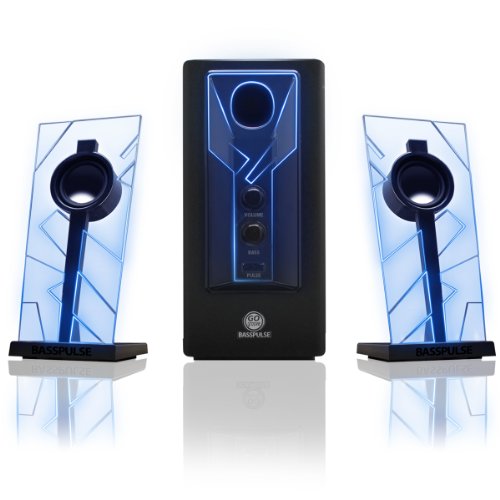
GOgroove BassPULSE 2.1 Computer Speakers with Blue LED Glow Lights and Powered Subwoofer
GOgroove BassPULSE 2.1 Computer Speakers with Blue LED Glow Lights and Powered Subwoofer
Type: 2.1 computer speakers
Subwoofer: Powered subwoofer included
Lighting: Blue LED glow lights
Configuration: Two satellite speakers plus subwoofer
For readers who want more energy from their desk audio, the GOgroove BassPULSE system adds a powered subwoofer to the usual two speakers. That extra low end gives games, movies, and music more weight, while the blue LED glow lights tie the setup into a gaming or entertainment corner. It is the kind of system that makes a desk feel like a small media station.
A 2.1 configuration needs a bit more planning than a basic pair of speakers. The subwoofer can sit on the floor under the desk or on a sturdy shelf, and the satellite speakers should sit at roughly ear level on either side of the monitor. Keeping the subwoofer away from a wall corner can help the bass stay clean rather than boomy. The LED lighting adds atmosphere in the evening and matches well with a blue neon sign or other accent lighting.
Who It Suits
This system suits gamers, movie watchers, and music listeners who want fuller sound at a desk. It also suits anyone building a themed setup with blue accent lighting. Readers in quiet shared spaces may prefer a smaller 2.0 set, since a subwoofer can carry through walls at higher volumes.
BONTEC Wood Monitor Stand Riser, 2-Tier Desktop Organizer
BONTEC Wood Monitor Stand Riser, 2-Tier Desktop Organizer
A monitor stand is one of the simplest ways to improve both comfort and organization. The BONTEC wood stand raises the screen, which can help reduce neck strain during long work sessions, and its two-tier design creates extra storage. The lower shelf or surface space underneath can hold a keyboard when it is not in use, a notebook, or small desk tools, keeping the main work area clear.
Wood construction gives the stand a warm, furniture-like look that fits home offices and living room desks better than plain plastic risers. It pairs naturally with wood desks and shelves, and it can make a basic desk feel more finished. Before buying, measure the width of your monitor base and the depth of your desk to confirm the stand will fit, and check that the top surface is wide enough for your screen.
Who It Suits
This stand suits anyone whose monitor sits too low or whose desk feels crowded. It is especially helpful for people who switch between typing, writing, and small projects at the same desk, since the extra tier keeps supplies within reach. Readers with very large monitors should confirm the stand dimensions and weight capacity first.
FAQ
Is a vertical mouse better than a regular mouse?
A vertical mouse can be better for comfort during long work sessions because it keeps the hand in a more natural handshake position. It may take a few days to get used to the taller shape and button placement. For short tasks or fast-paced gaming, a regular mouse may still feel quicker, but many office users prefer the vertical design once they adjust.
Where should a neon sign hang in a home office?
Hang a neon sign where it adds character without causing glare on the screen. Above the desk, on a side wall, or behind the main chair are common choices. If the desk is used for video calls, consider whether the sign will appear in the background and whether its theme suits a professional setting.
What is the difference between 2.0 and 2.1 speakers?
A 2.0 system has two speakers and no subwoofer, which keeps the setup compact and simple. A 2.1 system adds a powered subwoofer for deeper bass, which suits games and movies. Choose 2.0 for everyday calls and music at moderate volume, and 2.1 when low-end sound matters more than saving space.
How high should a monitor sit on a stand?
The top of the screen should be near eye level when you sit upright, with the center of the screen slightly below eye level. A stand riser can add the extra height many desks lack. If the screen still feels low after adding a stand, check your chair height as well, since both affect posture.
Final Verdict
Each product in this guide solves a different desk problem, so the best choice depends on where your current setup falls short. For wrist comfort during long days, the Anker vertical mouse is the clear starting point. For simple, compact sound, the Cyber Acoustics speakers keep things tidy, while the GOgroove BassPULSE system delivers fuller audio and lighting for entertainment. The Gamerneon poker sign adds personality to a game room or personal corner, and the BONTEC wood stand improves screen height while clearing space. Together, they show how a few well-chosen pieces can make a home desk more comfortable, more organized, and more enjoyable to use every day.
Product and ASIN Reference
Product Name
ASIN
Anker 2.4G Wireless Ergonomic Mouse, Right Hand Vertical Mouse USB Receiver
B00BIFNTMC
Gamerneon Blue Poker Neon Sign Casino Playing Cards Neon Signs for Man Cave
Compare the best vertical mice and neon signs for a warmer desk: an ergonomic wireless mouse, a poker neon sign, computer speakers, and a monitor stand.
Compare the best vertical mice, neon signs, computer speakers, and a wood monitor stand for a comfortable woodworking shop desk and design corner setup.


 GOgroove BassPULSE 2.1 Computer Speakers with Blue LED Glow Lights and Powered Subwoofer
 BONTEC Wood Monitor Stand Riser, 2-Tier Desktop Organizer