As an Amazon Associate I earn from qualifying purchases. This post may contain affiliate links at no extra cost to you.
A comfortable desk setup does not need to be complicated. A vertical mouse can ease the strain of long hours at a computer, a neon sign adds character to a plain wall, and the right speakers and monitor riser make the whole workspace easier to use. This guide brings together five desk accessories that cover comfort, sound, lighting, and organization in one simple shopping list.
OUR TOP PICK
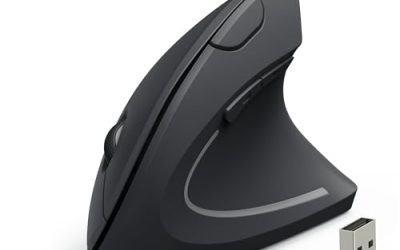
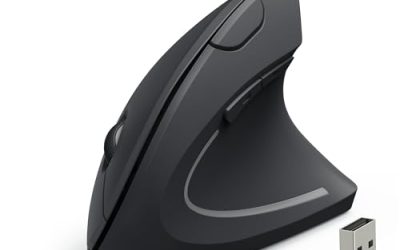
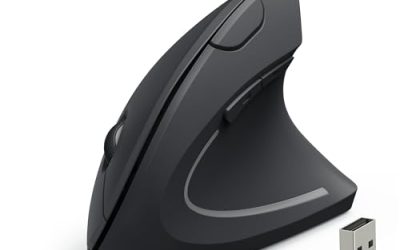
Anker 2.4G Wireless Ergonomic Mouse, Right Hand Vertical Mouse USB Receiver
Each pick below serves a different purpose, so the list works whether you are building a home office from scratch or upgrading a desk that already works well. Read through the buying notes, compare the specs and fit notes for each product, and match the items to the way you actually work, relax, and decorate your space.
As an Amazon Associate, we earn from qualifying purchases.
How to Choose
Start with the problem you want to solve. If your wrist or forearm feels tired after long sessions, a vertical mouse is the first item to consider. If your desk sounds flat or tinny, look at the speaker options and decide whether a compact stereo pair or a set with a powered subwoofer fits your space. If the wall behind your desk feels bare, a neon sign gives the room a focal point without taking up any desktop room.
Think about desk space next. Monitor risers free up room underneath the screen for a keyboard, notebooks, or small storage, which matters on smaller desks. Speakers also compete for space, so measure the width of your desk before choosing between a compact two-speaker set and a larger system with a separate subwoofer box. Neon signs mount on the wall, so they add style without crowding the surface.
Consider how the pieces work together. A monitor riser plus a vertical mouse makes long workdays easier on your neck, shoulders, and wrist. Speakers paired with a neon sign turn the same desk into a comfortable spot for music, videos, and games after hours. Choosing items that complement each other gives you a setup that feels considered rather than pieced together at random.
Finally, check the practical details in each product section below. Connection type, size, and power source all matter for daily use. Specs that could not be confirmed from the product listings are marked as not stated, so you can see exactly what is known about each item before deciding.
Anker 2.4G Wireless Ergonomic Mouse, Right Hand Vertical Mouse USB Receiver
Top Pick
Anker 2.4G Wireless Ergonomic Mouse, Right Hand Vertical Mouse USB Receiver
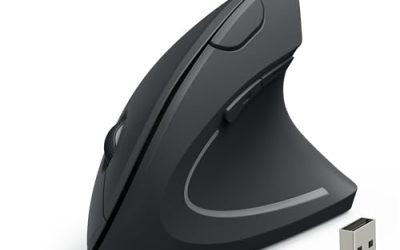
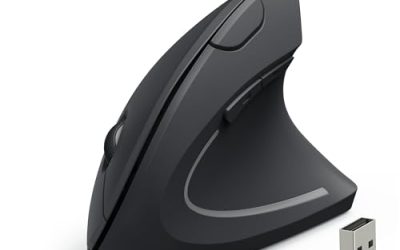
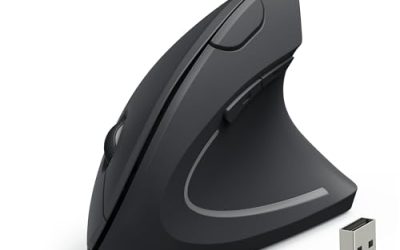
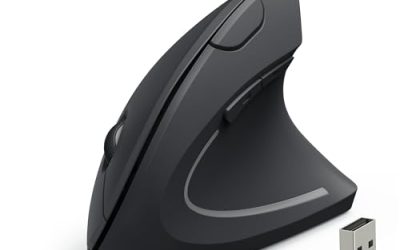
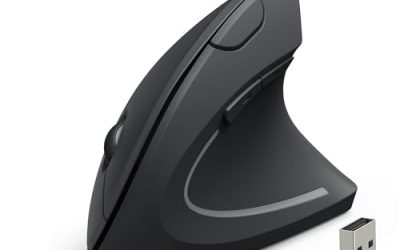
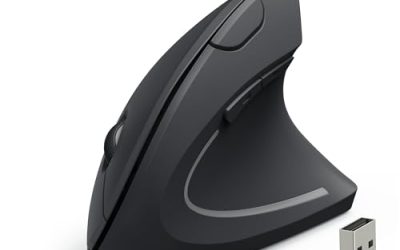
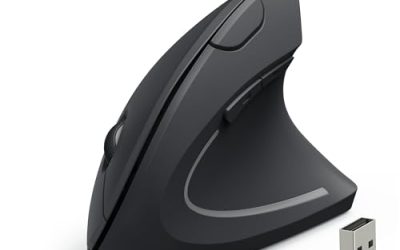
The Anker 2.4G Wireless Ergonomic Mouse is built for right-handed users who want a more natural hand position during long computer sessions. Its vertical shape keeps the hand in a handshake-style grip instead of forcing the wrist flat, which many desk workers prefer for everyday tasks like writing, browsing, and spreadsheet work. The wireless connection uses a USB receiver, so there are no cables to route around your desk.
Who It Suits
This mouse suits right-handed desk workers, writers, and students who spend several hours a day at a computer and want to reduce wrist strain. It is a good fit for anyone moving from a standard flat mouse to an ergonomic shape for the first time. Left-handed users should look elsewhere, since the design is shaped for the right hand only.
Gamerneon Blue Poker Neon Sign Casino Playing Cards Neon Signs for Man Cave
Runner-Up
Gamerneon Blue Poker Neon Sign Casino Playing Cards Neon Signs for Man Cave
The Gamerneon Blue Poker Neon Sign adds a playful casino theme to a game room, home office, or entertainment corner. Its playing-cards design and blue glow make it a natural focal point on a wall that would otherwise stay plain. Because it hangs on the wall, it adds personality to the room without using any desk surface.
Who It Suits
This sign suits poker fans, card players, and anyone decorating a man cave, game room, or home bar area. It also works in a home office where you want a bit of fun character behind your desk for video calls or casual evenings. If you prefer a minimalist room, a themed sign like this may be more decoration than you want.
The Cyber Acoustics CA-2014 is a compact two-speaker set made for desks where space is limited. With 4 watts of stereo sound, it covers everyday listening such as music, videos, podcasts, and video calls without the bulk of a larger system. The simple 2.0 setup keeps cables and clutter to a minimum.
Who It Suits
These speakers suit students, home office workers, and anyone who wants clear basic sound from a small footprint. They fit well on compact desks, dorm rooms, and shared spaces where a subwoofer would be too much. Listeners who want deep bass for movies or games may prefer the 2.1 system below instead.
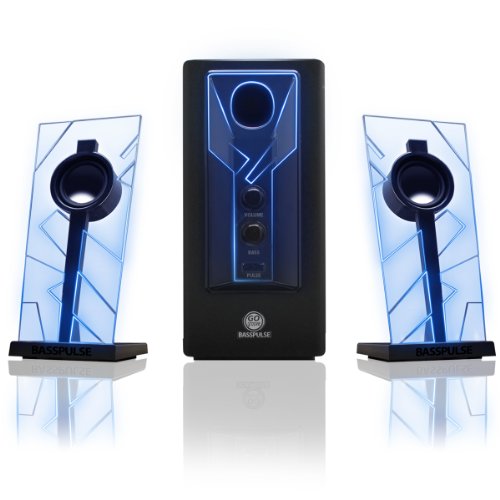
GOgroove BassPULSE 2.1 Computer Speakers with Blue LED Glow Lights and Powered Subwoofer
GOgroove BassPULSE 2.1 Computer Speakers with Blue LED Glow Lights and Powered Subwoofer
The GOgroove BassPULSE 2.1 system pairs two satellite speakers with a powered subwoofer for fuller sound than a basic stereo set. The blue LED glow lights add a decorative touch that pairs nicely with a neon sign or a gaming-style desk. It is built for listeners who want more low-end presence for music, films, and games.
Who It Suits
This system suits gamers, movie watchers, and music listeners who want richer bass at their desk. The LED glow makes it a good match for entertainment-focused setups and rooms with accent lighting. If your desk is very small, check that you have floor or shelf space for the subwoofer before choosing this set.
BONTEC Wood Monitor Stand Riser, 2-Tier Desktop Organizer
BONTEC Wood Monitor Stand Riser, 2-Tier Desktop Organizer
The BONTEC Wood Monitor Stand Riser lifts your screen to a more comfortable viewing height while adding storage underneath. The two-tier design gives you room to tuck away a keyboard, notebooks, or small desk items, keeping the surface tidy. Its wood finish blends well with home decor, so the desk looks intentional rather than purely functional.
Who It Suits
This riser suits anyone whose monitor sits too low or whose desk feels crowded. It works well for home offices, study desks, and craft tables where extra under-screen storage helps. If you use a laptop without an external monitor, the riser can still serve as a shelf for books, plants, or supplies.
Putting the Desk Setup Together
These five pieces combine into a practical, comfortable workspace. Place the BONTEC riser under your monitor to bring the screen up to eye level and free the space below for your keyboard or notebooks. Set the Anker vertical mouse to the right of the keyboard so your hand rests in a natural position during long sessions. Choose between the compact Cyber Acoustics speakers for a tidy desk or the GOgroove BassPULSE system if you want stronger bass and LED accents. Hang the Gamerneon sign on the wall behind the desk to finish the room with a bit of personality.
Care and Storage Tips
Keep the mouse receiver plugged into a consistent USB port so you do not misplace it, and wipe the mouse shell with a dry cloth to remove dust. Dust speaker grilles gently with a soft brush and keep liquids away from the subwoofer vents. Clean the neon sign with a dry microfiber cloth and avoid pressing on the light tubes or strips. For the wood riser, use a slightly damp cloth for spills and dry the surface right away to protect the finish.
FAQ
Is a vertical mouse better than a regular mouse?
A vertical mouse keeps your hand in a handshake-style position, which many people find more comfortable during long sessions. It is not automatically better for everyone, but if a flat mouse leaves your wrist or forearm tired, a vertical design like the Anker model is worth considering. Give yourself a few days to adjust to the new grip.
Should I choose 2.0 or 2.1 speakers for my desk?
Choose 2.0 speakers such as the Cyber Acoustics CA-2014 if desk space is tight and you mainly listen to calls, videos, and casual music. Choose a 2.1 system such as the GOgroove BassPULSE if you want stronger bass for games and movies and you have room for the subwoofer. Both options are covered in the sections above so you can compare the trade-offs.
Where should a neon sign be placed in a home office?
A wall behind or beside the desk is the most common spot, since it stays visible without taking up work space. The Gamerneon poker sign works well in game rooms and entertainment corners as well as offices. Make sure the power cord can reach an outlet without crossing a walkway.
How does a monitor riser help with comfort?
A riser lifts the screen closer to eye level, which can reduce neck strain during long workdays. The BONTEC two-tier riser also adds storage underneath, so the desk surface stays clearer. It is a simple change that helps both posture and organization.
Final Verdict
For most home office desks, the strongest combination from this list is the Anker vertical mouse for comfort, the BONTEC wood riser for screen height and storage, and one of the two speaker sets depending on your space and bass preferences. Add the Gamerneon neon sign if you want the room to feel finished and personal. Together, these five accessories cover the essentials of a desk that is comfortable to work at and pleasant to spend time around.
Product and ASIN Reference
Product
ASIN
Anker 2.4G Wireless Ergonomic Mouse, Right Hand Vertical Mouse USB Receiver
B00BIFNTMC
Gamerneon Blue Poker Neon Sign Casino Playing Cards Neon Signs for Man Cave
Compare the best vertical mice and neon signs for a warmer desk: an ergonomic wireless mouse, a poker neon sign, computer speakers, and a monitor stand.
Compare the best vertical mice, neon signs, computer speakers, and a wood monitor stand for a comfortable woodworking shop desk and design corner setup.


 Cyber Acoustics CA-2014 2.0 Computer Speakers, 4W, Stereo Sound
 GOgroove BassPULSE 2.1 Computer Speakers with Blue LED Glow Lights and Powered Subwoofer
 BONTEC Wood Monitor Stand Riser, 2-Tier Desktop Organizer