As an Amazon Associate I earn from qualifying purchases. This post may contain affiliate links at no extra cost to you.
The real decision with a first 3D printer is not top speed or exotic materials. It is how much fiddling stands between unboxing and a first layer that actually sticks. Beginners quit over failed prints, and failed prints almost always trace back to manual bed leveling, loose assembly or a filament path that fights flexible mistakes. A machine that levels itself, loads its own filament and arrives mostly assembled removes most of that friction.
This roundup is for first-time buyers printing PLA and PETG at a desk or in a small workshop: hobbyists making jigs and organizers, parents buying for a teenager, and woodworkers curious about printed templates and dust ports. Every pick below is an FDM machine chosen from its Amazon listing details, with auto leveling as the shared baseline.
Quick Picks
As an Amazon Associate we earn from qualifying purchases
Bed leveling is the skill that used to eat a beginner’s first weekend. A probe-based system such as CR Touch measures the bed surface at many points and compensates for small tilts, while full-auto calibration routines also set flow rate and Z offset without a stack of test prints. Check the listing language carefully: “auto leveling” should mean the printer probes the bed itself. If a listing still expects you to slide paper under the nozzle and turn four thumb wheels before every few prints, expect a slower, more frustrating start.
Assembly time shapes the first week
Some printers here arrive as a base and gantry that bolt together in minutes, while older kit-style designs ask for an evening of frame squaring, belt tensioning and cable routing. Neither approach is wrong, but they suit different people. If the goal is printing this weekend, favor listings that stress quick setup, pre-assembled modules and a guided first-print routine on the touchscreen. If learning how the machine works matters as much as the prints themselves, a kit-style build teaches exactly that as you go, and later repairs feel far less intimidating.
Build volume versus desk footprint
A 180 mm cube handles keychains, brackets, miniatures and most desk accessories, and the machine fits on a shelf. Step up to 220 to 250 mm plates and you can print storage boxes, helmet-sized pieces in fewer parts, and longer jigs in one piece. Height matters separately: tall vases and lamp bodies need Z range, not just a wide plate. Match the plate to the projects you actually have in mind, and remember the printer’s outer footprint, plus spool and cable clearance, is always larger than the print area itself.
Extruder style and nozzle temperature
A direct drive extruder pushes filament straight into the hotend, which makes flexible TPU and short retraction settings far easier to manage than a Bowden tube setup, where the filament can buckle on its way to the nozzle. Nozzle temperature matters too: listings rated to 260 or 280 degrees cover PLA, PETG and TPU comfortably, while lower ceilings limit you to basic PLA. For a first machine, a direct drive with auto filament loading removes two common sources of early clogs, under-extrusion and failed starts.
The 5 Best Options
Bambu Lab A1 mini Combo
Top Pick
Bambu Lab A1 mini Combo
Best for: beginners who want multi-color prints and the least possible setup.
The A1 mini Combo pairs Bambu Lab’s smallest printer with the AMS lite, so a complete beginner can print in up to four colors without ever pausing to swap spools by hand. Setup is the shortest in this group, the machine calibrates itself fully, and the listing rates operation at 48 dB or less, which suits a bedroom desk or shared office. The trade is size: the 180 mm cube is the smallest build volume here, fine for learning and small parts.
Creality Ender 3 V3 SE
Runner-Up
Creality Ender 3 V3 SE
Best for: learners who want a well-documented machine with upgrade headroom.
Print size: 220 x 220 x 250 mm (8.66 x 8.66 x 9.84 inch)
The Ender 3 V3 SE keeps the open frame and huge community knowledge base that made the Ender line a default first printer, then removes its worst habits. CR Touch auto leveling replaces the manual wheels, the Sprite direct extruder handles flexible filament, and auto filament loading takes the guesswork out of spool changes. Dual Z-axis screws and dual Y-axis rails keep the gantry steadier than the original design. It is the pick for someone who wants to learn the craft on a machine that still rewards tinkering.
FLASHFORGE Adventurer 5M
FLASHFORGE Adventurer 5M
Best for: impatient beginners who want fast turnaround between prints.
The Adventurer 5M is the speed pick: a rigid frame, a quick-detachable nozzle that swaps in seconds without tools, and one-click fully automatic leveling. Its listing claims print speeds up to 600 mm/s, and the dual-sided PEI plate releases finished parts with a flex once cooled. For a beginner, the appeal is rhythm: level once with a button press, print fast, pop the part off, go again. The 220 mm cube matches the Ender’s footprint while the enclosed-style frame feels tidier on a desk.
ELEGOO Neptune 4 Pro
ELEGOO Neptune 4 Pro
Best for: beginners planning taller parts who want Klipper from the start.
Print volume: 225 x 225 x 265 mm
Max speed: 500 mm/s with pre-installed Klipper firmware
Extruder: dual-gear direct drive, 5.2 to 1 reduction ratio
The Neptune 4 Pro ships with Klipper firmware already installed, which is the software layer many beginners only meet after a year of upgrades. Klipper brings input shaping and fast motion, and the listing rates the machine to 500 mm/s. A dual-gear direct extruder with a 5.2 to 1 reduction ratio grips filament firmly, the segmented heatbed warms the zone under your part, and the 225 x 225 x 265 mm volume is the tallest here. It asks a little more of its owner and gives more back.
Anycubic Kobra 3
Anycubic Kobra 3
Best for: beginners who want the biggest plate now and color as a later add-on.
Print size: 250 x 250 x 260 mm (9.8 x 9.8 x 10.2 inch)
Max speed: 600 mm/s
Calibration: full-auto calibration
Multi-color: supported with the optional ACE Pro, sold separately
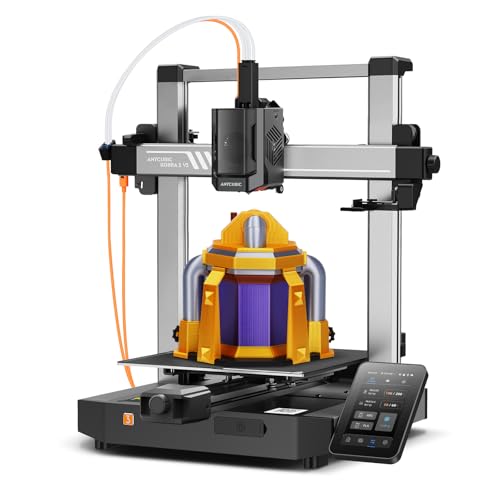
The Kobra 3 offers the largest bed in this roundup at 250 x 250 x 260 mm, with full-auto calibration and a stated maximum speed of 600 mm/s. Bought as the printer-only listing, it is a single-color machine, but the design is built around Anycubic’s ACE Pro unit, which adds multi-color printing and active filament drying later. That upgrade path makes it a sensible middle choice: generous size and simple calibration now, color printing when the hobby sticks. The touchscreen workflow keeps daily operation straightforward for a first-time owner.
Which One Fits Your Situation
You want color prints without learning spool swaps
Choose the Bambu Lab A1 mini Combo. The included AMS lite feeds up to four filaments automatically, the machine calibrates itself, and the compact frame fits a shelf or study desk. Accept the 180 mm build volume as the price of that simplicity; most first projects, from plant pots to game pieces, fit inside it comfortably.
You are buying for a teenager or a classroom
The FLASHFORGE Adventurer 5M keeps supervision simple: one-click leveling, a nozzle that detaches without tools when a clog happens, and a PEI plate that releases parts without prying. Fast print speeds also matter in a class period, where a slow machine turns a lesson into a waiting exercise. Keep spare nozzles on hand.
You plan to print jigs, templates and shop aids
The ELEGOO Neptune 4 Pro and the Creality Ender 3 V3 SE both suit a workshop bench. The Neptune’s taller 265 mm Z height and Klipper firmware favor bigger fixtures, while the Ender’s vast community documentation helps when a printed dust port or router template needs a proven profile. Either handles PETG, the usual choice for shop parts.
You want one machine that can grow with the hobby
Pick the Anycubic Kobra 3. Its 250 mm bed is the largest here, calibration is automatic, and the optional ACE Pro adds multi-color printing and filament drying when you are ready. Starting with the printer-only listing keeps the first purchase focused while leaving a clear, manufacturer-supported upgrade on the table.
Common Mistakes
Buying the biggest printer first, then discovering the desk, shelf or spare room cannot fit its footprint plus spool clearance.
Skipping the auto leveling routine after moving the printer or changing the build plate, then blaming the filament for first-layer failures.
Starting with PETG or TPU before printing a few successful PLA pieces and learning how the slicer settings behave.
Ordering a Combo or bundle listing without checking whether the multi-color unit is actually included in that specific ASIN.
Leaving filament loaded and exposed to humid air for weeks, which causes stringing and popping that look like machine faults.
Frequently Asked Questions
Do beginners still need to level the bed by hand?
On the five printers here, no. Each listing includes probe-based auto leveling or full-auto calibration that measures the bed and sets the nozzle offset for you. You may still run the routine again after moving the machine or swapping plates, but the paper-and-thumb-wheel ritual of older printers is gone from this group.
Is a bigger build volume always better for a first printer?
Not necessarily. A 250 mm bed prints larger single pieces, yet it also means longer heat-up times, a bigger footprint and more material in every failed print. Many beginners learn faster on a compact 180 to 220 mm machine, then upgrade once their projects genuinely outgrow the plate.
Can these printers handle flexible TPU filament?
Yes, within limits. The Ender 3 V3 SE, Neptune 4 Pro and Adventurer 5M use direct drive extruders that feed flexible filament more reliably than Bowden setups, and their listings include TPU among supported materials. Print TPU slowly, keep the filament dry, and expect softer grades to be fussier than standard 95A filament.
Should I buy the multi-color version right away?
Only if color is central to what you plan to print, such as signs, game tokens or gifts. The A1 mini Combo includes its AMS lite in the box, while the Kobra 3 adds color later through the ACE Pro. Single-color printing teaches the same core skills with one less system to manage.
J
JD's Woodworks Editorial Team
We compare specs, warranty terms, long-term owner feedback and street pricing before anything earns a spot. Rankings are never paid.
Affiliate disclosure. As an Amazon Associate we earn from qualifying purchases at no extra cost to you. Prices accurate as of the date shown.
Miter saw vs table saw: compare crosscuts, rip cuts, accuracy, space, and value to choose the right saw for your shop and your first woodworking projects.
Compare five solar portable generators for shops, campsites, and outages, covering battery size, output, solar charging, outlets, and what to check first.
The best portable CNC machines for small shops and shared spaces, compared by footprint, weight, work area, and setup. Compact benchtop picks for wood, acrylic, and soft metal.
Find the best Penn Industries dust collector on Amazon: the PSI Woodworking DC3XX blower and the DC725 tabletop unit, compared on airflow, pressure, and shop fit.
Compare five large stationary horizontal metal band saws for fabrication shops on cutting capacity, motor, power supply, blade speed, and mitering before buying.
Find the best mortising chisel bits for clean square mortises in this guide: hollow-chisel sets and singles compared by size, shank, steel, and machine fit.
Find the best drill press base for your shop. Compare rolling stands and mobile bases by capacity, footprint, casters, locking, and setup before you buy.
Find the best dewalt planer dw734 blades for your 12-1/2-inch thickness planer. Compare OEM and aftermarket 3-knife sets, steel types, and fit before you buy.


 ELEGOO Neptune 4 Pro
 Anycubic Kobra 3