As an Amazon Associate I earn from qualifying purchases. This post may contain affiliate links at no extra cost to you.
Anycubic’s Kobra lineup covers nearly every kind of maker, from a first printer on a desk to a large-format machine for helmets and cosplay parts. The choice is not about brand loyalty but about build volume, speed, and whether you need multi-color printing. A compact printer that fits your desk will frustrate you the first time a part is too tall, while a large machine wastes space if you only print small brackets and toys. Speed, volume, and color are the three things to compare first.
This guide is for makers, hobbyists, and small-shop owners choosing an Anycubic printer for functional parts, prototypes, and creative projects. The four machines below were chosen from the names and specifications shown on their Amazon pages, spanning the entry-level Neo up to the large-format Max. Build volume, speed, and multi-color support are the three things to compare first.
Quick Picks
As an Amazon Associate we earn from qualifying purchases
Product
Best for
Key spec from title
Anycubic Kobra 2 Neo
First 3D printer
250mm/s max print speed
Anycubic Kobra 3
Fast multi-color printing
600mm/s max print speed
Anycubic Kobra 3 Max
Large-format prints
420 x 420 x 500 mm build volume
Anycubic Kobra S1 ACE 2 Pro
Enclosed multi-color printing
4-color printing with ACE Pro
How to Choose
Build volume decides what fits
Build volume is the first specification to check, because it sets a hard limit on the size of every part. A 220-by-220-by-250-millimeter volume suits brackets, toys, and small prototypes, while a 420-by-420-by-500-millimeter volume swallows helmets, cosplay armor, and large functional parts in one piece. Measure the largest part you expect to print and compare it against the listed volume rather than the machine’s footprint. A printer that is just big enough today becomes too small the moment a larger project arrives. Buying the larger volume now is cheaper than replacing the printer later. A printer that is just big enough today becomes too small with the first larger commission.
Print speed and auto-leveling
Print speed decides how long a part takes, and auto-leveling decides how often the first layer fails. A printer rated at 600 millimeters per second finishes a bracket in a fraction of the time a 250-millimeter-per-second machine needs, which matters when a project involves many parts. Auto-leveling systems such as LeviQ 2.0 measure the bed and compensate for tilt, so the first layer sticks without manual adjustment. Check the listing for the maximum speed and the leveling system, since both affect the daily experience more than any other specification. A fast printer with poor leveling wastes more filament than a slow printer with a reliable first layer. Poor leveling wastes more filament than slow printing does.
Safety around a hot printer
A 3D printer runs a hotend above 200 degrees and a heated bed that stays hot, so treat the machine with the same respect as any hot tool. Keep fingers away from the nozzle and the bed while printing, and place the printer where children and pets cannot reach it. Ventilation matters because melting filament releases fumes, so run the printer in a ventilated room and avoid printing exotic materials in a closed bedroom. Never leave a printer running unattended for long stretches without checking on it, and read the manual that ships with the machine before the first print. Keep the printer away from children and pets while it runs.
Filament, multi-color, and running costs
Filament choice shapes what a printer can make, so confirm the supported materials before buying. PLA suits beginners and decorative parts, while PETG and TPU handle functional parts that need strength or flexibility. Multi-color printing needs an add-on unit such as the ACE Pro, which feeds several filaments and switches between them, so check whether the listing includes it or sells it separately. Nozzle temperature limits decide which materials work: a hotend rated to 320 degrees opens engineering filaments that a lower-rated hotend cannot melt. Budget for filament, spare nozzles, and a build plate alongside the printer itself. Store filament dry, since damp filament prints poorly and clogs nozzles.
The Anycubic Kobra 2 Neo is the first-printer pick in this guide and the most approachable machine Anycubic makes. Its 250-millimeter-per-second top speed is quick for an entry printer, and the LeviQ 2.0 auto-leveling system measures the bed so the first layer sticks without manual tweaking. The 220-by-220-by-250-millimeter build volume covers brackets, toys, and small prototypes, which is where most beginners start. Assembly is short and the learning curve is gentle, so a first print usually succeeds on the first or second try. For a maker buying a first printer, it is the lowest-risk way into the hobby.
Watch out for: the compact build volume limits large parts to sections.
Anycubic Kobra 3
Runner-Up
Anycubic Kobra 3
Best for: makers who want fast prints with multi-color options.
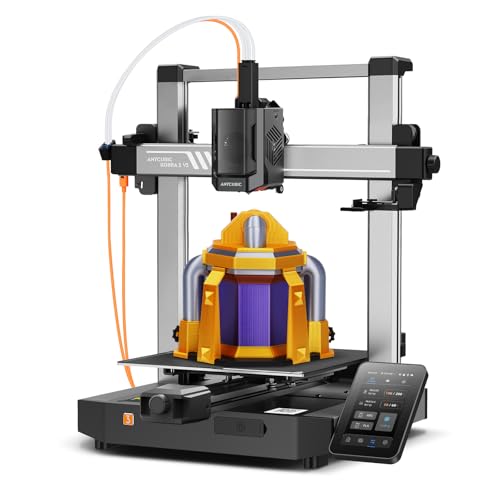
The Anycubic Kobra 3 is the speed pick for makers who print often and want multi-color output. Its 600-millimeter-per-second top speed cuts print times sharply, and the full-auto calibration handles bed leveling and Z-offset without manual steps. The 250-by-250-by-260-millimeter build volume fits most functional parts, and multi-color printing works with an additional ACE Pro unit that feeds up to four colors. That combination suits a maker who prints batches of parts and wants color without painting. The faster speeds reward a little tuning, since a rushed profile can show layer lines on visible surfaces.
Watch out for: the ACE Pro multi-color unit is an additional purchase.
Anycubic Kobra 3 Max
The Anycubic Kobra 3 Max is the large-format pick for makers whose parts simply do not fit a standard printer. Its 420-by-420-by-500-millimeter build volume prints helmets, cosplay armor, large vases, and furniture brackets in one piece instead of sections that need gluing. The 500-millimeter-per-second top speed keeps those large prints from taking days, and auto-leveling handles the bigger bed without manual adjustment. The trade-offs are size and patience: the machine needs a sturdy table and long prints still take hours. For a maker whose projects keep outgrowing the bed, it is the only pick in this guide that ends the problem.
Specs
500mm/s maximum print speed
420 x 420 x 500 mm build volume
Auto-leveling for the large bed
High-speed printing with auto-leveling
Best for: large parts such as helmets and cosplay armor.
Watch out for: needs a sturdy table and long prints still take hours.
Anycubic Kobra S1 ACE 2 Pro
Anycubic Kobra S1 ACE 2 Pro
Best for: engineering filaments and serious multi-color printing.
4-color printing, 16 colors with additional ACE units
The Anycubic Kobra S1 ACE 2 Pro is the enclosed multi-color pick for makers who print engineering materials or want cleaner multi-color results. Its enclosed design holds heat steadier, which helps with materials that warp in open air, and the ACE Pro system prints up to four colors, expanding to sixteen with additional units. The 320-degree hotend melts filaments that lower-rated machines cannot handle, opening the door to stronger functional parts. The enclosure also contains fumes better than an open frame. For a maker moving from basic PLA into tougher materials and real multi-color work, it is the most capable machine here.
Watch out for: the enclosed frame needs clearance for ventilation and access.
Which One Fits Your Situation
First 3D printer for a beginner
A beginner should start with the Anycubic Kobra 2 Neo. It assembles quickly, the auto-leveling system removes the hardest setup step, and the speed is plenty for learning. The compact build volume is a fair trade for the price and simplicity, and most first projects fit easily. Move up only when parts regularly exceed the bed or multi-color work becomes a priority. Most first projects fit easily inside the compact build volume.
Fast prints and multi-color projects
Makers who print often and want color should look at the Anycubic Kobra 3. Its 600-millimeter-per-second speed shortens every job, and the ACE Pro system adds multi-color printing without a second machine. The Kobra S1 ACE 2 Pro is the alternative when the work involves engineering filaments or an enclosed chamber matters more than raw speed. The ACE Pro system adds multi-color printing without a second machine.
Large parts in one piece
Helmets, armor, and large functional parts belong on the Anycubic Kobra 3 Max. Its 420-by-420-by-500-millimeter volume prints pieces that no other machine here can take, and splitting a helmet into glued sections is never as strong as printing it whole. Budget for a sturdy table and accept that large prints still take hours, even at high speed. A large bed ends the problem of parts that do not fit.
Stronger materials and engineering parts
Functional parts that need strength or heat resistance call for the Kobra S1 ACE 2 Pro. Its 320-degree hotend and enclosed chamber handle materials that warp or fail on an open-frame printer, and the multi-color system stays available for the same machine. The Kobra 3 is the fallback when the budget is tighter and the material range can stay with PLA and PETG. An enclosed chamber holds heat steadier for warping materials.
Common Mistakes
Buying the smallest printer and then gluing large parts together from sections that never hold well.
Skipping auto-leveling and fighting first-layer failures on every print from the first layer.
Ordering a multi-color printer without the ACE Pro unit that enables color changes.
Printing engineering filaments on a hotend that cannot reach their melting temperature.
Leaving a printer running unattended in a closed room without ventilation for hours at a time.
Frequently Asked Questions
What is the difference between the Kobra 2 Neo and the Kobra 3?
The Kobra 2 Neo is an entry-level printer with a 250-millimeter-per-second top speed and a 220-by-220-by-250-millimeter build volume, aimed at beginners. The Kobra 3 is faster at 600 millimeters per second, calibrates itself fully, with multi-color support. Choose the Neo for a first printer and the Kobra 3 for faster, more capable printing.
Do I need the ACE Pro for multi-color printing?
Yes, multi-color printing on the Kobra 3 and Kobra S1 needs the ACE Pro filament system, which feeds several colors and switches between them during a print. The Kobra 3 listing covers the printer alone, so confirm whether the bundle you order includes the ACE Pro. Without it, the printer prints in a single color per job.
How long does a large print take?
Print time depends on the part size, the layer height, and the speed setting, so a helmet on the Kobra 3 Max can still take many hours even at high speed. Faster speeds shorten the job, but thicker layers and larger parts add time back. Slice the model first to see the estimated time before committing to a long print.
Can these printers use PETG and TPU?
Yes, the Kobra machines handle PLA, PETG, and TPU, which cover most maker projects. The Kobra S1 ACE 2 Pro reaches higher hotend temperatures, so it also handles engineering filaments that need more heat. Check the listing for the supported materials and the maximum hotend temperature before buying filament for a demanding part. PLA suits beginners while PETG handles functional parts.
J
JD's Woodworks Editorial Team
We compare specs, warranty terms, long-term owner feedback and street pricing before anything earns a spot. Rankings are never paid.
Affiliate disclosure. As an Amazon Associate we earn from qualifying purchases at no extra cost to you. Prices accurate as of the date shown.
Miter saw vs table saw: compare crosscuts, rip cuts, accuracy, space, and value to choose the right saw for your shop and your first woodworking projects.
Compare five solar portable generators for shops, campsites, and outages, covering battery size, output, solar charging, outlets, and what to check first.
The best portable CNC machines for small shops and shared spaces, compared by footprint, weight, work area, and setup. Compact benchtop picks for wood, acrylic, and soft metal.
Find the best Penn Industries dust collector on Amazon: the PSI Woodworking DC3XX blower and the DC725 tabletop unit, compared on airflow, pressure, and shop fit.
Compare five large stationary horizontal metal band saws for fabrication shops on cutting capacity, motor, power supply, blade speed, and mitering before buying.
Find the best mortising chisel bits for clean square mortises in this guide: hollow-chisel sets and singles compared by size, shank, steel, and machine fit.
Find the best drill press base for your shop. Compare rolling stands and mobile bases by capacity, footprint, casters, locking, and setup before you buy.
Find the best dewalt planer dw734 blades for your 12-1/2-inch thickness planer. Compare OEM and aftermarket 3-knife sets, steel types, and fit before you buy.