Key takeaways
- A best christmas tree laser cutter guide comparing four diode and CO2 machines for wooden and acrylic ornaments, with work area, beam power and safety.
What's inside
As an Amazon Associate I earn from qualifying purchases. This post may contain affiliate links at no extra cost to you.
A Christmas tree laser cutter is read here as a laser cutter for cutting Christmas tree designs and ornaments: layered wooden trees, hanging ornaments, tree toppers, gift tags and small decorative panels cut from thin plywood, basswood, MDF and acrylic. That reading needs stating plainly, because no machine is built only for Christmas trees. The machines below are general laser cutters judged on how well they handle the ornament job: fine detail on small pieces, clean edges on thin sheet goods, and batch cutting, where one sheet yields a dozen ornaments in a single layout.


This guide is narrower than the general laser cutter guide on this site, which compares work areas and materials across the whole woodworking range. Here every pick is weighed against ornament work. A machine that cuts thick hardwood slowly but engraves beautifully can still earn a place if it handles thin ornament stock well, while a machine built for large panels may lose out if its bed and setup suit furniture parts better than a tray of small hanging pieces. Four machines made the list, spanning a compact enclosed five-watt diode, an open-frame ten-watt diode, an enclosed forty-watt diode and a fifty-five-watt desktop CO2 unit. The range covers a first ornament batch on a kitchen table and a small run of ornaments for a craft fair table.
Safety shapes every choice in this class. Diode machines in open frames are Class 4, which means the beam is not contained inside a housing, and they need eye protection, a ventilated room and a watchful operator. Enclosed machines contain the beam and the smoke, which matters when the work happens indoors in winter, with windows shut and family nearby. Never cut PVC, vinyl or unknown plastics: they can release corrosive gases and damage the machine. Unknown plywood, painted stock and treated lumber are also out unless the composition is documented. Laser-safe plywood and MDF are more predictable, but glue differences still change cutting behavior from one sheet to the next.
What to look for
Beam power decides what thickness a machine cuts in a reasonable number of passes. A five-watt diode engraves crisply and cuts thin veneer, cardboard and light plywood, but thick plywood takes many slow passes and chars more with every pass. A ten-watt diode cuts three-millimetre plywood in fewer passes and handles basswood ornaments with cleaner edges. A twenty-watt or forty-watt diode cuts thicker ornament stock in one pass and keeps batch work moving. A fifty-five-watt CO2 unit cuts wood and acrylic faster still, and it is the only class here that cuts clear acrylic, which matters for transparent ornaments and layered acrylic trees.
Work area decides how many ornaments fit on one sheet. A 125-millimetre square bed suits single ornaments and gift tags, but a batch of twelve ornaments needs repeated setups. A 400-millimetre square bed holds a full sheet of ornament blanks with room for clamps. A bed near 600 by 300 millimetres holds several rows of ornaments and still fits on a sturdy bench. Measure the usable area, not the outside dimensions: the laser head, margins, clamps and any rotary attachment all take space from the nominal bed.
Enclosure and ventilation decide where the machine can live. An enclosed machine with a built-in exhaust fan and a smoke filter can run on a bench near a window with a short duct run outdoors. An open-frame machine needs a dedicated bench, a separate enclosure or a well-ventilated room, plus eye protection for everyone nearby. Air assist matters for ornament edges: a stream of air at the cut point reduces flare-ups and keeps edges lighter, which is visible on pale basswood and birch.
Software and file handling decide how quickly a design becomes a cut. Look for software that imports common vector formats, lets you nest many small shapes on one sheet, and holds focus and power settings per layer so engraved details and cut lines run in one job. A camera or pin-point positioning helps place a design on a small offcut, which saves material when ornaments are cut from leftover sheet pieces. A machine that needs a wired computer beside it for every job suits a shop bench; one with Wi-Fi and app control suits a craft room where the computer lives elsewhere.
Material range is the last check. Every pick below lists wood, plywood, MDF, leather, cardboard and acrylic among its materials, but the details differ. Diode lasers struggle with clear acrylic because the beam passes through it rather than being absorbed, so clear acrylic ornaments need a CO2 machine or opaque acrylic. Light-colored woods can cut less predictably than dark or resin-rich woods on a diode, so a machine with air assist and fine focus control earns its place on pale ornament stock.
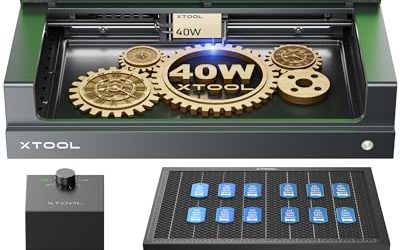
xTool S1 40W Laser Cutter and Engraver
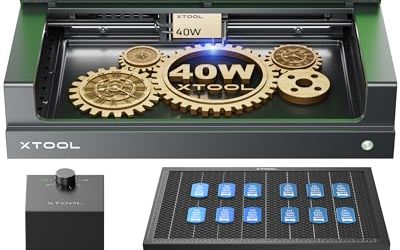
The xTool S1 is the enclosed forty-watt diode pick, and it leads this guide because it combines the largest bed here with a Class 1 enclosed design. The Basic Bundle behind this listing includes smart air assist and a honeycomb panel, so the machine arrives ready for ornament sheet work without extra parts. Its bed measures 23.93 by 15.16 inches, which holds several rows of ornament blanks on one sheet and leaves room for clamps at the edges. Engraving runs at up to 600 millimetres per second, and the listing states the forty-watt module cuts eighteen-millimetre cherry wood in a single pass, which is far thicker than any ornament stock needs and leaves ample margin for clean cuts on three-millimetre and six-millimetre plywood.
Pin-point positioning is the feature that matters most for ornament work on this machine. It lets the operator place a design exactly on a small offcut or a partly used sheet, so leftover basswood and birch pieces become ornaments instead of waste. Auto-focus sets the beam height without manual shims, which keeps small batch runs consistent when sheets vary slightly in thickness. The S1 accepts four switchable laser modules, so a buyer can fit a lower-power module for fine engraving or an infrared module for coated metal tags, though the forty-watt module in this listing is the one judged here.
The enclosure is the other reason this machine leads. A Class 1 enclosed diode contains the beam and the smoke path, which suits indoor winter work with family nearby, and the three-millimetre aerospace-grade aluminum frame keeps the gantry rigid across a wide bed. The listing names wood, metal, acrylic and leather among its materials, and the forty-watt beam handles opaque acrylic ornaments as well as wooden ones. One listing inconsistency deserves a note: a part-number field on the listing reads S1 10W while the title and size fields read 40W, so a buyer should confirm the forty-watt module on the exact listing before ordering. The machine weighs 44 pounds, so it stays on its bench once placed, and it needs a power outlet and an exhaust route for the smoke it produces.
OMTech Polar Lite 55W CO2 Laser Engraver and Cutter
The OMTech Polar Lite is the CO2 pick, and it earns its place on one capability no diode here has: it cuts clear acrylic. Transparent acrylic ornaments, layered acrylic trees and clear gift tags are outside the diode range, because a diode beam passes through clear acrylic instead of cutting it. The Polar Lite is a fifty-five-watt desktop CO2 machine with a 20 by 12 inch work area, built-in exhaust fans and a half-gallon water tank, so it runs as a self-contained desktop unit with a duct run outdoors for the exhaust.
Cutting figures from the listing put wood up to 0.61 inches and acrylic up to 1 inch within reach, which covers every ornament thickness a buyer is likely to cut. One-click autofocus sets the beam height, a five-megapixel camera helps place designs on the bed, and front and back pass-through doors let longer stock feed through when a design runs past the bed. Engraving runs at up to 500 millimetres per second. The machine works with LightBurn and RDWorks, the two programs most ornament makers already use, and a rotary axis is compatible for curved pieces such as engraved baubles.
The trade-off against the diode picks is ownership complexity. A CO2 machine needs water cooling, a pump and stronger exhaust than a small diode enclosure, and its tube output declines with age, so water quality, pump reliability and leaks deserve routine attention. The Polar Lite is also a desktop machine that stays put once installed. For a buyer whose ornament plans center on clear acrylic, layered acrylic and faster batch cutting of wood, those demands are worth accepting. For a buyer cutting only wooden ornaments, the enclosed forty-watt diode above does the same wood job with simpler upkeep. The Polar Lite listing is the current model in the maker’s desktop CO2 line, and a related listing names it as the newer version of the maker’s smaller CO2 machine.
SCULPFUN iCube Pro 5W Laser Engraver
The SCULPFUN iCube Pro is the compact pick, a five-watt diode machine built for a desk rather than a shop bench. Its work area is 125 by 125 millimetres, which fits one ornament or a small gift tag at a time, and its enclosed body with a built-in smoke filter means it can run in a craft room without a separate enclosure or duct run. Engraving runs at up to 10,000 millimetres per minute, the laser spot measures 0.06 millimetres for fine detail, and autofocus sets the beam without manual adjustment. The machine connects by Wi-Fi and through an app, so designs can come from a phone as well as a computer.
Five watts is the weakest beam in this guide, and its limits need stating plainly. It engraves wood, black acrylic, leather, cardboard and coated metal with crisp detail, and it cuts thin veneer, cardboard and light plywood, but thick plywood is outside its comfortable range: it takes many slow passes, and the edges char more with every pass. An ornament maker working in three-millimetre basswood and thin birch plywood will find it capable, while one cutting six-millimetre plywood in batches will want a stronger machine. The small bed is the other limit: batch work means repeated setups, one ornament at a time, so it suits single gifts and small runs rather than a craft fair table.
What the iCube Pro gives back is simplicity. It arrives with no assembly required, weighs about seven pounds on one mirror listing, and its smoke filter handles the fumes of small engraving jobs without an exhaust hose. A temperature alarm watches the module, and the enclosure keeps the beam contained, which matters in a shared room. One figure conflict deserves a note: some listings give the work area as 130 by 130 millimetres while the Amazon listing title gives 125 by 125 millimetres, so a buyer cutting ornaments to a tight size should confirm the usable area on the exact listing. For a first ornament machine, a gift maker, or a desk that cannot hold a larger unit, this is the pick that fits.
Ortur Laser Master 3 10W Laser Engraver
The Ortur Laser Master 3 is the open-frame ten-watt pick, and it sits in the middle of this guide on beam power. Ten watts cuts three-millimetre plywood in fewer passes than a five-watt machine and leaves cleaner edges on basswood ornaments, while its bench-size bed holds a full sheet of ornament blanks with room to nest a dozen small shapes in one layout. The machine is sold by Ortur Official on the listing, and its open frame keeps the unit light and easy to move between a bench and storage.
Open frame is also the fact a buyer must weigh most carefully. This is a Class 4 machine with no enclosure, so the beam is not contained, and it needs eye protection within reach, a ventilated room and a watchful operator for every job. A separate enclosure or a dedicated bench with the door shut suits it better than a shared craft table. The listing names wood, bamboo, leather, MDF, cardboard, slate and coated metal as engraving materials, and thin veneer, cardboard and light plywood as cutting materials, which matches the ornament job closely. Thick plywood stays outside its comfortable range, and a buyer planning regular six-millimetre stock should look at the forty-watt enclosed machine above instead.
Evidence for this pick is the thinnest in the guide, and that is flagged here rather than hidden. The Amazon listing excerpt is about ten months old and reads only eight left in stock, while import mirrors read out of stock, so a buyer should confirm a new-unit buying option on the exact listing before ordering. If the listing has no new buying option, the guide still stands on three machines. The Laser Master 3 earns its place on beam power and bed size for the ornament job, but it is the pick to confirm live before buying.
Comparison
| Machine | Beam | Work area | Enclosure | Best ornament use |
|---|---|---|---|---|
| xTool S1 40W | 40W diode | 23.93 x 15.16 in | Enclosed, Class 1 | Batch cutting, thick and thin stock |
| OMTech Polar Lite 55W | 55W CO2 | 20 x 12 in | Enclosed desktop | Clear acrylic, fast batch cutting |
| SCULPFUN iCube Pro 5W | 5W diode | 125 x 125 mm | Enclosed, smoke filter | Single ornaments, desk work |
| Ortur Laser Master 3 10W | 10W diode | 400 x 400 mm | Open frame, Class 4 | Sheet nesting, mid-power cutting |
Frequently asked questions
Can a diode laser cut clear acrylic ornaments?
No. A diode beam passes through clear acrylic rather than being absorbed, so it cannot cut transparent acrylic. Opaque and dark acrylic cut well on a diode, and the forty-watt xTool S1 handles opaque acrylic ornaments without trouble. For clear acrylic ornaments, layered acrylic trees and transparent gift tags, a CO2 machine such as the OMTech Polar Lite is the right class, because CO2 energy is absorbed well by clear acrylic. A buyer who wants both wooden and clear acrylic ornaments should choose the CO2 machine or plan two separate material paths.
What thickness of wood suits Christmas ornaments?
Three-millimetre plywood, basswood and birch are the common ornament thicknesses, and every machine in this guide cuts them. Six-millimetre plywood suits layered trees and sturdier hanging pieces, and it needs ten watts or more for clean edges in a reasonable number of passes. Thicker stock is rarely needed for ornaments and brings more charring and longer jobs. Laser-safe plywood and MDF are the predictable choices; unknown plywood, painted stock and treated lumber should stay out unless the composition is documented, because glue and coatings change cutting behavior and can release harmful fumes.
Do I need an enclosure for ornament work indoors?
An enclosure helps whenever the work happens indoors, especially in winter with windows shut. Enclosed machines contain the beam and guide smoke toward an exhaust fan or filter, which keeps a shared room usable. Open-frame machines need eye protection, a ventilated room and a watchful operator, and they suit a dedicated bench better than a shared craft table. A smoke filter handles small engraving jobs, while a duct run outdoors suits regular cutting. Whichever machine is chosen, never cut PVC, vinyl or unknown plastics, and keep a fire watch during cutting: thin wood and paper offcuts can smoulder if the beam lingers.
How to choose
Begin with material. Wooden ornaments in three-millimetre and six-millimetre stock suit any machine here, with beam power deciding how many passes each cut needs. Clear acrylic ornaments need the CO2 machine, while opaque acrylic suits the diode picks. Then weigh the batch size: a single ornament or a gift tag fits the compact five-watt machine, a dozen ornaments on one sheet needs a 400-millimetre bed or larger, and a craft fair run suits the widest bed with air assist and autofocus. Then weigh the room: an enclosed machine fits a shared indoor space, while an open-frame machine needs a dedicated bench and ventilation. A buyer cutting only wooden ornaments in small batches gets the simplest answer from an enclosed diode, a buyer cutting clear acrylic gets it from the CO2 machine, and a buyer nesting many small shapes on full sheets gets it from the widest bed with the strongest beam the budget allows. Confirm a new-unit buying option on the exact listing before ordering, and confirm the work area and beam power on that same listing, because listings in this class sometimes carry conflicting figures across fields.
Disclosure: As an Amazon Associate, we may earn a commission from qualifying purchases made through links in this article, at no additional cost to you.
Related guides
More from Amazon
Programs that pair well with the guide above. Offers and eligibility are set by Amazon and may change.
Send a Prime gift membership to someone who would use free shipping and Prime Video.
Gift Amazon PrimeGive audiobooks to someone who loves to listen. Plans and prices are set by Amazon.
Gift AudibleA free business account with business pricing and bulk-buying tools for work, shop or home office.
Create a business accountFree shipping on eligible items, Prime Video and more. Eligible new members can start with a free trial.
Start a Prime free trialAs an Amazon Associate we earn from qualifying purchases.