
What's inside
- Quick comparison: CNC router or laser cutter?
- Cutting depth: the decisive difference
- Material compatibility and safety
- Edge finish, accuracy, and cleanup
- Work-area needs and ownership realities
- Decision matrix by project and workspace
- Operating-cost calculation before you buy
- Final recommendation
- Related Guides
As an Amazon Associate I earn from qualifying purchases. This post may contain affiliate links at no extra cost to you.
Choose a CNC router for deep, three-dimensional work in wood and other rigid materials; choose a laser cutter for fast, precise two-dimensional cutting, engraving, and clean detail in thin sheet goods.
The better answer to cnc vs laser cutter depends less on which machine is “more powerful” and more on the projects you expect to make. A CNC router removes material with a spinning bit, while a laser cutter burns or vaporizes a narrow path. That difference affects cutting depth, compatible materials, edge appearance, workspace, noise, ventilation, and long-term operating cost.
As an Amazon Associate we earn from qualifying purchases at no extra cost to you.
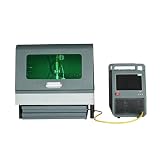


Quick comparison: CNC router or laser cutter?
| Factor | CNC router | Laser cutter |
|---|---|---|
| Typical hobby work area | 300 × 300 mm to 600 × 900 mm | 300 × 200 mm to 600 × 400 mm |
| Typical cutting depth per pass | 2–6 mm in softwood, depending on bit and setup | Usually 3–12 mm for wood, depending on laser power and material |
| Practical material thickness | 3D carving and stock commonly 6–50 mm or more | Commonly 3–12 mm for wood; thicker material needs higher power and multiple passes |
| Best detail scale | Approximately 0.5–2 mm tool-dependent detail | Often approximately 0.1–0.3 mm kerf and fine line engraving |
| Typical entry-level machine price | About $500–$2,000, excluding some accessories | About $500–$4,000, often with ventilation or air-assist costs |
| Noise and debris | High noise, chips, and dust; dust collection is strongly recommended | Quieter cutting, but smoke, odors, and airborne contaminants require extraction |
| Typical consumables | Router bits, spoilboards, collets, dust-collection filters | Lens or mirror cleaning supplies, air-assist parts, filters, and eventually a tube or laser source |
These figures are planning ranges rather than universal limits. A rigid professional machine can exceed them, while a compact desktop model may fall well below them.
Cutting depth: the decisive difference
When a CNC router wins
A CNC router is the better choice when the project needs depth rather than simply a cutout. It can pocket a 12 mm recess, contour a thick tabletop, cut joinery, shape a guitar component, or carve a sign with sloped lettering. By changing the toolpath and bit, the same machine can rough away material and then make a finishing pass.
Depth is not unlimited. A router must clear chips from the cut, and the workpiece must be held securely against lateral cutting forces. A 6 mm bit may cut 6 mm plywood efficiently, but attempting to remove the entire thickness in one aggressive pass can cause chatter, broken bits, burned wood, or a lost step. Multiple shallow passes are usually safer and produce a better surface.
When a laser cutter wins
A laser cutter excels at thin, flat parts: ornaments, templates, box panels, signs, inlays, stencils, and repeated shapes. It has no cutting tool that physically contacts the stock, so there is little mechanical force and small parts can be cut without elaborate clamping.
Laser depth is less flexible. A laser can cut through sheet material, but it does not efficiently excavate a broad, deep pocket or create a sculpted 3D surface. Multiple passes through thick wood can also produce more charring and a tapered or uneven edge.
Material compatibility and safety
CNC routers accept a broad range of solid materials, including hardwood, softwood, plywood, MDF, acrylic, HDPE, machining wax, and some nonferrous metals when the machine is designed for them. Tool selection matters: an upcut bit clears chips well, while a downcut bit can leave a cleaner top surface in plywood. Metalwork needs suitable rigidity, cutting fluid practices, speeds, and workholding rather than simply a different software setting.
Laser cutters handle wood, paper, cardboard, leather, acrylic, fabric, and certain coated or anodized surfaces particularly well. Some plastics are unsafe because they release corrosive or toxic gases. PVC and vinyl should not be laser cut, and unknown composite sheets should be treated as unsuitable until their composition and safety data are confirmed. Fiberglass, carbon-fiber composites, and materials containing chlorine can damage equipment or create dangerous fumes.
Neither machine should be operated unattended. A CNC needs guarded moving parts, eye and hearing protection as appropriate, and effective dust extraction. A laser needs an enclosed beam path where applicable, functioning interlocks, fire precautions, and exhaust that actually vents contaminants away from the workspace.
Edge finish, accuracy, and cleanup
Laser-cut wood commonly has a darkened edge. Lower-power settings, faster passes, masking tape, and air assist can reduce staining, but some char is part of the process. The cut edge may be very consistent and square enough for small boxes, yet resinous plywood can discolor unevenly.
A CNC-router edge is usually the same color as the material and can be sanded or finished like a conventional machined surface. However, it may show tool marks, fuzzing, tear-out, or a small ridge where passes overlap. Grain direction, bit sharpness, feed rate, and the final finishing pass have a large effect. For visible hardwood edges, a sharp bit and conservative finishing pass often matter more than maximum spindle speed.
If your priority is tiny engraved lettering or repeated thin shapes, the laser generally has the cleaner workflow. If your priority is a natural-looking edge, joinery, or a shaped surface, the CNC router usually has the advantage.
Work-area needs and ownership realities
A desktop laser may occupy less floor space than a CNC router, but it still needs clearance for ventilation, an exhaust hose, and safe access around the enclosure. A water-cooled laser system may also require a chiller. A diode laser can be smaller and less expensive, but it may cut wood more slowly and may not cut clear acrylic effectively.
A CNC router requires room for the machine, a computer, stock-loading space, and dust collection. A 600 × 900 mm work area does not mean the complete installation is 600 × 900 mm; allow additional space for the gantry, hoses, control box, and long boards.
On a CNC router, the spoilboard is a wear item. Router bits eventually become dull, collets collect dust, belts can lose tension, and dust can reach bearings or lead screws. On a laser, dirty optics reduce performance, air-assist nozzles can collect residue, exhaust filters load up, and laser tubes or sources have finite service lives. Cleaning after each session is cheaper than compensating for a dirty lens or a blunt bit with slower, hotter settings.
Decision matrix by project and workspace
| Your situation | Better starting choice | Reason |
|---|---|---|
| Mostly plywood ornaments, signs, and flat panels under 6 mm | Laser cutter | Fast outlines, fine engraving, and simple workholding |
| Furniture parts, dados, pockets, joinery, or relief carving | CNC router | Mechanical cutting provides real depth and 3D toolpaths |
| Very limited indoor space and no practical exhaust route | Neither until ventilation is solved | Dust and laser fumes require different but essential extraction systems |
| New to digital fabrication and making occasional small parts | Enclosed laser or compact CNC, based on material | Choose the simpler workflow that matches the material rather than buying for future possibilities |
| Frequent production of identical flat components | Laser cutter | Quick setup, minimal clamping, and efficient repeatability |
| Occasional custom hardwood work with changing dimensions | CNC router | More adaptable for stock thickness, joinery, and shaping |
Operating-cost calculation before you buy
Suppose a small CNC router costs $1,200, with an average $25 bit replaced every 25 projects. Allocating the machine over 300 projects adds $4 per project, while bit wear adds $1. The equipment-related cost is therefore roughly $5 per project, before electricity, stock, and dust-collection filters.
For a laser costing $2,000 and allocated over 400 projects, the equipment portion is about $5 per project. Add an estimated $1.50 for cleaning supplies, filters, and replacement wear parts averaged across those projects, and the comparable ownership allowance is about $6.50 per project. These are planning figures, not guarantees: production volume, machine quality, ventilation, and replacement intervals can change the result substantially.
Electricity is rarely the deciding expense for small machines. Material waste, failed cuts, ventilation, dust control, and your time spent sanding or cleaning often matter more.
Final recommendation
Choose a CNC router if your projects involve thick stock, furniture-scale parts, pockets, joinery, relief carving, or natural wood edges. Choose a laser cutter if you mainly need thin-sheet cutting, engraving, intricate flat designs, and repeatable production with minimal clamping.
If you are still asking “CNC or laser cutter?” list your next ten projects and record the thickest material, deepest feature, largest part, and required edge appearance. If even two or three projects require substantial depth or 3D shaping, the CNC router is likely the more versatile investment. If nearly all are flat parts under about 12 mm with fine engraving, a laser cutter will usually provide the faster path from drawing to finished piece.