As an Amazon Associate I earn from qualifying purchases. This post may contain affiliate links at no extra cost to you.
Choosing a 3D printer for engineering work is really a decision about chamber and temperature. Functional parts in ABS, ASA or carbon-fibre blends warp and crack in open air, so the enclosure matters as much as the motion system, and the nozzle has to reach the temperatures those filaments demand. Speed figures only help once those two boxes are ticked.
The four printers below serve prototyping engineers, product designers printing functional fixtures, and advanced makers moving from PLA into technical materials. Every pick was chosen from the names and specifications on its Amazon product page: CoreXY motion, enclosed frames, stated build volumes and stated nozzle temperatures, with no figures carried over from other models in the same range. Each listing was also checked so that no two picks turn out to be the same machine sold in different packaging.
Quick Picks
As an Amazon Associate we earn from qualifying purchases..
Product
Best for
Key spec from title
Bambu Lab P1S
Engineers who want the largest stated build volume here in a fully enclosed CoreXY machine with multi-material options.
256 x 256 x 256 mm build volume, up to 500 mm/s
FLASHFORGE AD5M Pro
Users who value stated acceleration and quick-swap nozzles in a smaller enclosed footprint for the bench.
Buyers who want a CoreXY machine with a 280C direct-drive extruder at the simpler, open-frame end of this group.
220 x 220 x 220 mm build volume, 280C direct-drive extruder
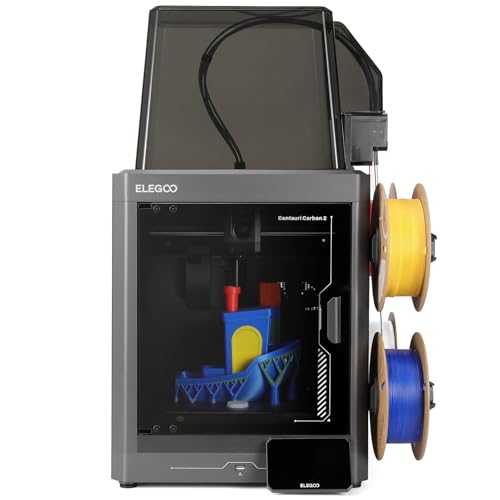
ELEGOO Centauri Carbon 2 Combo
Engineers who want the highest stated nozzle temperature here plus multicolour printing in a 256 mm CoreXY cube.
350C nozzle, 256 x 256 x 256 mm, 500 mm/s
How to Choose
Enclosure decides which filaments are realistic
Engineering filaments such as ABS, ASA and polycarbonate blends shrink as they cool, and a draughty room pulls heat from the part unevenly. A fully enclosed printer holds chamber temperature steadier, which is why three of these four picks are enclosed and the open-frame Adventurer 5M is the compromise choice. If your parts are mostly PLA or PETG prototypes, an open frame is workable; if you print functional parts that must hold tolerance across a tall build, treat the enclosure as a requirement rather than a luxury.
Nozzle temperature sets the material ceiling
Every filament has a melting range, and the printer’s stated maximum nozzle temperature decides which materials are even possible. The listings here state 280 degrees for both FLASHFORGE models and 350 degrees for the ELEGOO, a gap that matters for the hottest engineering blends. Check the temperature your intended filament needs, then leave headroom above it rather than running a hot end at its stated limit for hours at a time on long functional prints.
Build volume must fit the part, not the brochure
Two of these printers state a 256 mm cube and two state 220 mm, and that difference decides whether a long bracket or enclosure panel prints in one piece or gets split and joined. Measure your largest typical part diagonally as well as by its longest edge, because a part can often be rotated to fit. Splitting parts adds glue joints and weak points, so buy the volume your real work needs instead of the volume that looks impressive in a listing headline.
Speed figures only count with the motion system behind them
All four picks use CoreXY motion, which keeps the moving mass low and supports the stated speeds of 500 to 600 mm/s. Acceleration matters just as much on small engineering parts full of corners and holes: the AD5M Pro states 20,000 mm/s squared, which is where short, detailed prints gain their time. Treat headline speed as a ceiling for long straight runs, and weigh acceleration and stated rigidity when your parts are small and intricate.
The 4 Best Options
Bambu Lab P1S
Top Pick
Bambu Lab P1S
Best for: Engineers printing larger functional parts who want an enclosed chamber and the option of multi-material work later.
Engineers printing larger functional parts who want an enclosed chamber and the option of multi-material work later.
Watch out for
Multi-colour and multi-material work depends on the AMS setup described in the listing, so confirm which configuration the listing you open actually includes.
The P1S is the enclosed workhorse of this group: a fully enclosed CoreXY machine with a stated build volume of 256 x 256 x 256 mm and speeds up to 500 mm/s. Auto bed leveling removes one setup variable before long functional prints, and the listing states support for up to 16 colours and multi-material printing with the AMS system. For an engineer printing brackets, housings and jigs in technical filaments, that combination of chamber, volume and stated speed is the most complete package among these four listings.
Watch out for: Multi-colour and multi-material work depends on the AMS setup described in the listing, so confirm which configuration the listing you open actually includes.
FLASHFORGE AD5M Pro
Runner-Up
FLASHFORGE AD5M Pro
Best for: Engineers with limited bench space who swap nozzle sizes often and print smaller functional parts.
Motion system: CoreXY per listing
Top speed: 600 mm/s per listing
Acceleration: 20,000 mm/s squared per listing
Nozzles: 280C quick-swap, 0.4 and 0.6 mm per listing
The AD5M Pro states the sharpest motion figures in this group: 600 mm/s top speed with 20,000 mm/s squared acceleration on a CoreXY frame, inside a fully enclosed body. Its 280 degree quick-swap nozzles come in 0.4 and 0.6 mm sizes, which suits engineers who alternate between fine detail work and faster, thicker-walled functional parts. The build volume is smaller at 220 x 220 x 220 mm, and one-click auto leveling is stated, so the trade is chamber size against stated agility and nozzle flexibility.
Watch out for: The 220 mm build cube is the smallest here alongside its sibling, so measure your largest planned part against it before ordering.
FLASHFORGE Adventurer 5M
FLASHFORGE Adventurer 5M
Best for: Makers stepping up to higher-temperature filaments for parts that do not need a sealed chamber.
Makers stepping up to higher-temperature filaments for parts that do not need a sealed chamber.
Watch out for
The open frame is the weak point for engineering filaments such as ABS and ASA, which warp without an enclosure; plan part materials around that limit.
The Adventurer 5M is the straightforward entry in this set: CoreXY motion, a 220 x 220 x 220 mm build volume and a 280 degree direct-drive extruder, without the enclosure its Pro sibling carries. That extruder temperature still opens the door to a wider filament range than basic machines allow, and direct drive helps with flexible materials. What it gives up is the chamber, so engineering filaments that warp in moving air will be harder to hold to tolerance here than in the enclosed picks.
Watch out for: The open frame is the weak point for engineering filaments such as ABS and ASA, which warp without an enclosure; plan part materials around that limit.
ELEGOO Centauri Carbon 2 Combo
ELEGOO Centauri Carbon 2 Combo
Best for: Engineers printing high-temperature functional parts who also want multicolour capability in the same machine.
Engineers printing high-temperature functional parts who also want multicolour capability in the same machine.
Watch out for
This pick is the Combo configuration with the Canvas system; check the listing carefully so the configuration you order matches the one described here.
The Centauri Carbon 2 Combo states the highest nozzle temperature in this group at 350 degrees, paired with CoreXY motion, 500 mm/s stated speed and the same 256 x 256 x 256 mm build volume as the P1S. One-click auto leveling is stated, and the Combo configuration adds multicolour printing through the Canvas system. For engineers whose parts call for the hottest-running filaments on this list, that temperature headroom is the deciding figure, provided the rest of the setup matches their workflow.
Watch out for: This pick is the Combo configuration with the Canvas system; check the listing carefully so the configuration you order matches the one described here.
Which One Fits Your Situation
You print functional parts in ABS or ASA
Start with the enclosed picks. The Bambu Lab P1S and ELEGOO Centauri Carbon 2 Combo both pair a chamber with a 256 mm build cube, and the FLASHFORGE AD5M Pro encloses a smaller 220 mm volume. The open-frame Adventurer 5M will fight warping on these materials, so it only makes sense if your parts are small and your room is warm and still.
Your parts need the hottest filaments
The ELEGOO Centauri Carbon 2 Combo states a 350 degree nozzle, the highest figure in this group, which gives it the widest stated material range. The two FLASHFORGE models state 280 degrees, enough for many technical filaments but with less headroom. Match the figure to the filament you actually plan to run rather than buying temperature you will never use.
Bench space is tight but parts are serious
The FLASHFORGE AD5M Pro packs an enclosure, CoreXY motion and quick-swap nozzles into the 220 mm class, which suits a crowded bench better than the 256 mm machines. Its stated acceleration is the highest here, so small intricate parts still finish quickly. Choose it when footprint is the binding constraint and your parts fit the smaller cube.
You want multi-material or multicolour options
Two picks state a path beyond single-material printing: the P1S with AMS support for up to 16 colours, and the Centauri Carbon 2 Combo with its Canvas multicolour system. Decide which ecosystem you prefer before ordering, because the configuration in the box decides what is possible on day one and what needs extra hardware later.
Common Mistakes
Buying an open-frame printer for ABS or ASA parts, then blaming the filament when corners lift and layers split in a draughty room.
Comparing headline print speeds while ignoring acceleration, even though small engineering parts with many corners spend most of their time speeding up and slowing down.
Choosing a 220 mm build volume for parts that measure 240 mm, then splitting every design and adding weak glue joints to save a small price gap.
Running a nozzle at its stated maximum temperature for whole prints because a filament lists that figure as its minimum, leaving no headroom at all.
Ordering a Combo or AMS configuration without checking what the specific listing includes, then finding the multi-material hardware is a separate purchase.
Frequently Asked Questions
Do engineering filaments really need an enclosed printer?
For materials such as ABS and ASA, yes in practice. These filaments shrink as they cool, and uneven cooling in open air lifts corners and splits layers. An enclosure holds the air around the part steadier. PLA and PETG prototypes are far more forgiving, which is why an open-frame machine can still suit early design work.
What nozzle temperature should I look for?
Start from the filament you plan to print and work backwards. Many technical filaments run comfortably below 280 degrees, which both FLASHFORGE picks state, while the hottest blends benefit from the 350 degree ceiling stated for the ELEGOO. Leaving headroom above your filament’s working range is safer than running at the stated maximum.
Is CoreXY worth it for engineering parts?
CoreXY keeps the moving print head light, which supports the higher stated speeds and acceleration figures in these listings and helps hold detail on small, intricate parts. For slow, occasional printing the benefit is smaller, but engineers printing fixtures and housings regularly will feel the difference in both time and consistency across repeated parts.
Should I buy the 256 mm or 220 mm build volume?
Measure your largest recurring part first. If it fits inside 220 mm with room to spare, the smaller machines save bench space and still cover most brackets, mounts and enclosures. If you print long panels or larger housings, the 256 mm cube avoids splitting parts, and a split part is almost always the weaker part.
J
JD's Woodworks Editorial Team
We compare specs, warranty terms, long-term owner feedback and street pricing before anything earns a spot. Rankings are never paid.
Affiliate disclosure. As an Amazon Associate we earn from qualifying purchases at no extra cost to you. Prices accurate as of the date shown.
Table saws under the 1500 mark compared: the Grizzly G0771Z and Shop Fox W1837 hybrid saws with cast iron tables, 2 HP motors and T-square fences, specs from their listings.
Table saws for fine woodworking compared: the SawStop Professional Cabinet Saw and Powermatic PM1000, judged on fence precision, table flatness and vibration from listing specs.
Table saw combos explained: saws sold with a stand and accessories in one listing, what to check in the box, and which bundle fits your shop or jobsite.
Compare the best planer digital thickness gauges and digital readout kits for portable planers, with fit, resolution and mounting checks before you buy.
Model table saws for scale modelling and hobby work compared: the precision Proxxon FET 37070 and the compact Saker mini table saw, with specs taken from their Amazon listings.
Three CoreXY 3D printers for product development, each with the architecture stated on its listing: an enclosed multicolor machine, a large-format enclosed model and a heated-chamber model.


 ELEGOO Centauri Carbon 2 Combo









