4 Best 4×4 Laser Cutters for Large Panels (November 2026)
Compare 4 large-bed CO2 laser cutters with pass-through feeding for oversized panels, with work areas, power, autofocus and safety notes for woodshops.
As an Amazon Associate I earn from qualifying purchases. This post may contain affiliate links at no extra cost to you.
A laser cutter that can handle large panels changes what a woodshop can take on: full signs, cabinet door inlays, oversized templates and repeatable parts cut from sheet goods instead of pieced together from smaller offcuts. The real decision is not chasing the biggest bed on paper, but finding a machine whose work area, power and feeding options match the panels you actually cut. A bed that is too small forces every large job into tiled sections, while a machine without pass-through feeding turns every oversized panel into a handling problem.
This guide is for woodworkers, sign makers and small-shop owners who need to cut large panels and long boards without outsourcing every job. Every machine below was picked from its Amazon listing, using the work area, laser power and feeding features shown on the product page. No machine here takes a full large sheet in a single pass, so the picks below are the largest-bed CO2 machines with pass-through options available, chosen for real panel work.
Quick Picks
As an Amazon Associate we earn from qualifying purchases.
Product
Best for
Key spec from title
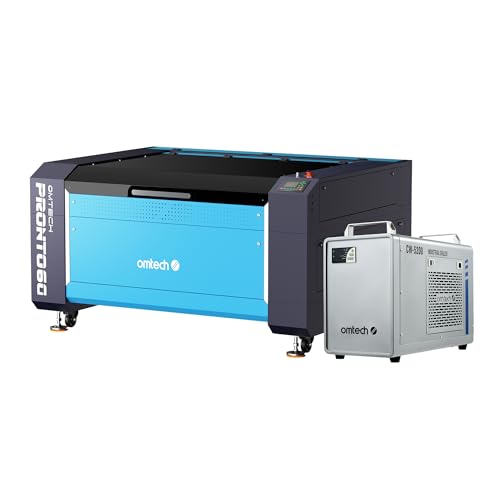
OMTech Pronto 130W CO2 Laser
Widest single bed for large panels
130W CO2, 51 x 35 inch work area
OMTech 130W CO2 Laser Engraver
Long panels fed through the bed
130W CO2, 35 x 55 inch work area
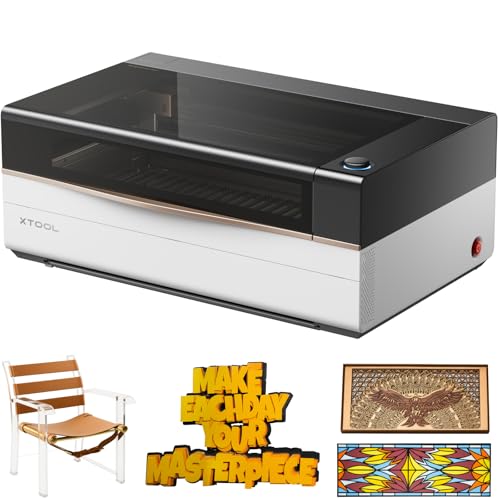
xTool P3 80W CO2 Laser
Detailed work with camera alignment
80W CO2, 36 x 18 inch bed
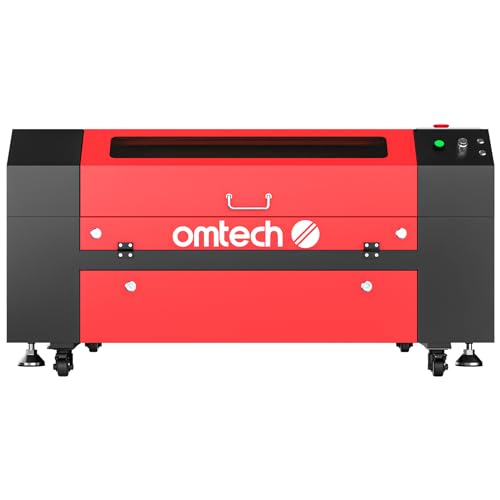
OMTech Maker 60W CO2 Laser
Oversized boards on a smaller footprint
60W CO2, 28 x 20 inch bed, pass-through
How to Choose
Match the Work Area to Your Panels
Start with the largest panel you expect to load in one setup, not the largest you imagine cutting one day. A bed in the 35 x 55 inch class takes long sign blanks and cabinet panels, while a 51 x 35 inch bed gives more width for wide inlay pieces and door fronts. Pass-through feeding matters just as much as bed size: a machine that opens front and back lets a long board slide through in sections, so a panel longer than the bed can still be cut. Measure your bench, your panel stock and the space around the machine before you order, because a large laser needs clearance on every side for loading and for the exhaust hose.
Laser Power Decides Thickness and Speed
Laser power sets how thick a sheet you can cut cleanly and how many passes each cut needs. A 130W CO2 tube moves through plywood, MDF and hardwood panels faster than a 60W tube, and it holds a cleaner edge on thicker stock because the beam does not linger and scorch the cut line. The 80W machine here sits between the two, handling common sheet goods well while asking for an extra pass on the thickest boards. Think about the thickest plywood you cut often, then choose a machine that can take it without slowing every job to a crawl. Power also matters for engraving speed across large panels, where a stronger tube finishes a full sign face sooner.
Autofocus, Autolift and Cameras Save Setup Time
Large panels are rarely perfectly flat, so a machine that focuses itself saves real time on every job. Autofocus sets the lens distance as the material changes, and an autolift bed raises or lowers the work surface so thick boards and thin sheets both sit at the right height without manual shimming. A camera system, like the dual cameras on the xTool P3, shows the panel so you can place a design exactly where the grain and the edges fall. These features matter most when you cut one-off pieces, because each setup is different and manual measuring eats into shop time. On repeat production runs, a fixed setup can work, but autofocus still pays off whenever stock thickness varies.
Cooling, Ventilation and Shop Space
A CO2 laser needs cooling and somewhere for the smoke to go, so plan both before the machine arrives. The two 130W machines here include a water chiller, which keeps the tube cool during long cuts, while smaller machines rely on simpler cooling that suits shorter sessions. Every laser in this guide needs an exhaust hose run outside or into a fume extractor, because cutting plywood and MDF fills the air with smoke that has no place in a closed shop. Leave room around the cabinet for loading panels, the chiller and the hose run. A machine that fits your bench and your ventilation route will get used far more than one that needs a rearrangement every time it runs.
The 4 Best Options
OMTech Pronto 130W CO2 Laser
Top Pick
OMTech Pronto 130W CO2 Laser
Best for: wide panels, large signs and door fronts cut in a single setup.
The Pronto is the pick for shops that cut the widest panels in this guide, with a 51 x 35 inch work area that takes large sign blanks, door panels and wide inlay pieces in a single setup. Its 130W CO2 tube moves through plywood and MDF with fewer passes than the smaller machines here, which keeps edges cleaner on thick stock. The included water chiller supports long cutting sessions, so a full day of panel work does not overheat the tube. It is the machine to choose when panel width matters more than anything else and your shop has the floor space for a large cabinet.
Watch out for: the large cabinet needs real floor space plus clearance for loading and exhaust.
OMTech 130W CO2 Laser Engraver
Runner-Up
OMTech 130W CO2 Laser Engraver
Best for: long panels and tall signs that need a deep bed.
This 130W machine trades width for length, with a 35 x 55 inch work area that suits long panels, tall signs and boards that run lengthwise through the bed. The same 130W tube as the Pronto gives it the same cutting strength on thick plywood and MDF, and autofocus plus autolift adjust the lens and the bed as material thickness changes. The water chiller keeps the tube cool during long jobs. Choose it when your work runs long rather than wide, such as tall signage, long templates and full-length trim pieces that need a deep bed.
Watch out for: check the length of your longest board against the bed depth before ordering.
xTool P3 80W CO2 Laser
xTool P3 80W CO2 Laser
Best for: detailed designs placed precisely on varied panel stock.
The xTool P3 is the pick for detailed work on large panels, pairing an 80W CO2 tube with a 36 x 18 inch bed and a dual-camera system that shows the material on screen before you cut. The cameras make it easy to place a design around knots, grain and panel edges, which matters when every board is different. ACS autofocus sets the lens distance automatically as stock thickness changes. It cuts common plywood, MDF and acrylic well, and it fits shops that value precise placement over raw bed size. Choose it when your panels carry detailed artwork that must land in exactly the right spot.
Watch out for: the bed is smaller than the two 130W machines, so very large panels need sectioned cuts.
OMTech Maker 60W CO2 Laser
OMTech Maker 60W CO2 Laser
Best for: long boards cut in sections from a compact machine.
The Maker 60W is the smallest machine in this guide, and its strength is pass-through feeding: a 4-way pass-through lets long boards slide through the 28 x 20 inch bed in sections, so oversized stock is still possible without a huge cabinet. The 60W CO2 tube handles common plywood, MDF and acrylic, and the autolift bed adjusts for material thickness. It suits a small shop that cuts long boards occasionally and cannot spare floor space for a full-size cabinet. Choose it when budget and footprint matter more than cutting the thickest panels in a single pass.
Watch out for: thick stock may need extra passes, and very wide panels will not fit the bed.
Laser Safety in a Woodshop
A CO2 laser is a real cutting tool, not a desktop printer, so treat it with the same respect as a table saw. Never leave a laser running unattended: wood, MDF and paper can smolder and catch fire, so stay in the room and keep a fire extinguisher within reach. Vent every cut outside or through a fume extractor, because laser smoke carries fine particles and fumes that should not fill a closed shop. Wear eye protection when the lid is open for setup, and never defeat the lid interlock or look directly at the beam. Keep the bed clear of offcuts and dust, and never cut PVC or vinyl, which releases corrosive gas when heated. A clean machine, a clear exhaust path and an operator in the room are the three habits that keep laser work safe.
Which One Fits Your Situation
You Cut the Widest Panels in the Shop
When your work means wide sign blanks, door fronts and inlay panels, the OMTech Pronto is the natural pick. Its 51 x 35 inch bed takes the widest pieces in this guide in one setup, and the 130W tube keeps edges clean on thick stock. The water chiller supports long sessions, so a full day of panel cutting stays steady. It needs real floor space, but for a shop built around wide panels, that space pays for itself.
Your Panels Run Long Rather Than Wide
Tall signs, long templates and full-length trim pieces call for depth more than width, and the OMTech 130W with its 35 x 55 inch bed fits that work. The same 130W tube as the Pronto gives it equal cutting strength, while autofocus and autolift adjust for every change in stock thickness. Pick it when your boards are longer than they are wide and you want a deep bed without giving up power.
Every Board Is Different and Placement Matters
One-off signs and custom panels rarely share the same grain, knots or edges, so the xTool P3 earns its place here. Its dual cameras show the board on screen, letting you place artwork around flaws before the beam moves. ACS autofocus handles the thickness changes between boards. Choose it when precise placement on varied stock matters more than raw bed size.
Your Shop Is Small but Your Boards Are Long
A compact shop can still cut long boards with the OMTech Maker 60W, thanks to its 4-way pass-through feeding. Long stock slides through the 28 x 20 inch bed in sections, so oversized work stays possible without a full-size cabinet. The 60W tube handles common sheet goods, and the autolift bed adjusts for thickness. Pick it when footprint matters most and your long boards can be cut in sections.
Common Mistakes
Buying for the biggest panel you might cut one day instead of the panels you cut every week.
Forgetting pass-through feeding and discovering a long board cannot fit the bed at all.
Skipping ventilation planning and filling the shop with smoke on the first cut.
Cutting PVC or vinyl, which damages the machine and releases harmful gas.
Leaving the machine running unattended while a cut smolders unnoticed.
Frequently Asked Questions
Can any of these laser cutters handle a full large sheet in one pass?
No. None of the machines in this guide takes a full large sheet in a single pass, and no large-bed machine of this class does. The picks here are the largest beds available, from 28 x 20 inches to 51 x 35 inches, and pass-through models let long boards feed through in sections. Plan to cut oversized panels in sections or to size the sheet down before loading it.
What thickness of plywood can a CO2 laser cut?
It depends on laser power and on the plywood itself, since glue layers and voids change each cut. A 130W tube cuts thicker plywood and MDF in fewer passes than a 60W tube, with cleaner edges on thick stock. A 60W machine handles common sheet goods but may need an extra pass on thick boards. Run a sample cut on scrap from the same sheet before a full panel.
Do I need a water chiller for a CO2 laser?
Higher-power CO2 tubes need steady cooling during long cuts, and both 130W machines in this guide include a water chiller for that reason. The chiller keeps the tube at a stable temperature across a full day of panel work. Smaller machines suit shorter sessions with simpler cooling, but any CO2 laser still needs ventilation, so plan the exhaust route before the machine arrives.
What materials can a CO2 laser cut and engrave?
A CO2 laser cuts plywood, MDF, hardwood, acrylic, leather, paper and fabric, and it engraves wood, glass, stone and coated metal. That range covers most sign work, inlays, templates and decorative panels in a woodshop. Never cut PVC or vinyl, which releases corrosive gas when heated and can damage the machine. When in doubt about a new material, check the listing guidance and run a sample cut on scrap first.
J
JD's Woodworks Editorial Team
We compare specs, warranty terms, long-term owner feedback and street pricing before anything earns a spot. Rankings are never paid.
Affiliate disclosure. As an Amazon Associate we earn from qualifying purchases at no extra cost to you. Prices accurate as of the date shown.
Table saws under the 1500 mark compared: the Grizzly G0771Z and Shop Fox W1837 hybrid saws with cast iron tables, 2 HP motors and T-square fences, specs from their listings.
Table saws for fine woodworking compared: the SawStop Professional Cabinet Saw and Powermatic PM1000, judged on fence precision, table flatness and vibration from listing specs.
Table saw combos explained: saws sold with a stand and accessories in one listing, what to check in the box, and which bundle fits your shop or jobsite.
Compare the best planer digital thickness gauges and digital readout kits for portable planers, with fit, resolution and mounting checks before you buy.
Model table saws for scale modelling and hobby work compared: the precision Proxxon FET 37070 and the compact Saker mini table saw, with specs taken from their Amazon listings.
Three CoreXY 3D printers for product development, each with the architecture stated on its listing: an enclosed multicolor machine, a large-format enclosed model and a heated-chamber model.


 OMTech Maker 60W CO2 Laser









