4 Best Beginner CNC Routers for Wood (November 2026)
Find the best beginner cnc router for carving signs, inlays and small parts, with simple GRBL control, sturdy frames and work areas that suit a first machine.
As an Amazon Associate I earn from qualifying purchases. This post may contain affiliate links at no extra cost to you.
A beginner CNC router should turn a design file into a carved sign the same day you finish assembling it, without demanding an engineering degree to run. The real choice is between a small desktop machine that teaches the basics cheaply and a larger, sturdier router that can grow with your projects. Both paths work, but they suit different benches, different budgets, and different ambitions for what you want to make first.
This guide is for woodworkers buying their first CNC router for signs, inlays, carved panels, and small parts. Every machine below was chosen from the name and specifications shown on its Amazon page, with a focus on GRBL control, a frame that stays rigid under load, and a work area that matches common beginner projects. The four machines here cover the main beginner choices, from a compact budget router to a closed-loop machine that holds accuracy on hardwood, so you can match the purchase to your bench and your project list.
Quick Picks
As an Amazon Associate we earn from qualifying purchases
Product
Best for
Key spec from title
FoxAlien Masuter 3S
Strongest beginner frame with closed-loop motors
400W spindle
FoxAlien XE-PRO
Ball-screw precision on a mid-size bed
400W spindle, ball screws
Genmitsu 4040-PRO
Large work area for signs and panels
15.7 x 15.7 inch work area
VEVOR S4040
Budget 400mm bed with offline control
300W spindle, 400x400mm area
How to Choose
Work Area Against Your Project List
Work area decides the largest sign or panel you can carve without repositioning the workpiece, and repositioning is where beginners lose alignment. A 300 by 180mm bed covers coasters, small plaques, and jewelry boxes, while a 400 by 400mm bed handles house signs, cutting boards, and cabinet door panels. List the three biggest pieces you plan to carve, measure them, and buy the bed that fits the largest one with room for clamps. A bed that fits your biggest project from the start saves you from learning tiling, which is the hardest skill for a beginner to master. Clamps eat into the usable area, so leave room for them when you measure.
Frame Rigidity and Drive Type
A rigid frame is what keeps cuts clean, because any flex in the gantry shows up as chatter marks on the wood. All-metal frames with linear rails hold their line better than plastic or thin extrusion builds, especially on deeper passes. Ball screws and lead screws drive the axes more accurately than belts, and closed-loop stepper motors catch missed steps before they ruin a carve. Read the frame and drive details on the listing rather than trusting the marketing name alone, and check the weight of the machine as a rough guide to how solidly it is built.
Spindle Power and Speed Range
Spindle power decides how aggressively you can cut and which materials you can tackle. A 300W spindle handles softwood, MDF, and acrylic at sensible feed rates, while a 400W spindle cuts deeper per pass and copes better with hardwoods. Speed range matters too: a spindle that reaches 10,000 RPM or more leaves a cleaner edge on wood than a slow one. Match the spindle to the hardest material on your project list, not the easiest, and leave some headroom for the day you try a denser board. A 400W spindle also holds its speed better under load, which keeps the cut quality steady when the bit meets a knot or a dense patch of grain.
Controller and Software Simplicity
GRBL control is the standard for beginner machines because the software is free, widely documented, and easy to learn. An offline controller is a useful bonus, since it lets you run a job from a memory card without keeping a laptop beside a dusty machine. Check whether the listing names the control board and which software it supports, and confirm that the machine ships with the bits and clamps needed for a first carve. A machine that arrives ready to run saves your first evening for carving instead of shopping for missing parts. Keep the controller box clear of dust and chips, since a clogged fan can stop a job halfway through a carve.
The Masuter 3S is the most solid beginner machine in this guide, built around a metal frame with closed-loop stepper motors that hold position under load. Its 400W spindle spins to 10,000 RPM, which is enough for clean cuts in hardwood, acrylic, and soft aluminum. The machine arrives as a sturdy benchtop unit that suits a woodworker who wants to carve signs and panels without fighting flex or missed steps. The closed-loop motors are the key feature here, since they correct small positioning errors before they show up as ruined work.
The XE-PRO brings ball-screw drive to a beginner-friendly machine, which means smoother motion and tighter positioning than belt-driven routers at this level. Its 400W spindle reaches 12,000 RPM for fine detail work, and the frame accepts linear rail upgrades later if your ambitions grow. It is a good middle step between a small desktop carver and a full-size shop router. The included Z probe and drag chain keep the setup tidy, and the ball screws hold their accuracy over long cutting sessions without the stretch that belts develop.
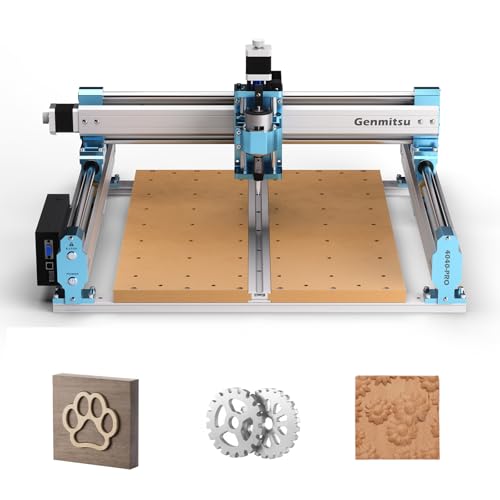
The 4040-PRO gives beginners a full 15.7 by 15.7 inch work area with lead-screw drive and GRBL control, so house signs and cabinet panels fit without tiling. It is a straightforward machine to learn on, with a familiar control layout and a wide range of compatible bits and accessories. The larger bed makes it the natural pick when your project list already includes full-size signs. Lead screws drive each axis directly, which keeps long straight cuts true and makes the machine forgiving for a first-time operator.
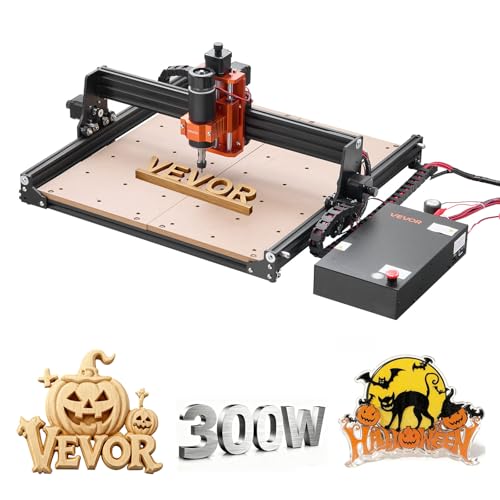
The VEVOR S4040 is the budget route to a 400 by 400mm bed, with a 300W spindle and an offline controller included in the box. Its aluminum alloy frame keeps the machine light enough to move, and the offline controller lets you run jobs without a laptop beside the router. It suits a beginner who wants the larger work area without paying for premium drive hardware on the first machine. The 300W spindle handles softwood and MDF comfortably, and the offline controller keeps the workflow simple for a first-time user.
Which One Fits Your Situation
First Machine for Learning the Craft
Pick the VEVOR S4040 when you want the most work area for the least money while you learn. The offline controller keeps the setup simple, and the 400mm bed means your early signs fit without tiling. Treat it as a teaching machine: learn feeds, speeds, and clamping here, then decide what your second router needs. The offline controller keeps the workflow simple, so you can focus on learning the machine.
Hardwood Signs and Inlays
Pick the FoxAlien Masuter 3S when your work is mostly hardwood and you need the cut to stay true. The closed-loop motors and metal frame resist the flex that shows up as chatter on dense boards, and the 400W spindle holds its speed through deeper passes. It is the machine to choose when finish quality matters from the first project. Take shallow passes on the densest boards to keep the finish clean.
Fine Detail and Small Lettering
Pick the FoxAlien XE-PRO when your designs lean toward small text, inlays, and tight curves. Ball screws keep the motion smooth at small step sizes, and the higher spindle speed leaves crisp edges on fine work. It rewards careful setup with noticeably cleaner detail than a belt-driven machine. The included Z probe speeds up setup on every job, so small text stays sharp from the first pass.
Full-Size Panels Without Tiling
Pick the Genmitsu 4040-PRO when your project list is full of house signs, serving trays, and cabinet panels. The square 400mm bed fits those pieces in one setup, and the lead-screw drive keeps long straight cuts true. Give it a flat, level bench and it will handle panel work for years. Surface and tram the spoilboard first, so large panels sit flat for the whole cut.
Common Mistakes
Buying the smallest bed available and discovering your first sign needs tiling across two setups.
Running the first carve at full depth instead of testing feeds and speeds on scrap stock.
Clamping the workpiece at one corner only and watching it shift halfway through a cut.
Skipping the spoilboard surfacing pass and carving into an uneven surface.
Choosing bits by price alone and wondering why edges burn or tear on hardwood.
Frequently Asked Questions
What size CNC router should a beginner buy?
A 400 by 400mm bed is a good starting point for wood signs and panels, while a 300 by 180mm bed suits small plaques and learning projects. Measure the largest piece you plan to carve and buy the bed that fits it with room for clamps. A bed that is too small forces tiling, the hardest skill for a beginner to learn.
Is GRBL control hard to learn?
GRBL is the friendliest control system for a first CNC router, with free software, clear documentation, and a large community answering questions. Most beginners send their first file within a day of assembly. An offline controller makes it easier still, since you can run jobs from a memory card without a laptop in a dusty shop.
Can a beginner CNC router cut hardwood?
Yes, provided the spindle has enough power and you take sensible pass depths. A 400W spindle handles oak, maple, and walnut at moderate feed rates, while a 300W spindle needs shallower passes on the same stock. Use sharp bits, keep the feed steady, and test on scrap before cutting into a finished board.
Do I need an enclosure for a beginner CNC router?
An enclosure helps with dust and noise, but it is not required for a first machine. Most beginners start with the router open on the bench and add a simple dust shoe or a shop vacuum hose nearby. If the machine sits in a shared room, an enclosure becomes more useful, so weigh your workspace before buying one.
J
JD's Woodworks Editorial Team
We compare specs, warranty terms, long-term owner feedback and street pricing before anything earns a spot. Rankings are never paid.
Affiliate disclosure. As an Amazon Associate we earn from qualifying purchases at no extra cost to you. Prices accurate as of the date shown.
Table saws under the 1500 mark compared: the Grizzly G0771Z and Shop Fox W1837 hybrid saws with cast iron tables, 2 HP motors and T-square fences, specs from their listings.
Table saws for fine woodworking compared: the SawStop Professional Cabinet Saw and Powermatic PM1000, judged on fence precision, table flatness and vibration from listing specs.
Table saw combos explained: saws sold with a stand and accessories in one listing, what to check in the box, and which bundle fits your shop or jobsite.
Compare the best planer digital thickness gauges and digital readout kits for portable planers, with fit, resolution and mounting checks before you buy.
Model table saws for scale modelling and hobby work compared: the precision Proxxon FET 37070 and the compact Saker mini table saw, with specs taken from their Amazon listings.
Three CoreXY 3D printers for product development, each with the architecture stated on its listing: an enclosed multicolor machine, a large-format enclosed model and a heated-chamber model.


 VEVOR S4040










