What's inside
As an Amazon Associate I earn from qualifying purchases. This post may contain affiliate links at no extra cost to you.
Why router tables are hard to dust
A router table throws chips in more than one direction. The bit cuts upward through the workpiece, so some debris lands below the table, but the cutter also flings fine dust and chips across the top. A cabinet port alone may catch much of the debris from a fence-mounted bit, yet leave a mess on the tabletop. A hood above the bit can help, but it must leave room for the workpiece and your hands.
For a small table, the practical choice is usually a hood at the fence, a cabinet port, or both. The right setup depends on the kind of work you do, the space under the table, and the airflow your collector can actually deliver. No hood makes routing dust-free, so use suitable respiratory protection and keep the collector running during cleanup.
As an Amazon Associate we earn from qualifying purchases at no extra cost to you.

What to look for in a hood
Check the port diameter before buying. Many shop vac hoses use a nominal 2-1/2-inch connection, while dust-collection systems commonly use 4-inch ducting. Adapters can bridge the gap, but a smaller hose and long, narrow duct runs can restrict airflow. A shop vac is handy for a small, enclosed router cabinet; a dust collector with a larger hose is generally a better match for a hood that needs to catch airborne debris across the fence.
Look for a clear opening wide enough to see the bit and guide stock safely. The hood should not snag the workpiece, block the fence adjustment, or force your hands close to the cutter. A brush or flexible curtain can reduce escaping chips, but overly stiff bristles may catch thin stock. Before routing, test with the router unplugged: slide your largest workpiece through the opening and check the full range of fence positions.
Compare the main hood options
| Option | Best for | Trade-off |
|---|---|---|
| Fence-mounted dust port | Everyday edge routing with a bit close to the fence | Misses some dust from raised-panel bits and cuts made away from the fence |
| Cabinet-mounted port | Capturing chips that fall below the tabletop | Does little for dust thrown across the table surface |
| Overhead or table-level hood | Work that sends debris upward or away from the fence | Can obstruct visibility, stock movement, or hand access |
| Fence port plus cabinet port | Frequent routing and a cabinet that can be sealed reasonably well | Needs enough collector airflow for two branches, or a way to close one branch |
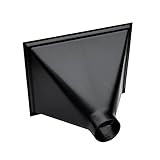
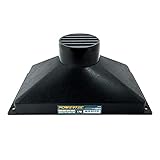
For most small router tables, start with a fence port if the fence accepts one, then add cabinet extraction if chips accumulate underneath. If your table has no useful fence port, a router-table dust collection hood can provide a place to connect a hose without fabricating a full fence. Check its opening dimensions and mounting method; “universal” does not guarantee it will fit a compact table.
Choosing a hood for your setup
A purpose-made fence hood is the cleanest option when you route mostly along the fence. It keeps the hose connection close to the cutter and is less likely to interfere with the tabletop than an overhead arm. A hood with a 2-1/2-inch port is convenient for a shop vac, but do not assume the vac will capture fine dust well once a restrictive hose, adapter, and bends are added. Keep the hose short and avoid crushing it behind the cabinet.
If the existing fence is sound, a replacement fence with a dust port may be simpler than adapting a separate hood. Compare the fence’s height, mounting slots, and port size with your table before ordering. A router-table fence with dust collection is worth considering if you also want better fence adjustment or support. If your current fence works and has a compatible port, buying a complete replacement may add cost without improving collection much.
For occasional routing, a basic cabinet port can be enough, especially when the table is enclosed and the bit is kept near the fence. Seal large gaps around the cabinet door and router plate with foam weatherstripping, but leave an intentional path for make-up air. A nearly airtight cabinet can starve the port of airflow, while an open cabinet leaks dust into the shop. Start with modest gaps and adjust after a test cut.
A flexible overhead hood makes more sense for cuts that throw debris toward the operator or when the workpiece is held away from the fence. Its main drawback is interference: a hood that sits too low can obstruct a wide board, and one set too high may catch little. Position it so the opening is close to the cutting area without touching the stock, then verify that it cannot be pulled into the bit.
Install and test before committing
Mount the hood securely; vibration can loosen a clamp or shift a lightweight plastic hood during a long cut. Keep the hose away from the router’s moving parts and make sure it cannot tug the fence out of alignment. If connecting both fence and cabinet ports, use a blast gate so you can direct airflow where it is needed. A collector divided between two open branches may perform worse at each hood than it did with one branch open.
Test with a short offcut and a common bit, such as a straight bit used for a shallow groove. Inspect both the tabletop and cabinet after the cut. A pile of chips inside the cabinet points to poor capture at the fence; dust coating the table or nearby surfaces suggests the hood is too far away, the airflow is weak, or the cut is ejecting material beyond its opening. Do not solve poor capture by narrowing the hood until stock movement becomes unsafe.
Clear packed chips from the hood and hose regularly. A partially blocked port can look connected while airflow drops sharply, especially with fine dust mixed with larger chips. If you mostly need a straightforward fence connection, a router-table dust port adapter may be the inexpensive fix. It is fine to skip a specialized hood when your current fence port fits, the cabinet captures the bulk of the waste, and cleanup stays manageable.