As an Amazon Associate I earn from qualifying purchases. This post may contain affiliate links at no extra cost to you.
A desk that gets used every day for long stretches needs two things to work well together: controls that keep the hand and wrist in a relaxed position, and lighting and sound that make the space feel finished rather than improvised. Vertical mice address the first need by turning the palm sideways instead of flat, while neon signs, compact speakers, and a raised monitor stand address the second by adding character, sound, and better screen height without taking over the work surface.
OUR TOP PICK
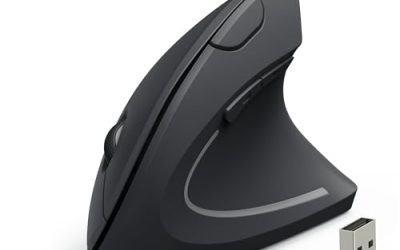
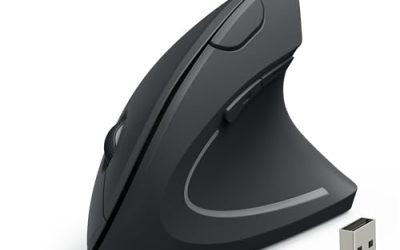
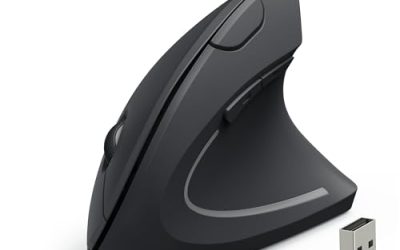
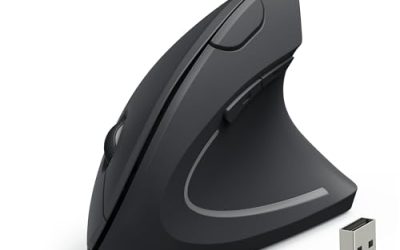
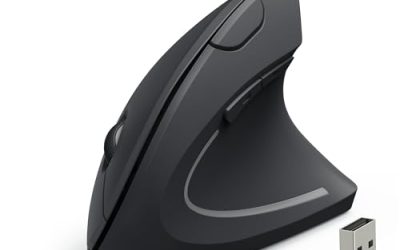
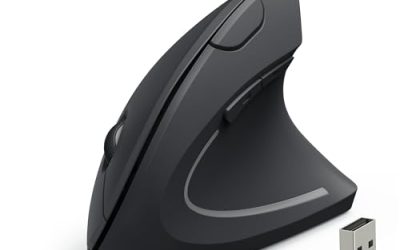
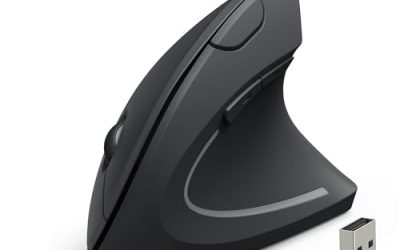
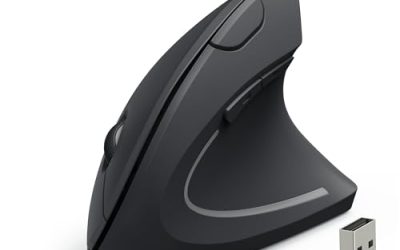
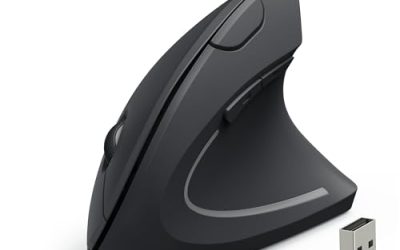
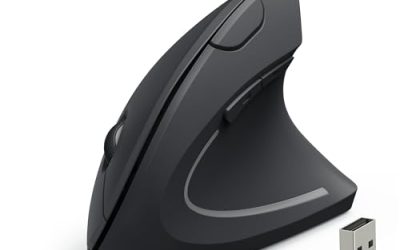
Anker 2.4G Wireless Ergonomic Mouse, Right Hand Vertical Mouse USB Receiver
This guide looks at five products that cover those needs from different angles. One is a wireless ergonomic mouse built for right-hand use, one is a blue neon sign with a playing-card theme for a workshop corner or game area, two are desktop speaker options at different sizes, and one is a two-tier wood monitor stand that lifts the screen and creates storage underneath. Each section covers the key specs, who the product suits, and what to check before choosing.
As an Amazon Associate, we earn from qualifying purchases.
How to Choose
Start with the hand. A vertical mouse only helps if the grip angle, button placement, and connection method fit the way the desk is actually used. Right-hand models suit most users, but left-hand users should look for a left-hand version rather than adapting. Wireless models with a USB receiver keep the desk clear of cables and work well for both desktop and laptop setups, while wired models avoid batteries altogether. Check the number of buttons, whether the scroll wheel sits comfortably under the index finger, and whether the shape fills the palm without forcing the fingers to curl tightly.
Next, consider screen height. A monitor stand that raises the display by a few inches can bring the top of the screen closer to eye level, which reduces neck tilt during long sessions. Two-tier designs add a lower shelf for a keyboard, notebooks, or small tools, so the stand earns its footprint twice. Wood stands pair naturally with a workshop or home office built around timber furniture, and the raised surface also protects the desk from heat and spills.
For sound, decide between simplicity and low-end weight. A compact 2.0 speaker pair is enough for calls, videos, and background music at close range, and it leaves more desk space for other items. A 2.1 system with a separate subwoofer adds fuller bass for music and media, but it needs floor or shelf space for the subwoofer and a power outlet nearby. LED lighting on speakers can tie in with a neon sign for a consistent glow, or it can be left off for a plainer look.
For neon signs, think about placement, power, and brightness control. Wall-mounted signs work best where there is a clear sightline from the chair or doorway, and they should sit away from direct sunlight so the glow stays visible. Check whether the sign includes a dimmer or remote, how it mounts, and whether the cable length reaches an outlet without crossing the work area. A themed design such as playing cards suits a game room, bar area, or workshop lounge corner more than a formal office, so match the motif to the room.
Finally, plan the whole surface. Measure the desk depth before adding a monitor stand and speakers together, leave room for the mouse to move without hitting the stand legs, and route cables along the back edge. A tidy layout with a few well-chosen pieces looks better and works better than a crowded surface with every accessory competing for space.
Anker 2.4G Wireless Ergonomic Mouse, Right Hand Vertical Mouse USB Receiver
Top Pick
Anker 2.4G Wireless Ergonomic Mouse, Right Hand Vertical Mouse USB Receiver
The Anker 2.4G Wireless Ergonomic Mouse is built around a vertical grip that keeps the hand in a handshake position rather than flat on the desk. That upright angle is the main reason to choose this style of mouse: the forearm stays in a more neutral rotation, and the wrist avoids the bent-back posture that a flat mouse can encourage during long sessions. The wireless connection uses a USB receiver, so there is no cable dragging across the desk and no pairing steps beyond plugging in the receiver.
Who It Suits
This mouse suits right-handed users who spend long hours at a desk and want to try a vertical grip without changing the rest of the setup. It fits home offices, workshop desks used for plans and orders, and any workstation where a cable-free surface matters. Users who switch between a desktop and a laptop can move the receiver between machines easily. Left-handed users should look for a dedicated left-hand model instead, since the shape is molded for the right hand.
Gamerneon Blue Poker Neon Sign Casino Playing Cards Neon Signs for Man Cave
Runner-Up
Gamerneon Blue Poker Neon Sign Casino Playing Cards Neon Signs for Man Cave
The Gamerneon Blue Poker Neon Sign uses a playing-card motif in blue light, aimed at game rooms, bars, and casual lounge corners. Neon-style signs of this kind use LED tubing shaped like traditional neon, which gives an even glow along the outline of the design. The blue color reads clearly in dim rooms and pairs well with dark walls, wood paneling, or a workshop corner set aside for breaks and games.
Who It Suits
This sign suits anyone finishing a man cave, game room, home bar, or a relaxed corner of a workshop where a themed glow fits the mood. It works as a backdrop for a card table, a shelf display, or a seating area, and the playing-card design makes the theme clear without any text. It is less suited to a formal office or a bright room where the glow would wash out, and anyone who prefers plain decor should choose a simpler shape.
The Cyber Acoustics CA-2014 is a compact 2.0 speaker pair for close-range desk listening. With a total output of 4 watts across two channels, it covers the everyday needs of a workstation: video calls, tutorials, podcasts, and background music while working. The small footprint leaves room for a monitor stand, keyboard, and mouse, which matters on narrower desks where a larger speaker system would crowd the surface.
Who It Suits
These speakers suit users who want clear, simple stereo sound without giving up desk space or adding a subwoofer. They fit small home offices, workshop desks used for videos and calls, and student setups where space is tight. Listeners who want deep bass for music or films will be happier with a 2.1 system, while anyone who mainly needs intelligible voices and light music will find a compact pair like this sufficient and easy to place.
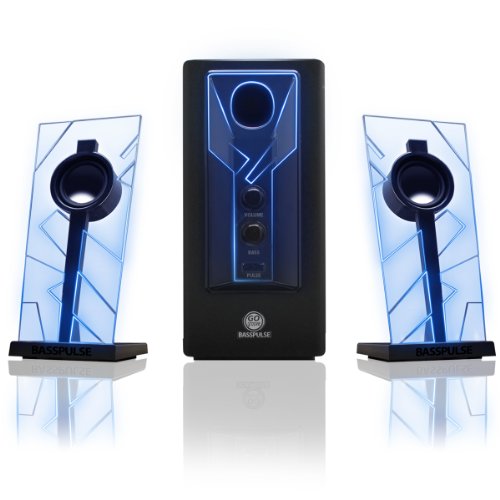
GOgroove BassPULSE 2.1 Computer Speakers with Blue LED Glow Lights and Powered Subwoofer
GOgroove BassPULSE 2.1 Computer Speakers with Blue LED Glow Lights and Powered Subwoofer
The GOgroove BassPULSE system steps up from a basic pair by adding a powered subwoofer for low-frequency weight. The two satellite speakers handle the higher range while the subwoofer fills in bass, which gives music and media a fuller sound at desk distance. Blue LED glow lights on the system add a visual element that can match a blue neon sign for a coordinated look across the desk and wall.
Who It Suits
This system suits listeners who play music often at the desk and want bass presence that a small 2.0 pair cannot provide. It fits media corners, game setups, and home offices where the desk doubles as an entertainment space in the evening. The subwoofer needs a spot on the floor or a lower shelf and access to power, so it suits rooms with a little extra space. Users with very small desks or who only need call audio can keep things simpler with a compact pair.
BONTEC Wood Monitor Stand Riser, 2-Tier Desktop Organizer
BONTEC Wood Monitor Stand Riser, 2-Tier Desktop Organizer
The BONTEC Wood Monitor Stand Riser lifts the screen on a two-tier wooden structure that also works as a desktop organizer. The top tier holds the monitor at a raised height, while the lower tier creates a shelf for a keyboard, notebooks, or small desk items. Wood construction suits timber desks and workshop-style offices, and the open design keeps the surface underneath accessible rather than boxed in.
Who It Suits
This stand suits anyone whose monitor sits too low on the desk or whose surface has run out of room for papers and tools. Raising the screen can reduce neck tilt, and the lower shelf gives the keyboard a place to slide away when the desk is needed for writing, sketching, or sorting parts. It pairs well with a vertical mouse and compact speakers to build a complete ergonomic corner. Users with very large or heavy monitors should confirm the stand dimensions and weight capacity before placing the screen on top.
FAQ
Is a vertical mouse hard to get used to?
Most users need a short adjustment period because the hand sits at a different angle and the buttons fall under the fingers in slightly different places. Starting with lighter tasks such as browsing and email before moving to detailed work can ease the transition. Keeping the old mouse nearby for the first few days also helps, since the user can switch back for precision tasks until the new grip feels natural.
Where should a neon sign be placed in a workshop or game room?
A neon sign reads best on a wall that faces the main seating or standing area, away from direct sunlight that would wash out the glow. Mounting it above a shelf, card table, or seating corner keeps it visible without competing with task lighting over a workbench. Check the cable length and outlet position before drilling, and keep the sign clear of heat sources and moving equipment.
Should I choose 2.0 speakers or a 2.1 system with a subwoofer?
Choose a 2.0 pair when desk space is limited and the main needs are calls, videos, and light background music at close range. Choose a 2.1 system when music and films matter more and there is floor or shelf space for the subwoofer. The subwoofer adds bass weight that small speakers cannot reproduce, but it also adds cables and a power connection to manage.
How high should a monitor stand raise the screen?
A useful target is to have the top third of the screen near eye level when sitting upright, so the eyes look slightly downward at the center of the display. A stand that raises the monitor by a few inches is usually enough for a standard desk and chair combination. If the chair or desk height is adjustable, set those first and then choose a stand height that completes the alignment.
Final Verdict
For most desks, the strongest combination from this list is the Anker vertical mouse for hand comfort, the BONTEC wood monitor stand for screen height and storage, and one of the two speaker options depending on space and listening habits. Add the Gamerneon blue poker sign when the room has a game or lounge corner that benefits from a themed glow. Together, these pieces turn a plain work surface into a comfortable, finished setup without crowding it.
Product and ASIN Reference
Product Name
ASIN
Anker 2.4G Wireless Ergonomic Mouse, Right Hand Vertical Mouse USB Receiver
B00BIFNTMC
Gamerneon Blue Poker Neon Sign Casino Playing Cards Neon Signs for Man Cave
Compare the best vertical mice and neon signs for a warmer desk: an ergonomic wireless mouse, a poker neon sign, computer speakers, and a monitor stand.
Compare the best vertical mice, neon signs, computer speakers, and a wood monitor stand for a comfortable woodworking shop desk and design corner setup.


 Cyber Acoustics CA-2014 2.0 Computer Speakers, 4W, Stereo Sound
 GOgroove BassPULSE 2.1 Computer Speakers with Blue LED Glow Lights and Powered Subwoofer
 BONTEC Wood Monitor Stand Riser, 2-Tier Desktop Organizer