Best Vertical Mice and Neon Signs for Home Desk Setup
Compare the best vertical mice and neon signs for home desk setups, from ergonomic wireless mice and glowing signs to speakers and wood monitor stands.
As an Amazon Associate I earn from qualifying purchases. This post may contain affiliate links at no extra cost to you.
A home desk has to work hard. It needs to feel comfortable through long writing sessions, look good on camera during calls, and stay organized when projects spread out across the surface. That is why many people pair ergonomic desk gear with a few decorative touches that make the space feel finished rather than improvised. A vertical mouse can ease wrist strain during long days at the keyboard, while a neon sign adds character to a plain wall behind the desk. This guide looks at five products that help turn a basic workspace into a place you enjoy sitting down to use.
OUR TOP PICK
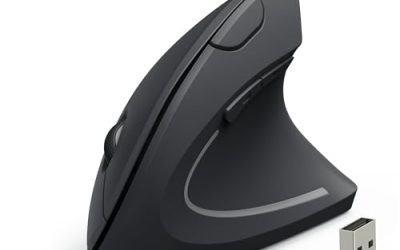
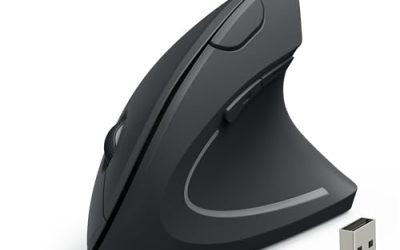
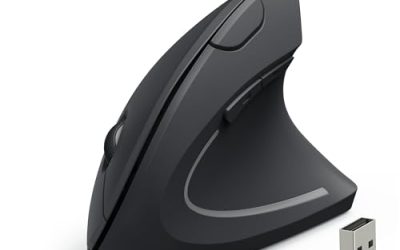
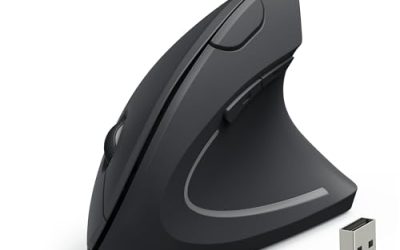
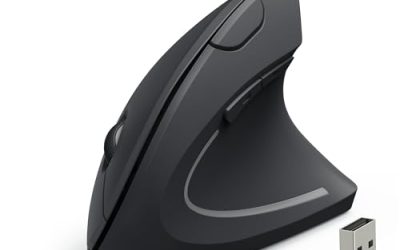
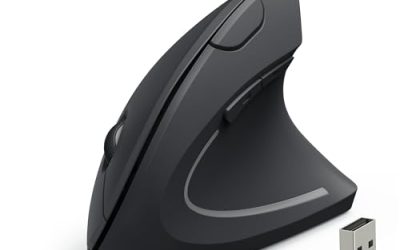
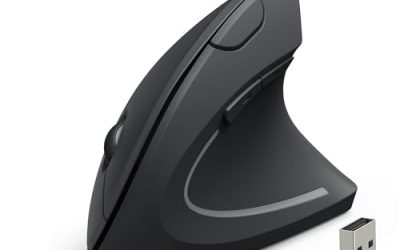
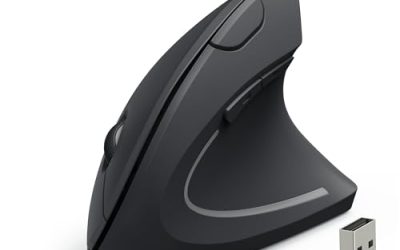
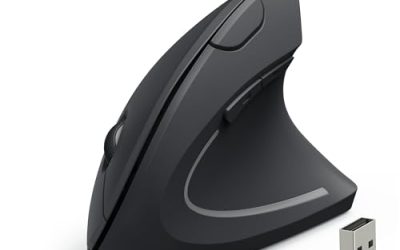
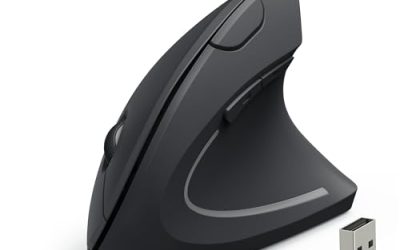
Anker 2.4G Wireless Ergonomic Mouse, Right Hand Vertical Mouse USB Receiver
The five picks below cover the core pieces of a comfortable, good-looking desk: an ergonomic vertical mouse, a decorative neon sign, two sets of computer speakers, and a wooden monitor stand that lifts your screen and adds storage underneath. Each product section includes a specs table and notes on who it suits, so you can match the right item to your desk size, your habits, and the look you want.
As an Amazon Associate, we earn from qualifying purchases.
How to Choose
Start with comfort. If you spend hours moving a mouse, its shape matters more than almost anything else on the desk. A vertical mouse keeps your hand in a more natural handshake position, which many users find easier on the wrist and forearm than a flat mouse. Look for a wireless model with a simple USB receiver to keep the desk free of extra cables, and check whether it is shaped for right-hand or left-hand use before you buy.
Next, think about the look of the space. A neon sign works best when it matches the mood of the room: a poker or playing card design suits a game room or hobby corner, while simpler shapes fit a general home office. Consider where the sign will hang and whether its glow will reflect on the monitor. A sign above or beside the desk usually reads better than one directly behind the screen.
Sound is the third piece. Compact 2.0 speakers suit desks with limited depth, while a 2.1 system with a separate subwoofer gives fuller low-end sound for music and video. Think about how much desk surface you can give up and where the subwoofer would sit.
Finally, consider screen height. A monitor stand that raises the display toward eye level can make long sessions more comfortable, and a two-tier design adds a shelf for a keyboard, notebooks, or small tools. Wooden stands also warm up a desk that is otherwise all plastic and metal. Measure your desk depth and monitor base before choosing, so the stand fits without crowding the setup.
The Anker 2.4G Wireless Ergonomic Mouse is a right-hand vertical mouse that connects through a USB receiver. Its upright shape keeps the hand in a neutral position, which can help reduce the twisting motion a traditional flat mouse asks of your wrist. For people who write, edit, or browse most of the day, that change in posture is often the single biggest comfort upgrade on the desk.
Because it is wireless, the mouse keeps your workspace clear of one more cable, and the receiver plugs into a standard USB port without extra software fuss for basic use. The vertical grip takes a short adjustment period, but most users settle into the handshake-style hold quickly. Buttons are placed for thumb and index finger access, so everyday clicking and scrolling stay within easy reach.
Who It Suits
This mouse suits right-handed users who spend long hours at a desk and want a more natural hand position. It fits writers, office workers, and anyone who has noticed wrist or forearm fatigue with a flat mouse. Left-handed users should look for a left-hand model instead.
The Gamerneon Blue Poker Neon Sign brings a casino playing card theme to a wall, shelf, or desk backdrop. Its blue glow gives a room a relaxed, evening feel, and the poker motif makes it a natural fit for game rooms, hobby corners, and home bars. Mounted above a desk, it doubles as a backdrop for video calls and streams, adding personality without taking up desk surface.
Neon-style signs like this one are decorative first, so think of it as part of the room rather than part of the workstation. The blue tone pairs well with darker walls and wood furniture. If your desk sits in a shared living space, a themed sign helps mark out your corner as its own zone.
Who It Suits
This sign suits people who want a playful, themed accent for a game room, hobby desk, or entertainment corner. It works well for poker fans and anyone building a casual, lounge-style workspace. If you prefer a minimalist office look, a themed sign may feel too bold.
The Cyber Acoustics CA-2014 is a compact 2.0 computer speaker set rated at 4W with stereo sound. A 2.0 setup means two satellite speakers and no separate subwoofer, which keeps the footprint small and the wiring simple. For a desk that already holds a monitor, keyboard, and notebooks, that compact size is a real advantage.
These speakers are aimed at everyday desk audio: video calls, tutorials, background music, and casual video watching. Stereo separation helps voices and music sound clearer than a typical built-in monitor speaker, and the simple design sits neatly on either side of a screen.
Who It Suits
This speaker set suits users with small or crowded desks who want clearer sound than built-in speakers provide. It fits home offices, dorm desks, and shared workspaces where a separate subwoofer would get in the way.
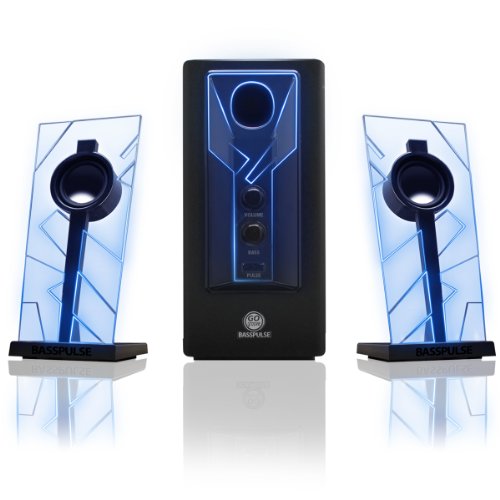
The GOgroove BassPULSE is a 2.1 computer speaker system with a powered subwoofer and blue LED glow lights. The subwoofer handles low frequencies, so music and video sound fuller than a basic 2.0 pair, while the two satellite speakers keep voices and higher tones clear. The blue glow ties in nicely with the neon sign in this guide if you like a coordinated desk look.
A 2.1 system asks for a bit more room: the subwoofer usually sits on the floor or a lower shelf, and there are more cables to route. In return, you get richer sound for music and longer videos at the desk, plus LED lighting that matches gaming and entertainment setups.
Who It Suits
This system suits users who want fuller sound for music and video and who like a bit of ambient lighting at the desk. It fits gaming corners, media desks, and home offices where the subwoofer has a place to sit. If your desk area is very small, measure first, since the subwoofer needs floor or shelf space.
The BONTEC Wood Monitor Stand Riser is a two-tier desktop organizer that lifts your monitor and adds storage underneath. Raising the screen can bring it closer to eye level, which helps you sit with a straighter neck and shoulders during long sessions. The lower tier gives you a place to slide a keyboard, stash notebooks, or keep small desk items within reach but off the main surface.
The wooden build suits the home decor side of a desk setup. Wood tones soften the look of a workspace full of black plastic and metal, and the stand doubles as a small piece of furniture rather than a purely technical accessory.
Who It Suits
This stand suits anyone whose monitor sits too low or whose desk feels cluttered. It fits writers, students, and home office users who want better screen height plus a tidy shelf for everyday items. Measure your monitor base and desk depth first.
Putting the Setup Together
These five products work well as a group because each one solves a different desk problem. The vertical mouse handles comfort for your hand and wrist. The monitor stand handles comfort for your neck and shoulders while adding storage. The speakers handle sound, with a choice between a compact 2.0 pair and a fuller 2.1 system. The neon sign handles the look of the room.
A sensible order is to start with the pieces you touch every day. Set the monitor stand first so your screen height is right, then place the mouse where your hand naturally rests. Add speakers on either side of the screen, keeping the subwoofer, if you choose the 2.1 system, on the floor or a sturdy shelf. Hang the neon sign last, once you can see how the desk looks from your chair and from the room.
FAQ
Is a vertical mouse hard to get used to?
Most people need a short adjustment period because the handshake-style grip feels different from a flat mouse. Everyday tasks like clicking and scrolling usually feel natural within a few days of regular use. Give yourself a little time to adapt rather than judging the shape in the first hour.
Where should a neon sign go in a home office?
A good spot is on the wall above or beside the desk, where it adds character without reflecting in the screen. Hanging it directly behind the monitor can create glare. Try to keep it visible from the room so it works as decor, not just as desk lighting.
Should I choose 2.0 or 2.1 computer speakers?
Choose 2.0 speakers if desk space is limited and you mainly need clear sound for calls, videos, and background music. Choose a 2.1 system if you want deeper bass and fuller sound for music and movies, and you have room for a subwoofer.
How do I know if a monitor stand will fit my desk?
Measure the depth of your desk and the footprint of your monitor base, then compare those numbers with the stand dimensions listed by the seller. Leave room in front of the stand for your keyboard and wrists.
Final Verdict
A comfortable desk is built from small, deliberate choices. The Anker vertical mouse is the comfort pick for long hours of hand and wrist use. The BONTEC wood monitor stand raises your screen and tidies the surface while adding a warm, furniture-like touch. For sound, the Cyber Acoustics CA-2014 keeps things compact and simple, while the GOgroove BassPULSE adds a powered subwoofer and blue glow for a richer, more decorative setup. The Gamerneon poker sign finishes the room with personality, especially in a game or hobby corner.
If you are upgrading one piece at a time, start with the mouse or the monitor stand, since those affect how your body feels at the end of the day. Add speakers next, and finish with the neon sign once the functional pieces are in place. Together, these five products cover comfort, sound, storage, and style.
Product and ASIN Reference
Product
ASIN
Anker 2.4G Wireless Ergonomic Mouse, Right Hand Vertical Mouse USB Receiver
B00BIFNTMC
Gamerneon Blue Poker Neon Sign Casino Playing Cards Neon Signs for Man Cave
Compare the best vertical mice and neon signs for a warmer desk: an ergonomic wireless mouse, a poker neon sign, computer speakers, and a monitor stand.
Compare the best vertical mice, neon signs, computer speakers, and a wood monitor stand for a comfortable woodworking shop desk and design corner setup.

 Anker 2.4G Wireless Ergonomic Mouse
 Gamerneon Blue Poker Neon Sign
 Cyber Acoustics CA-2014 2.0 Computer Speakers
 GOgroove BassPULSE 2.1 Computer Speakers
 BONTEC Wood Monitor Stand Riser