As an Amazon Associate I earn from qualifying purchases. This post may contain affiliate links at no extra cost to you.
A small CNC router promises a lot for a home workshop: carved signs, inlay work, small furniture parts and repeatable joinery, all from a machine that fits on a bench. The real decision is not which machine looks most capable on paper, but which work area, spindle and drive system match the pieces you actually plan to cut. A router that is too small forces you to split every project into tiles, while a machine with a weak spindle turns hardwood into a slow, chattering chore.
This guide is for woodworkers setting up a first CNC corner, hobbyists moving from hand routing to programmed cuts, and small-shop makers who need repeatable parts without giving up half the garage. Every machine below was picked from its Amazon listing, using the work area, spindle and drive details shown on the product page, so you can compare the four on the same terms.
Quick Picks
As an Amazon Associate we earn from qualifying purchases.
Product
Best for
Key spec from title
Genmitsu 3018-PROVer V2
First-time CNC owners learning the workflow
Work area 300 x 180 x 45 mm
FoxAlien Masuter Pro
Larger signs and panels in a compact frame
Work area 15.75 x 15.75 inches, 300W spindle
Genmitsu 4040-PRO MAX
Bigger stock and deeper cuts
710W trimmer spindle, work area 410 x 405 x 77 mm
Genmitsu 3030-PROVer MAX
Stiffer cuts on a mid-size bed
710W spindle, linear guide and ball screw drive
How to Choose
Match the Work Area to Your Typical Part
Start by measuring the largest piece you expect to cut in one setup, not the largest piece you dream about. A 300 x 180 mm bed handles plaques, coasters, small boxes and inlay panels, but a serving tray or a cabinet door panel will not fit without tiling. The 4040-PRO MAX, with its 410 x 405 mm area, covers a much wider range of household projects, while the Masuter Pro sits between the two with a square 15.75-inch bed that suits signs well. Remember that clamps and hold-downs eat into the usable area, so leave a margin around every edge. If your work regularly exceeds one bed size, stepping up now costs less than re-cutting every project in sections later.
Spindle Power Decides How Fast You Can Cut Hardwood
Spindle power sets the pace of real cutting, especially in maple, walnut and other dense hardwoods. A 300W spindle like the one on the Masuter Pro handles engraving, softwood shaping and light hardwood passes with care, but it asks for shallow cuts and patience on thicker stock. The 710W trimmer spindles on the two larger Genmitsu machines remove material faster and hold their speed better under load, which means fewer passes and cleaner edges on deeper profiles. Think about the thickest hardwood you will cut often, then choose a spindle that can take it in a reasonable number of passes instead of forcing a small motor to struggle through every job.
Frame Rigidity and Drive Type Shape Cut Quality
A CNC router is only as accurate as its frame and the way its axes move. Machines built around linear guides and ball screws, such as the 3030-PROVer MAX, resist flex and backlash better than simpler rail designs, and that stiffness shows up as smoother walls on pockets and crisper corners on lettering. Lighter frames can still cut well in softwood and engraving work, but they reveal their limits when a bit bites into hardwood or a long cut runs for an hour. Look at how each axis is driven and how the gantry is supported before you compare bed sizes alone, because a rigid mid-size machine often out-cuts a floppy larger one.
Software, Assembly and Workspace Needs Matter Too
Every machine here arrives as a kit that needs assembly, squaring and calibration before its first cut, so budget an evening for setup rather than an hour. Check the footprint the assembled machine needs on your bench, plus room for the control box, a laptop and dust collection, since a small router still throws chips across a surprising area. Consider the material you will hold down, the bits you already own and whether the spindle accepts the shank sizes you plan to use. A machine that fits your bench, your dust setup and your existing bits will get used far more than one that demands a workshop rearrangement every time you switch it on.
The 4 Best Options
Genmitsu 3018-PROVer V2
Top Pick
Genmitsu 3018-PROVer V2
Best for: first-time CNC owners learning setup, toolpaths and workholding on small projects.
Work area: 300 x 180 x 45 mm
Machine type: desktop CNC router kit
Intended material: wood, plus plastics and soft metals per the listing
The 3018-PROVer V2 is the gentlest way into CNC routing for a woodworker who wants to learn the full workflow before committing to a larger machine. Its compact bed suits engraving, small signs, jewelry boxes and test pieces, and its modest footprint leaves room on a shared bench for the rest of your tools. Beginners can practice toolpaths, workholding and bit selection on inexpensive softwood, then move to hardwood once the process feels familiar. It is the pick for learning, prototyping and small gift projects rather than production runs.
Watch out for: the compact bed limits part size, so measure your largest planned piece before ordering.
FoxAlien Masuter Pro
Runner-Up
FoxAlien Masuter Pro
Best for: sign makers and hobbyists who need a wider bed for panels and plaques.
The Masuter Pro gives a home shop a square cutting area that handles signs, plaques and panels the smaller 3018-class machines cannot take in one pass. Its 300W spindle is aimed at engraving and shaping work in wood, and the wider bed means fewer tiled jobs and less repositioning mid-project. Makers who sell signs at craft markets or cut repeated panel parts will appreciate the extra room, while the machine still fits on a sturdy bench rather than demanding a dedicated stand. It strikes a practical balance between size, power and bench space.
Watch out for: the 300W spindle suits light passes, so plan shallow cuts in dense hardwood.
Genmitsu 4040-PRO MAX
Genmitsu 4040-PRO MAX
Best for: woodworkers cutting larger panels and thicker hardwood stock in one setup.
The 4040-PRO MAX is the largest machine in this guide, and its 710W trimmer spindle is the reason it earns that spot. With a work area of 410 x 405 x 77 mm, it takes on cabinet door panels, larger signs, serving boards and furniture parts that smaller routers must tile or skip. The extra Z travel helps with thicker stock and longer bits, and the stronger spindle keeps feed rates reasonable in hardwood. If your project list already outgrows a desktop starter machine, this is the step up that removes the bed-size ceiling.
Watch out for: the bigger frame needs a sturdy bench and more clear space around it for loading stock.
Genmitsu 3030-PROVer MAX
Genmitsu 3030-PROVer MAX
Best for: makers who want stiffer, more accurate cuts on mid-size signs and panels.
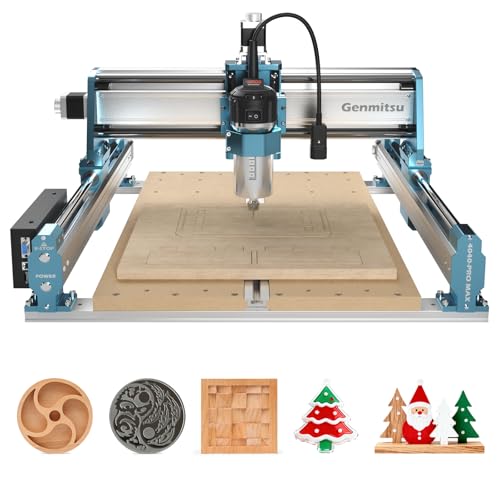
The 3030-PROVer MAX trades a little bed area for a stiffer machine, pairing a 710W spindle with a linear guide and ball screw drive. That combination aims at cleaner cuts and steadier motion, which matters when you run long engraving sessions or cut pockets that must line up exactly. Its bed still covers most sign and small-panel work, and the stronger drive system helps the machine hold accuracy as cuts get longer and deeper. For makers who value cut quality over maximum size, this is the most focused pick of the four.
Watch out for: confirm the work area fits your largest panel, since this bed is smaller than the 4040-PRO MAX.
CNC Router Safety Basics
A small CNC router still spins a sharp bit at high speed and throws chips, so treat every cut with the same respect you give a handheld router. Wear eye protection and hearing protection, keep hands clear of the cutting area while the spindle runs, and never reach across a moving gantry to adjust a clamp. Secure the workpiece firmly before starting, because a loose board can catch the bit and kick across the bed. Connect dust collection or wear a dust mask, since fine wood dust builds up fast in a closed room, and keep the workspace clear of loose cords and offcuts. Pause the job and switch the spindle off before changing a bit or clearing chips, and stay nearby while a cut runs so you can stop the machine if anything sounds wrong.
Which One Fits Your Situation
You Are Buying Your First CNC Router
Choose the Genmitsu 3018-PROVer V2. Its small bed and straightforward kit make the learning curve manageable, and the low bench footprint means it fits a workshop that already holds other tools. Practice on softwood, learn workholding and toolpaths, and you will know exactly what a bigger machine must offer before you upgrade.
You Mostly Cut Signs and Wall Art
Choose the FoxAlien Masuter Pro. Its square 15.75-inch bed fits the panels and plaques that sign work demands, and the 300W spindle handles engraving and shaping in wood with light, careful passes. You get room for real sign sizes without moving to a floor-standing machine, and the wider bed cuts down on repositioning between jobs.
You Need Room for Furniture Parts and Big Panels
Choose the Genmitsu 4040-PRO MAX. The 410 x 405 mm work area and 710W trimmer spindle take on cabinet parts, serving boards and large signs in a single setup, and the deeper Z travel suits thicker stock. It is the pick when bed size, not budget, is the constraint holding your projects back.
You Care Most About Clean, Accurate Cuts
Choose the Genmitsu 3030-PROVer MAX. Its linear guide and ball screw drive plus the 710W spindle aim at steadier motion and crisper edges, which shows in pockets, inlay and detailed lettering. The bed covers most mid-size work while the drive system keeps accuracy high across long jobs, so detailed pieces come out consistent from the first cut to the last.
Common Mistakes
Buying the smallest bed available and then tiling every project that is slightly too large for it.
Choosing a low-power spindle for thick hardwood and blaming the bits when cuts chatter and burn.
Skipping workholding, so a board shifts mid-cut and ruins an hour of machining.
Running the first real project without a test cut in scrap wood to check depth, feed and zero position.
Ignoring dust collection, which lets fine chips pile up around the rails and the spindle.
Frequently Asked Questions
What size CNC router do I need for wood signs?
Measure your largest sign blank, then add room for clamps on every side. A 300 x 180 mm bed covers small plaques, while a 15.75-inch square bed or larger handles most wall signs in one setup. If you sell signs regularly, pick the bigger bed so you are not tiling jobs that could run in a single pass.
Can a small CNC router cut hardwood?
Yes, with the right approach. Use sharp bits, shallow passes and a feed rate that lets the spindle hold speed, and a 710W spindle will move through hardwood far faster than a 300W one. Hardwood rewards patience: light cuts and good workholding produce cleaner edges than forcing a deep pass in one go.
How much bench space does a desktop CNC router need?
Allow the machine footprint plus space for the control box, a laptop and dust collection, along with clear room to load stock from the front. A compact 3018-class machine fits a shared bench, while the larger 4040-class frame needs a sturdy, dedicated bench area with space around all four sides.
Do I need dust collection for a small CNC router?
Yes, in practice. Even a small router throws chips and fine dust across the bench and into the air, and the dust settles on rails and electronics. A dust shoe or a shop vacuum hose near the spindle keeps the cut area visible and the workspace safer, and it also protects the machine from buildup over time.
J
JD's Woodworks Editorial Team
We compare specs, warranty terms, long-term owner feedback and street pricing before anything earns a spot. Rankings are never paid.
Affiliate disclosure. As an Amazon Associate we earn from qualifying purchases at no extra cost to you. Prices accurate as of the date shown.
Table saws under the 1500 mark compared: the Grizzly G0771Z and Shop Fox W1837 hybrid saws with cast iron tables, 2 HP motors and T-square fences, specs from their listings.
Table saws for fine woodworking compared: the SawStop Professional Cabinet Saw and Powermatic PM1000, judged on fence precision, table flatness and vibration from listing specs.
Table saw combos explained: saws sold with a stand and accessories in one listing, what to check in the box, and which bundle fits your shop or jobsite.
Compare the best planer digital thickness gauges and digital readout kits for portable planers, with fit, resolution and mounting checks before you buy.
Model table saws for scale modelling and hobby work compared: the precision Proxxon FET 37070 and the compact Saker mini table saw, with specs taken from their Amazon listings.
Three CoreXY 3D printers for product development, each with the architecture stated on its listing: an enclosed multicolor machine, a large-format enclosed model and a heated-chamber model.


 Genmitsu 3030-PROVer MAX










