
Key takeaways
- Find the best c02 laser cutting machine for cabinet-scale wood and acrylic work, with large beds, autofocus and pass-through doors for bigger panels today.
What's inside
As an Amazon Associate I earn from qualifying purchases. This post may contain affiliate links at no extra cost to you.
A cabinet CO2 laser cutting machine is a different tool from a desktop engraver. It holds full-size panels, cuts thicker stock in fewer passes, and runs long jobs without stopping to reposition the work. The real decision is which bed size and which automation features your cutting work needs, because the machines in this class look similar on paper but differ in the details that matter during a production run.
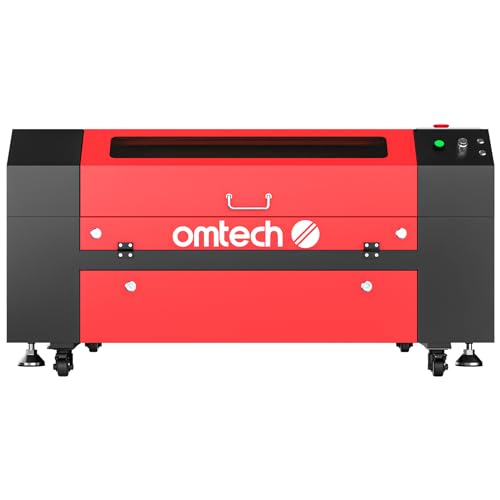
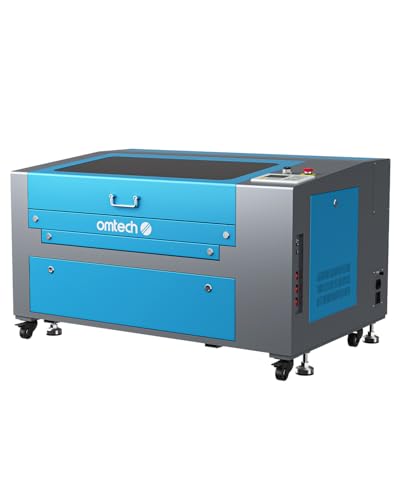
This guide is for workshops that cut wood and acrylic panels at cabinet scale, from furniture parts and signage to batch production of the same design. Every machine below was chosen from the name and specifications shown on its Amazon page, with a focus on bed size, autofocus, air assist, and the pass-through doors that let long boards feed through the cabinet. The three picks here all carry 60 watt tubes, so the choice comes down to bed size, cooling, and which automation features your cutting work needs.
Quick Picks
As an Amazon Associate we earn from qualifying purchases
| Product | Best for | Key spec from title |
|---|---|---|
| OMTech 60W 28×20 Autolift | Biggest bed with autofocus and autolift | 60W CO2, 28×20 inch bed |
| OMTech 60W 16×24 | Compact cabinet with dual workbeds | 60W CO2, 16×24 inch bed |
| OMTech 60W 20×28 with Chiller | Long production runs with water chiller | 60W CO2, 20×28 inch bed |
How to Choose
Bed Size and Pass-Through Doors
Bed size decides the largest panel you can cut in one setup, and pass-through doors decide whether longer boards can feed through the cabinet at all. A 16 by 24 inch bed handles cabinet door panels and medium signs, while a 28 by 20 inch bed takes on full furniture parts and large signage. Front and back pass-through doors let you cut boards longer than the bed by feeding them through in sections, so check the listing for that feature if your work includes long trim or sign blanks. Choosing a bed that covers your biggest panel avoids repeated repositioning and keeps every cut aligned. Measure your largest panel first.
Autofocus and Autolift for Repeat Jobs
Autofocus sets the lens height automatically for each material thickness, which removes a manual step that beginners often get wrong. Autolift raises and lowers the bed to match the workpiece, keeping the focal distance correct across different stock. These features matter most on repeat production work, where the same job runs many times and setup time adds up. Check whether the listing names autofocus and autolift, and whether they work with the software you plan to use. Manual focus works, but it slows every job change and invites mistakes on a busy day. Autolift matters most on thick stock, where the bed must drop further to keep the lens at the right height.
Air Assist and Cut Quality
Air assist blows a jet of air at the cutting point, which clears smoke and debris and keeps the cut edge clean. A four-way pass system moves air from several directions and suits thicker stock, while a two-way pass system is enough for thinner panels. The difference shows up on the edge: good air assist leaves a clean, light cut line, while poor airflow leaves char and smoke stains. Read the air assist specification on the listing and match it to the thickest material you cut regularly, since upgrading air assist later is rarely simple. A clean cut edge shows the air assist is working, while char and smoke stains mean it is not.
Cooling, Ventilation, and Safe Operation
A 60 watt CO2 tube needs steady water cooling and proper ventilation to run safely through long cutting jobs. The machines in this guide describe water pumps, water chillers, and exhaust systems that form part of the setup, and the OMTech 50W listing in our companion guide states that the air compressor should be attached to remove excess heat and combustible gases from the cutting surface. A water chiller holds the tube temperature steadier than a simple pump during production runs. Read the cooling and ventilation notes on the product page, vent the exhaust outside, and never leave a cutting job running unattended. Match cooling to your session length.
The 3 Best Options
OMTech 60W CO2 Laser Engraver, 28×20 Inch with Autolift
This is the largest machine in this guide, with a 28 by 20 inch bed, autofocus, autolift, and four-way pass air assist for clean cuts on thick stock. The 60 watt tube handles wood, glass, and leather, and the water pump keeps it cool through long jobs. Front, back, and side pass-through doors let long boards feed through the cabinet, which makes it the most flexible cutter here for oversized panels. The large bed also means fewer setups per project, since full furniture parts fit without splitting the design into sections. The 60 watt tube cuts thicker stock in fewer passes than a smaller desktop laser.
- Specs:
- Laser power: 60W CO2
- Work area: 28 x 20 inches
- Features: Autofocus, autolift, 4-way pass air assist
- Cooling: Water pump
- Machine size: 48.8 x 34.3 x 26.4 inches
- Weight: 223 pounds
- Pass-through: Front, back, and side doors
- Best for: Oversized panels and long boards that need pass-through cutting.
- Watch out for: The cabinet is heavy and large, so plan the delivery route and the floor space first.
OMTech 60W CO2 Laser Engraver, 16×24 Inch
The 16 by 24 inch OMTech 60W is the compact cabinet in this class, with dual workbeds and two-way pass air assist in a smaller footprint. Its 60 watt tube engraves as deep as 0.4 inches, and the digital control panel runs RDWorks software for design work. Front and back pass-through doors let larger pieces feed through despite the smaller bed, which keeps the machine useful for signs that run longer than the cabinet. The dual workbeds let you stage the next piece while the current one finishes cutting. The 0.4 inch engraving depth covers detailed work on wood and acrylic panels.
- Specs:
- Laser power: 60W CO2
- Work area: 16 x 24 inches, dual workbeds
- Air assist: 2-way pass
- Control: Digital control panel, RDWorks
- Engraving depth: Up to 0.4 inches
- Doors: Front and back pass-through
- Best for: Cabinet-scale cutting where floor space is limited.
- Watch out for: The two-way air assist suits thinner stock best, so test thick plywood settings on scrap first.
OMTech 60W CO2 Laser Engraver, 20×28 Inch with Water Chiller
This 20 by 28 inch OMTech 60W adds a water chiller and LightBurn compatibility to the cabinet formula, which suits long production runs where tube temperature must stay steady. Autofocus and autolift set the lens and bed height automatically, and four-way pass air assist keeps cut edges clean on thick stock. Front, back, and side pass-through doors handle oversized boards, and the dual workbeds let you stage the next job while one finishes. The chiller sets it apart for all-day cutting, since it holds the tube cool through hours of continuous work. The 20 by 28 inch bed takes on full furniture parts in one setup.
- Specs:
- Laser power: 60W CO2
- Work area: 20 x 28 inches, dual workbeds
- Cooling: Water chiller
- Software: LightBurn compatible
- Features: Autofocus, autolift, 4-way pass air assist
- Doors: Front, back, and side pass-through
- Best for: Long production runs where steady cooling matters most.
- Watch out for: The chiller adds size and setup steps, so allow extra space beside the cabinet.
Which One Fits Your Situation
Oversized Panels and Long Boards
Pick the OMTech 60W 28 by 20 inch machine when your panels are large and your boards run long. The biggest bed in this guide plus pass-through doors on three sides means fewer setups and fewer seams in the finished piece. Give it a clear delivery path and a solid floor, since the cabinet weighs over two hundred pounds. That bed size suits full furniture parts and large signage without splitting the design.
A Smaller Shop That Still Cuts Cabinets
Pick the OMTech 60W 16 by 24 inch machine when floor space is tight but the work is still cabinet scale. The dual workbeds and pass-through doors keep it flexible, and the smaller footprint fits a crowded workshop. It suits a maker who cuts furniture parts and signs without dedicating a whole wall to the laser. Pass-through doors keep longer signs possible, even with the smaller bed.
Batch Production All Day
Pick the OMTech 60W 20 by 28 inch machine with the water chiller when the laser runs for hours at a time. Steady cooling protects the tube during long jobs, and LightBurn compatibility keeps the design workflow simple. Autofocus and autolift remove the manual setup steps that slow down repeat runs, so each batch starts faster than the last. That combination suits a shop where the laser earns its keep every working day.
Cutting Acrylic and Thin Sheet
Pick the OMTech 60W 16 by 24 inch machine when your work is mostly acrylic sheet and thin plywood. The two-way air assist suits thinner stock, and the compact bed keeps the machine close to your bench for quick jobs. Test the cut settings on scrap first, since acrylic needs a steady speed to leave a polished edge. A smaller cabinet also costs less to ventilate, since the exhaust run stays short.
Common Mistakes
- Buying a bed that fits today’s panel and discovering next month’s sign is six inches too long, which forces you to split the design or buy a bigger machine.
- Running a long cutting job without checking the water cooling level first, since a dry tube can fail halfway through a panel.
- Skipping a test cut on scrap and charring the edge of an expensive hardwood panel, when a minute of testing would have set the speed correctly.
- Ignoring the pass-through doors on the listing and assuming every cabinet can feed long boards, then finding your longest sign does not fit.
- Leaving the machine running unattended during a cut, when a flare-up needs a person nearby to stop the job.
Frequently Asked Questions
How is a cabinet laser different from a desktop laser?
A cabinet laser holds larger panels, carries a stronger tube, and includes autofocus, autolift, and pass-through doors that desktop machines lack. Desktop lasers suit plaques and ornaments, while cabinet machines cut furniture parts and full signs. The cabinet also encloses the work area, which improves ventilation control and keeps the cutting process contained. Cabinet machines hold panels flat.
What thickness can a 60W CO2 laser cut?
Cutting depth depends on the material, the speed, and the number of passes, so the answer varies by job. A 60 watt tube cuts plywood and acrylic several millimetres thick in one or two passes, and thicker stock with additional passes. Test your exact material on scrap first, and record the speed and power settings that give a clean edge.
Do I need a water chiller or is a water pump enough?
A water pump suits shorter jobs and lighter use, while a water chiller holds the tube temperature steady during long production runs. The chiller matters most when the machine cuts for hours without a break, since a rising tube temperature shortens tube life. Match the cooling system to how long your typical cutting sessions last.
Can a CO2 laser cut metal?
No, a CO2 laser of this power does not cut bare metal, and the listings state that these machines only mark anodized coatings on metal surfaces. They cut wood, acrylic, leather, fabric, and similar non-metal materials. If metal cutting is part of your work, a fiber laser is the correct tool rather than a CO2 machine. Plan metal projects around engraving only.
Related guides
More from Amazon
Programs that pair well with the guide above. Offers and eligibility are set by Amazon and may change.
A free business account with business pricing and bulk-buying tools for work, shop or home office.
Create a business accountFree shipping on eligible items, Prime Video and more. Eligible new members can start with a free trial.
Start a Prime free trialAudiobooks and podcasts to listen to on the go. Eligible new members can start with a free trial.
Try Audible freeAd-free music streaming. Eligible new subscribers can start with a free trial.
Try Music Unlimited freeAs an Amazon Associate we earn from qualifying purchases.









