As an Amazon Associate I earn from qualifying purchases. This post may contain affiliate links at no extra cost to you.
A homemade CNC setup appeals to woodworkers who like building the tool as much as using it. Instead of buying a finished machine, you assemble a kit on a bench, wire the controller, square the frame, and end up with a router that cuts signs, carvings, inlays and small parts on command. The real decision is how much machine your projects need: a compact 3018-size kit handles plaques and small carvings, while a wider frame takes on cabinet door panels and larger signs without tiling the job into sections.
This guide is for first-time CNC builders, hobbyists moving from hand routing to programmed cuts, and small-shop makers who want repeatable parts without giving up half the garage. Every machine below was picked from its Amazon listing, using the work area, spindle and control details shown on the product page, so you can compare all five on the same terms before choosing a kit to build.
Quick Picks
As an Amazon Associate we earn from qualifying purchases.
Product
Best for
Key spec from title
Genmitsu 3018-PROVer V2
First kit build on a bench
300 x 180 x 45 mm work area
FoxAlien Masuter Pro
Wider signs and panels at home
15.75 x 15.75 in work area, 300W spindle
Genmitsu 4040-PRO MAX
Bigger carvings with a trimmer router
410 x 405 x 77 mm work area, 710W trimmer
Genmitsu 3018-PRO
Lowest-cost way into CNC carving
300 x 180 x 45 mm work area
VEVOR 3018-PRO
Offline control with limit switches
300 x 180 x 45 mm work area, GRBL offline control
How to Choose
Work Area First
Start with the largest piece you plan to cut, then add room for clamps and the bit to clear the edges. A 300 x 180 mm bed covers plaques, coasters, small signs and jewellery boxes, but a cabinet door or a wide house sign will not fit without splitting the design. Measure your bench too, because the machine footprint runs larger than the cutting area once the frame, controller and cable runs are in place. Buying the smallest kit and then tiling every job wastes more time than the wider frame costs, so size the bed to the work, not to the shelf space you hope to spare.
Spindle Power and Bits
Spindle power decides how fast you can cut and how clean the edge stays in hardwood. A 300W spindle suits softwood, plywood, MDF and shallow engraving, where light passes and sharp bits do the work. The 710W trimmer on the largest kit here pushes through hardwood and deeper profiles with less chatter, but it also adds weight and noise to a bench setup. Match the spindle to the material you cut most often, and remember that a dull bit makes even a strong spindle tear the grain. Budget for a small set of flat, ball-nose and V-bits in the shank size your spindle accepts, because the bits that arrive in the box rarely cover every job.
Frame, Drive and Assembly
A homemade CNC is a kit before it is a machine, so the frame and drive decide how much patience the build takes and how square the cuts come out. Look at how the axes move, how the gantry is supported, and whether the kit includes limit switches, because a machine that homes itself saves fiddly setup on every session. Aluminium extrusion frames stay rigid without weighing down the bench, while a wobbly gantry shows up as wavy edges and stepped cuts. Read the assembly notes on the listing before ordering, set aside an unhurried afternoon for the build, and check every bolt and belt tension again after the first few carvings.
Control, Software and Dust
Control decides how you send a design to the machine, and the wrong setup turns every carving into a cable hunt. Some kits run from a computer over USB, while others add an offline controller so the machine keeps cutting without a laptop tied to the bench. Confirm the controller on the listing, check that your design software can export the file type it reads, and keep the controller and cables clear of sawdust. Dust matters from the first cut: a CNC router throws fine chips across the bench, so plan a dust shoe or a shop vacuum connection and a clear path for the hose before the machine arrives.
The 5 Best Options
Genmitsu 3018-PROVer V2
Top Pick
Genmitsu 3018-PROVer V2
Best for: A first bench-top CNC build for plaques, small signs and engraved panels.
The 3018-PROVer V2 suits a first-time builder who wants the familiar 3018 size with the refinements of the PROVer line. Its 300 x 180 x 45 mm work area covers plaques, small signs, engraved panels and parts for boxes and models, and the bench footprint stays small enough for a shared workshop. Assembly teaches the basics of squaring a frame, setting belt tension and homing the axes, which pays off every time the machine needs attention later. Keep passes light in hardwood and let sharp bits do the cutting rather than forcing depth.
Watch out for: The 300 mm bed limits wide signs, so measure your largest planned piece first.
FoxAlien Masuter Pro
Runner-Up
FoxAlien Masuter Pro
Best for: Larger square signs, serving boards and door panels on a bench.
The Masuter Pro fits makers who outgrow the 3018 bed but still want a bench machine. Its 15.75 x 15.75 inch work area takes larger signs, serving boards and cabinet door panels without tiling, and the 300W spindle handles softwood, plywood and MDF with steady light passes. The square bed suits sign work in particular, since most sign blanks are square or near it. Give the frame a solid bench, square the gantry carefully during assembly, and keep feed rates modest in hardwood so the spindle stays in its comfort zone.
Watch out for: A 300W spindle needs light passes in hardwood, so do not rush deep cuts.
Genmitsu 4040-PRO MAX
Genmitsu 4040-PRO MAX
Best for: Wide signs, large carvings and furniture parts in hardwood.
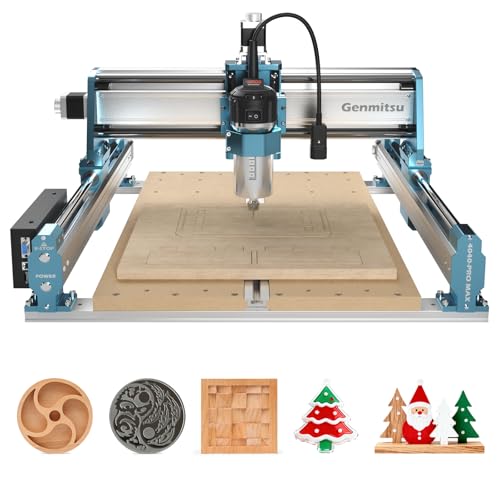
The 4040-PRO MAX is the pick for woodworkers who want the biggest work area in this group and a trimmer router instead of a small spindle. Its 410 x 405 x 77 mm work area covers wide signs, large carvings and furniture parts, and the 710W trimmer cuts hardwood profiles with more authority than the 300W spindles here. The deeper Z travel also helps with thicker stock and taller carvings. It needs a sturdier bench and more room than the 3018 kits, so measure the full footprint before ordering and plan dust collection from the start.
Watch out for: The larger frame needs a sturdy bench and more floor space than a 3018 kit.
Genmitsu 3018-PRO
Genmitsu 3018-PRO
Best for: Learning the CNC workflow on a small bench with small carvings.
The original 3018-PRO is the simplest way into homemade CNC carving. Its 300 x 180 x 45 mm work area matches the PROVer V2 on paper, covering plaques, small signs and model parts, while the kit keeps the build short and the bench footprint small. It suits a buyer who wants to learn the workflow — design, toolpath, carving, finishing — before committing to a wider machine. Treat it as a learning machine: light passes, sharp bits and patience produce cleaner results than pushing the little frame hard.
Watch out for: The compact bed and light frame suit light passes, not heavy hardwood hogging.
VEVOR 3018-PRO
The VEVOR 3018-PRO stands out in this group for its offline control and safety hardware. GRBL offline control lets the machine run a job without a computer connected, while limit switches, an emergency stop and an acrylic baffle come with the kit. Its 300 x 180 x 45 mm work area covers the same plaques and small signs as the other 3018-size machines here. It suits a builder who values the stop button and the baffle keeping chips contained, and who wants to load a file and step away from the laptop while the machine works.
Best for: Offline carving with limit switches and an emergency stop on the machine.
Watch out for: Confirm the listing shows stock and the full kit contents before ordering.
Which One Fits Your Situation
Building Your First CNC
Pick the Genmitsu 3018-PROVer V2 if this is your first kit. The 300 x 180 x 45 mm bed covers the plaques and small signs most beginners start with, and the build teaches frame squaring and axis homing without overwhelming the bench. Add the VEVOR 3018-PRO to the shortlist if offline control and an emergency stop matter to you from day one.
Cutting Wide Signs and Panels
Pick the FoxAlien Masuter Pro for square signs and serving boards, since its 15.75 x 15.75 inch bed takes blanks the 3018 kits cannot. Move up to the Genmitsu 4040-PRO MAX when signs grow wider still or hardwood profiles need the 710W trimmer, and give either machine a solid bench with room for clamps around the edges.
Learning on a Small Budget
Pick the Genmitsu 3018-PRO if you want the lowest-cost route into the workflow. The 300 x 180 x 45 mm work area still covers plaques, small signs and model parts, and the short build leaves more time for learning design and toolpaths. Spend the money saved on sharp bits and a dust shoe, which improve results more than a bigger frame at this stage.
Carving Hardwood Furniture Parts
Pick the Genmitsu 4040-PRO MAX for hardwood furniture parts. The 710W trimmer and 410 x 405 x 77 mm work area handle deeper profiles and thicker stock, while the extra Z travel suits taller carvings. Keep passes light even with the stronger router, secure the stock firmly, and clear chips often so the bit stays cool and the cut stays clean.
CNC Safety Basics
A spinning router bit deserves respect from the first job. Wear eye protection and hearing protection, tie back long hair and loose sleeves, and keep hands clear of the cutting area while the spindle runs. Clamp the stock firmly so it cannot shift mid-cut, and never reach across a moving gantry to adjust a clamp. Let the spindle stop fully before changing a bit, and unplug the machine or switch it off at the controller before touching the collet. Keep a clear bench, vacuum chips often, and never leave a running machine unattended in a room with sawdust and offcuts piled nearby.
Common Mistakes
Buying the smallest bed, then splitting every sign into tiles because the blank does not fit.
Forcing deep cuts in hardwood with a 300W spindle instead of taking light passes with a sharp bit.
Skipping the frame-squaring step during assembly, then wondering why cuts come out stepped and wavy.
Starting a job with dull bits or the wrong shank size, then blaming the machine for torn grain.
Running the first carving without dust control and letting fine chips pile up around the controller and cables.
Frequently Asked Questions
What size homemade CNC should a beginner buy?
A 300 x 180 mm machine covers plaques, small signs and model parts, which is where most beginners start. It fits a bench, keeps the build short, and teaches the full workflow before a bigger purchase. Move to a wider bed only when your regular projects stop fitting, since a larger frame needs a sturdier bench and more room.
Can a 3018-size CNC cut hardwood?
Yes, with light passes and sharp bits. A 3018-size machine with a 300W spindle handles hardwood signs and shallow carvings when feed rates stay modest and depth per pass stays small. Rushing deep cuts causes chatter and torn grain, so let the bit work at its own pace and clear chips between passes.
Do I need a computer connected while the CNC runs?
Not always. Some kits run from a computer over USB for the whole job, while the VEVOR 3018-PRO here adds GRBL offline control, so a file can run without a laptop tied to the bench. Check the control method on the listing before ordering, and confirm your design software exports the file type the controller reads.
How do I keep dust under control on a homemade CNC?
Plan dust control before the first cut. A dust shoe around the spindle catches chips at the source, and a shop vacuum connection clears the fine dust that settles on the frame and controller. Vacuum the bench between jobs, keep the controller and cables clear of chips, and wear a dust mask when cutting MDF or plywood.
J
JD's Woodworks Editorial Team
We compare specs, warranty terms, long-term owner feedback and street pricing before anything earns a spot. Rankings are never paid.
Affiliate disclosure. As an Amazon Associate we earn from qualifying purchases at no extra cost to you. Prices accurate as of the date shown.
Table saws under the 1500 mark compared: the Grizzly G0771Z and Shop Fox W1837 hybrid saws with cast iron tables, 2 HP motors and T-square fences, specs from their listings.
Table saws for fine woodworking compared: the SawStop Professional Cabinet Saw and Powermatic PM1000, judged on fence precision, table flatness and vibration from listing specs.
Table saw combos explained: saws sold with a stand and accessories in one listing, what to check in the box, and which bundle fits your shop or jobsite.
Compare the best planer digital thickness gauges and digital readout kits for portable planers, with fit, resolution and mounting checks before you buy.
Model table saws for scale modelling and hobby work compared: the precision Proxxon FET 37070 and the compact Saker mini table saw, with specs taken from their Amazon listings.
Three CoreXY 3D printers for product development, each with the architecture stated on its listing: an enclosed multicolor machine, a large-format enclosed model and a heated-chamber model.


 Genmitsu 3018-PRO











