Key takeaways
- Wi-Fi routers for multiple streaming devices, comparing MU-MIMO, OFDMA, streams and coverage so several TVs, tablets and phones can stream at once at home.
What's inside
As an Amazon Associate I earn from qualifying purchases. This post may contain affiliate links at no extra cost to you.
As an Amazon Associate we earn from qualifying purchases.
Disclosure: This article contains affiliate links. If you buy through these links, we may earn a commission at no additional cost to you.


A single video stream is easy. The difficulty starts when a household runs several at once: a television in the living room, a second screen in a bedroom, a tablet in the kitchen, and phones that keep playing video while their owners move around the house. Each stream needs a steady flow of data, not just a fast burst, and the streams compete with video calls, downloads, game updates, and smart home traffic in the background. When the router cannot organise that load, the picture drops to a lower resolution, playback pauses to refill its buffer, or one room’s stream suffers every time another room starts watching.
This guide is about Wi-Fi routers for that specific job — several simultaneous streaming devices in one home. The products below are standalone Wi-Fi routers, a different set from any router guide focused on two-router layouts, and they were chosen for the features that decide multi-stream performance: the number of wireless streams, MU-MIMO and OFDMA support, processor and memory headroom, wired ports for the screens that can be plugged in, and coverage claims that match real rooms rather than a single open space.
It helps to understand what a stream actually demands. High-definition video needs a modest but continuous slice of bandwidth. Higher-resolution video needs a larger slice, sustained for hours. Live video is less forgiving than on-demand playback because there is less buffer to hide gaps. Multiply those needs by three, four, or five screens, add the overhead of each device talking back to the router, and the total is still often below the headline speed of a modern router. That is why organisation matters more than headline speed alone: a router that can talk to several devices at once, divide its airtime efficiently, and keep queues orderly will feel smoother than a faster-on-paper router that serves devices one at a time.
The Features That Keep Several Streams Smooth
MU-MIMO lets a router exchange data with multiple devices at the same time on the same band, instead of cycling rapidly between them. For streaming households this matters on the 5 GHz band, where most televisions, streaming boxes, laptops, and modern phones connect. More streams generally means more simultaneous conversations the router can hold, which is why the stream count appears in the product sections below.
OFDMA, a Wi-Fi 6 feature, lets one transmission carry data for several devices at once. Video streams are not made of one huge transfer but of many small packets, and OFDMA packs those packets efficiently, reducing wasted airtime and delay. In a busy evening network, that efficiency is what keeps a new stream starting cleanly instead of disturbing the ones already playing.
Beamforming focuses the wireless signal toward connected devices rather than spreading it evenly in every direction. It helps streaming boxes tucked behind televisions and screens in rooms separated from the router by a wall or two. Dual-band operation matters as well: the 5 GHz band carries the heavy video load over shorter distances, while the 2.4 GHz band serves distant rooms and low-demand devices, keeping them off the main band.
Processor and memory are the quiet specifications. Every stream, wired device, security rule, and quality-of-service decision passes through the router’s processor. A stronger processor with more memory sustains performance when the household is busiest — exactly when streaming problems appear. Quality-of-service controls, where present, let you favour video or a specific device when the connection is under pressure.
Wired ports deserve more attention than they usually get. A television or streaming box placed near the router and connected by Ethernet removes one heavy stream from the wireless network entirely, freeing airtime for every other screen. When you compare routers, count the LAN ports and note their speed: gigabit ports suit current streaming needs, and a faster multi-gig port helps households with very fast internet service or a wired media server.
Placement and Setup Tips for Streaming Homes
Place the router centrally and raised, away from thick obstructions and large metal objects, and not hidden inside a closed cabinet where heat and blocked signal combine. If the main viewing room is far from the router, consider which band each screen uses: 5 GHz for the busy nearby screens, 2.4 GHz for a distant screen playing lower-resolution content.
Give the 5 GHz network a clear role. Connect televisions, streaming boxes, and tablets used for video to it first, and leave low-demand smart home gadgets on 2.4 GHz. Keep firmware current, because router makers refine device handling and security over time. Use WPA3 where your devices support it, with WPA2 compatibility for older screens. If one wired connection is possible, spend it on the most-used television; that single cable often improves wireless streaming everywhere else in the house.
Finally, match expectations to your internet service. A router organises the connection you have; it cannot create bandwidth the service does not provide. If several high-resolution streams together exceed the incoming connection, no router setting will fix that, and the answer is a faster service tier or lower playback resolution on some screens. If the incoming service is ample but rooms still struggle, the router and its placement are the right place to act — and that is the situation the picks below address.
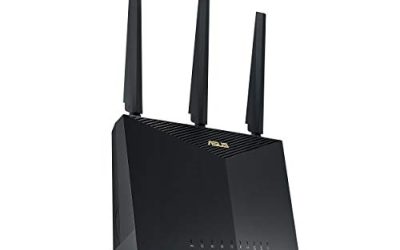
1. ASUS RT-AX86U Pro — High-Capacity Router for Busy Viewing Households
The ASUS RT-AX86U Pro is a dual-band Wi-Fi 6 router in the AX5700 class, delivering up to 5700 Mbps combined according to its product information, with 4804 Mbps on the 5 GHz band in the manufacturer’s breakdown for this class. It runs on a 2.0 GHz quad-core processor with 1 GB of memory, a combination aimed at households where many devices are active at once. For streaming, that processing headroom supports multiple simultaneous high-resolution streams alongside calls, downloads, and gaming traffic without the router itself becoming the bottleneck.
- Model: ASUS RT-AX86U Pro
- Link: https://www.amazon.com/dp/B0BQ417K47
- Wireless standard: Wi-Fi 6, dual-band, 802.11ax with earlier standards supported
- Speed class: AX5700, listed data transfer rate 5700 Mbps
- Processor and memory: 2.0 GHz quad-core processor, 1 GB RAM, 256 MB flash storage in the manufacturer’s specification summary
- Ports: six ports in the product information, including a 2.5 Gbps WAN/LAN port, standard gigabit LAN ports, USB 3.2 Gen 1 and USB 2.0
- Features: AiMesh compatible, AiProtection Pro network security, gaming port and mobile game mode, QoS, guest mode, parental controls, VPN support, WPA3
- Control: ASUS Router app and touch controls listed in the product information
- Included in the box listing: RT-AX86U Pro router, power adapter, RJ-45 cable, quick start guide, and warranty card
For multi-device streaming, the wide 5 GHz capacity is the main attraction. Several televisions and streaming boxes can share the band while the router’s MU-MIMO capability serves them in parallel, and the 160 MHz channel support in this class helps compatible devices sustain high throughput in the same room or the next one over. The AiProtection Pro security runs without a separate subscription arrangement described as subscription-free in the listing title, which keeps the ongoing setup simple for a family network.
The wired side is unusually complete. The 2.5 Gbps port can serve as a fast internet connection where service supports it, or as a fast link to a wired media server or a main television area switch. The dedicated gaming port is relevant in mixed households: when a console or gaming computer shares the network with several streams, prioritising that one wired device helps keep interactive traffic responsive while video continues elsewhere.
AiMesh compatibility adds a growth path. If a far bedroom screen still struggles because of distance rather than capacity, a compatible ASUS unit can extend the same network later, while this router remains the centre. That is an expansion option, not a requirement — in apartments and medium homes the RT-AX86U Pro is intended to carry the streaming load on its own.
Who should choose it: households with several screens playing at once, especially where gaming, video calls, and large downloads share the same evening network. Its processor, memory, and port selection suit a home that treats the router as long-term infrastructure.
Limits to keep in mind: it is a dual-band design, so there is no separate 6 GHz band for the newest devices, and its gaming-oriented styling and feature set are more than a light streaming household needs. Buy it for capacity and longevity, not for appearance.
2. NETGEAR Nighthawk RAX50 — Six Streams and Broad Coverage for Family Streaming
The NETGEAR Nighthawk RAX50 is a Wi-Fi 6 router in the AX5400 class, built around six wireless streams. NETGEAR’s product information describes dual-band wireless speed up to 5.4 Gbps, coverage up to 2,500 square feet, and support for up to 25 devices. That combination maps directly onto the family streaming pattern: a main television, a second screen, tablets, and phones, plus the background devices every modern home accumulates.
- Model: NETGEAR Nighthawk RAX50
- Link: https://www.amazon.com/dp/B082X17B8P
- Wireless standard: Wi-Fi 6, dual-band
- Speed class: AX5400, up to 5.4 Gbps combined
- Streams: six Wi-Fi streams
- Coverage and capacity in product information: up to 2,500 square feet and up to 25 devices
- Internet compatibility: designed for internet plans up to 1 Gbps, works with cable, satellite, fibre, and DSL service through a separate modem where one is required
- Features: NETGEAR Armor network protection, Smart Parental Controls, guest Wi-Fi, VPN support, voice control compatibility with Amazon Alexa and Google Assistant
- Control: Nighthawk app for setup, speed checks, remote access, and pausing the internet
- Model number in product information: RAX50-100NAS
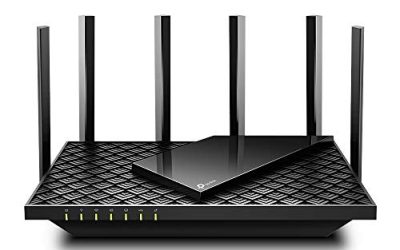
Six streams is the specification to notice. Compared with four-stream designs, the RAX50 can maintain more simultaneous wireless conversations, which is precisely what an evening of parallel streaming asks for. NETGEAR describes the model as providing several times more network capacity than the previous Wi-Fi 5 generation, and in practical terms that capacity shows up as streams that start promptly and hold their resolution when another room joins in.
Coverage is the second strength. A stated area of up to 2,500 square feet covers many single-family homes from one central position, subject to the usual limits of walls and construction materials. For streaming, honest placement still matters: central, elevated, and clear of obstructions will come closer to that figure than a corner of the basement ever will.
The Nighthawk app simplifies the parts families actually touch — setup, checking the connection speed, seeing which devices are connected, and pausing access. Smart Parental Controls and a guest network help separate children’s devices and visitors from the main streaming network, and NETGEAR Armor adds a protection layer across connected devices.
Who should choose it: families whose main problem is several screens across a medium or larger home, rather than extreme wired performance. Its balance of stream count, coverage, and app simplicity suits a household that wants to set the router up once and think about it rarely afterward.
Limits to keep in mind: its stated device capacity and coverage are lower than the raw throughput figures of the ASUS pick above might suggest for very large homes, and homes with internet service faster than gigabit, or with a wired media server at the centre, may prefer the multi-gig port on the other pick. Within gigabit-service family homes, the RAX50 is squarely in its element.
Head-to-Head: Which Router Fits Your Streaming?
Choose the ASUS RT-AX86U Pro if your network mixes streaming with gaming, calls, and heavy downloads, if you want the stronger processor and memory, or if a 2.5 Gbps port and AiMesh expansion matter for the next few years. Choose the NETGEAR Nighthawk RAX50 if your priority is several family screens spread across the home, you value its six-stream design and stated coverage, and you prefer the Nighthawk app’s straightforward day-to-day controls.
Both routers are dual-band Wi-Fi 6 models with gigabit-class wired networking, guest access, current security options, and app-based management. Neither can exceed the speed of the internet service entering the house, and both reward sensible placement and one or two wired screens. The difference is emphasis: ASUS leans toward processing power and wired flexibility, NETGEAR toward stream count and whole-home coverage for a family of viewers.
Verdict
For multiple streaming devices, look past the largest number on the box and count streams, check MU-MIMO and OFDMA support, confirm the processor can handle a busy evening, and wire the screens you can. The RT-AX86U Pro is the capacity pick for demanding mixed households, and the Nighthawk RAX50 is the coverage pick for families spreading several streams across the home. Either one, placed well and kept current, turns an evening of competing screens into what it should be: several people watching what they want, at the same time, without negotiating over the network.
FAQ
Head-to-Head: Which Router Fits Your Streaming?
Related guides
More from Amazon
Programs that pair well with the guide above. Offers and eligibility are set by Amazon and may change.
A free business account with business pricing and bulk-buying tools for work, shop or home office.
Create a business accountFree shipping on eligible items, Prime Video and more. Eligible new members can start with a free trial.
Start a Prime free trialAudiobooks and podcasts to listen to on the go. Eligible new members can start with a free trial.
Try Audible freeAd-free music streaming. Eligible new subscribers can start with a free trial.
Try Music Unlimited freeAs an Amazon Associate we earn from qualifying purchases.