As an Amazon Associate I earn from qualifying purchases. This post may contain affiliate links at no extra cost to you.
Cutting plastic on a scroll saw is a different problem from cutting wood. Plastic softens and melts when the blade runs too fast or lingers in the cut, so an edge that should come out smooth comes out gummed up, wavy, or chipped instead. The real decision is not how much power you can buy but how slowly and steadily the saw can run while you feed acrylic, polycarbonate, or thin sheet stock through it without heat building up in the kerf. A saw that holds a low, steady speed matters more than raw power here.
This guide is for hobbyists and small-shop makers who cut acrylic signs, polycarbonate panels, plastic model parts, and thin sheet goods, and who want clean edges without switching tools for every material. The four saws below were selected from Amazon listings, using the titles and specifications shown on each product page, with a focus on variable speed, throat depth, and blade options that suit plastic.
Quick Picks
As an Amazon Associate we earn from qualifying purchases.
Heat is the enemy when a scroll saw meets plastic. A blade that moves too fast rubs the kerf walls, softens the material, and leaves a melted ridge that is hard to clean up. Look for a saw whose lowest speed sits near 400 strokes per minute, because that slow end is where acrylic and polycarbonate cut cleanly instead of gumming up. A wide speed range matters too: you want to start slow on thin sheet, then raise the speed slightly for thicker stock without jumping straight to a melting pace. Check that the speed control is easy to reach and adjust while the saw runs, so you can react the moment a cut starts to drag.
Throat Depth and Table Support
Throat depth decides how large a plastic panel you can turn through the blade. A 16-inch saw handles most sign blanks, model parts, and small panels, while a 20-inch saw gives you room to rotate larger acrylic sheets without hitting the arm. The table matters just as much: plastic sheet flexes and vibrates, so a flat, stable table keeps the workpiece level and the cut line true. A larger table supports the sheet on both sides of the blade, which stops the far edge from drooping and snagging mid-cut. If you cut panels wider than the table, plan for roller support or an outfeed surface before you start.
Blade Options for Plastic
Blade choice decides whether plastic cuts cleanly or melts onto the teeth. Fine-tooth blades with a high tooth count take small bites, which keeps friction low and the edge smooth, while coarse blades grab and chip brittle acrylic. Pinless blades open up the widest choice of tooth patterns for thin material, and a saw that accepts both pinned and pinless blades gives you more options without buying another machine. Skip spiral blades for plastic sheet: they cut in every direction and can wander on a straight line. Keep a few blade types on hand, test each one on a scrap offcut first, and change the blade as soon as the cut starts to drag or smell hot.
Vibration, Dust, and Work Light
A scroll saw that shakes will chip plastic edges no matter how good the blade is. A heavier saw body and a solid bench mount absorb vibration, so the workpiece stays put and the cut line stays smooth. Plastic dust is another problem: fine chips and dust collect under the table and around the blade, and a dust port that connects to a shop vacuum keeps the cut line visible. A built-in work light helps just as much, because a shadowed cut line on clear acrylic is easy to lose. Check that the dust blower or port is easy to clear, since packed dust around the blade adds friction and heat to the next cut.
The 4 Best Options
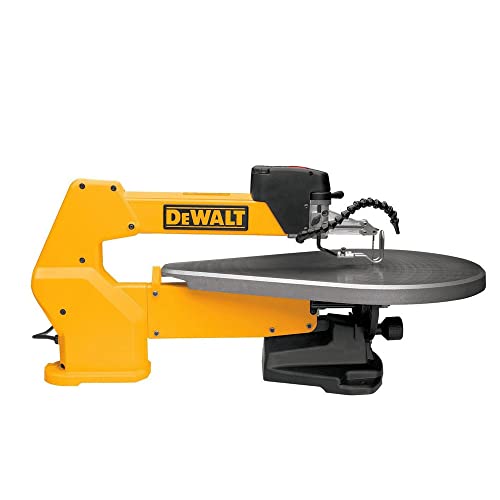
DEWALT DW788 20-Inch Scroll Saw
Top Pick
DEWALT DW788 20-Inch Scroll Saw
Best for: Large acrylic panels and long, steady cuts.
20-inch throat
1.3 amp motor
Variable speed from 400 to 1,750 strokes per minute
The DW788 suits makers who cut large acrylic panels and want room to turn the sheet without repositioning it. Its 20-inch throat handles sign blanks and panels that would crowd a smaller saw, and the parallel-link arm design keeps the blade moving in a steady up-and-down stroke, which helps keep the cut smooth on plastic. The speed range runs from 400 to 1,750 strokes per minute, so you can drop to the slow end where plastic cuts cleanly instead of melting. The 1.3 amp motor drives that range without forcing you to push the workpiece, and the variable speed control lets you adjust on the fly.
Watch out for: Check the blade type before cutting plastic; a coarse wood blade can chip brittle acrylic.
WEN 3921 16-Inch Scroll Saw
Runner-Up
WEN 3921 16-Inch Scroll Saw
Best for: Everyday plastic sheet work on a smaller bench.
16-inch throat
Variable speed from 550 to 1,600 strokes per minute
The WEN 3921 is a practical pick for everyday plastic sheet work on a smaller bench. Its 16-inch throat covers most sign blanks, model parts, and thin panels, and the speed range of 550 to 1,600 strokes per minute reaches low enough to cut acrylic without building up the heat that melts edges. It accepts both pinned and pinless blades, so you can switch to a fine-tooth pinless blade for thin plastic without changing machines. The built-in work light keeps the cut line visible on clear sheet, which matters when the line is hard to see against a bright table.
Watch out for: The lowest speed is 550 strokes per minute, so test thin acrylic on a scrap piece first.
WEN 3922 16-Inch Scroll Saw
WEN 3922 16-Inch Scroll Saw
Best for: Frequent blade changes between plastic types.
The WEN 3922 fits makers who switch between plastic types in one session and want blade changes to stay quick. Its 16-inch throat suits the same sign blanks and panels as other saws in this size, and the variable speed control lets you slow down for thin acrylic and speed up slightly for thicker stock. The quick blade change design shortens the pause between a fine-tooth blade for thin sheet and a different tooth pattern for thicker material, so you spend less time fiddling with the saw and more time cutting. It is a straightforward bench saw for plastic work that does not need a large footprint.
Watch out for: Confirm the speed range and blade options on the listing before buying, since the listing gives fewer details than the other picks here.
Delta 40-694 20-Inch Scroll Saw
Delta 40-694 20-Inch Scroll Saw
Best for: Big workpieces that need a stable cast iron table.
20-inch throat
Variable speed from 400 to 1,750 strokes per minute
The Delta 40-694 is the pick for large workpieces that need a stable table under them. Its 20-inch throat gives you room to turn big acrylic and polycarbonate panels, and the cast iron table supports the sheet so it does not flex or vibrate while you cut. The speed range runs from 400 to 1,750 strokes per minute, matching the slow end that keeps plastic from melting, and the variable speed control lets you tune the pace to the thickness in front of you. A five-year warranty backs the saw, which is worth weighing if it will see regular use in a busy shop.
Watch out for: Confirm the model and listing details before buying, since the ASIN listing needs a live check to confirm the exact configuration.
Which One Fits Your Situation
Cutting Acrylic Signs and Letters
Choose the DEWALT DW788 when your work is mostly acrylic signs and letters. The 20-inch throat turns large blanks without crowding, and the low end of its 400 to 1,750 strokes-per-minute range keeps edges clean instead of melted. The steady parallel-link stroke helps on long straight cuts and tight curves alike, so lettering comes out smooth with less sanding afterward.
Working in a Small Shop or Garage Corner
Pick the WEN 3921 when bench space is tight. The 16-inch throat still covers most sign blanks and model parts, and the work light keeps the cut line visible in a dim corner. Its pinned and pinless blade options let you fit a fine-tooth blade for thin plastic without buying a second saw, which keeps both the bench and the budget under control.
Switching Between Plastic Types in One Session
Go with the WEN 3922 when a session jumps between acrylic, polycarbonate, and thin sheet stock. The quick blade change design shortens the swap between tooth patterns, and the variable speed control lets you slow down for thin material and speed up slightly for thicker pieces. That combination keeps a mixed-material afternoon moving instead of stalling at every blade change.
Cutting Large Polycarbonate Panels
Take the Delta 40-694 for large polycarbonate panels that need real support. The 20-inch throat gives you room to rotate the sheet, and the cast iron table holds it flat so the cut stays true from edge to edge. Its speed range reaches down to 400 strokes per minute, which keeps heat low on long cuts through thicker panels.
Safety Tips for Cutting Plastic
Wear safety glasses and a dust mask every time the saw runs: plastic chips fly fast, and fine dust from acrylic and polycarbonate irritates lungs. Work with ventilation or a dust extractor, since overheated plastic can give off fumes you should not breathe. Keep your fingers clear of the blade path and use a push stick or hold-down for small pieces. Unplug the saw before changing blades or clearing packed dust, and stop the moment a cut starts to smell hot or the blade drags — a melted kerf is a sign to slow down, change the blade, or let the material cool.
Common Mistakes
Running the saw at full speed on plastic, which melts the kerf and leaves a rough, gummy edge.
Using a coarse wood blade on brittle acrylic, which chips the edge instead of cutting it cleanly.
Forcing the workpiece through the blade, which builds heat and bends the blade off the cut line.
Skipping a test cut on a scrap offcut, so the first real piece becomes the experiment.
Letting dust pack around the blade, which adds friction and heat to every cut that follows.
Frequently Asked Questions
Can a scroll saw cut acrylic without melting it?
Yes, when the speed stays low and the blade stays sharp. Run the saw near the bottom of its speed range, use a fine-tooth blade, and feed the acrylic steadily without pausing in the cut. If the edge starts to look cloudy or gummy, slow down, change to a finer blade, or let the material cool before continuing.
What blade should I use for plastic?
Use a fine-tooth blade with a high tooth count for thin plastic sheet, and a pinless blade when your saw accepts one, since pinless blades offer more tooth patterns for thin material. Skip coarse wood blades and spiral blades for sheet plastic: coarse teeth chip brittle acrylic, and spiral blades wander on straight cuts. Test the blade on a scrap piece first.
What speed should I use for plastic?
Start near the bottom of your saw’s speed range, around 400 to 550 strokes per minute for thin acrylic, then raise the speed slightly for thicker stock if the cut stays clean. Watch the edge as you go: a smooth edge means the pace is right, while a melted or cloudy edge means you should slow down or switch to a finer blade.
Can I use the same scroll saw for wood and plastic?
Yes. A variable-speed scroll saw handles both materials, as long as you change the blade and the speed to match what you are cutting. Use a fine-tooth blade and a slow speed for plastic, then switch to a wood blade and a faster speed for wood. Clean the table and clear packed dust between materials so plastic chips do not scratch the next piece.
J
JD's Woodworks Editorial Team
We compare specs, warranty terms, long-term owner feedback and street pricing before anything earns a spot. Rankings are never paid.
Affiliate disclosure. As an Amazon Associate we earn from qualifying purchases at no extra cost to you. Prices accurate as of the date shown.
Table saws under the 1500 mark compared: the Grizzly G0771Z and Shop Fox W1837 hybrid saws with cast iron tables, 2 HP motors and T-square fences, specs from their listings.
Table saws for fine woodworking compared: the SawStop Professional Cabinet Saw and Powermatic PM1000, judged on fence precision, table flatness and vibration from listing specs.
Table saw combos explained: saws sold with a stand and accessories in one listing, what to check in the box, and which bundle fits your shop or jobsite.
Compare the best planer digital thickness gauges and digital readout kits for portable planers, with fit, resolution and mounting checks before you buy.
Model table saws for scale modelling and hobby work compared: the precision Proxxon FET 37070 and the compact Saker mini table saw, with specs taken from their Amazon listings.
Three CoreXY 3D printers for product development, each with the architecture stated on its listing: an enclosed multicolor machine, a large-format enclosed model and a heated-chamber model.


 Delta 40-694 20-Inch Scroll Saw









