
What's inside
As an Amazon Associate I earn from qualifying purchases. This post may contain affiliate links at no extra cost to you.
For most people, the best CNC machine for home use is the Shapeoko 5 Pro in a size that fits your workbench; choose the Onefinity Elite for a quieter, more rigid router-based setup, the Genmitsu 4040-PRO for a lower-cost entry point, or the Carvera Air when enclosure, compactness, and automatic tool changing matter more than cutting area.
A home CNC decision is less about maximum travel and more about whether the machine fits the room, power circuit, dust-control plan, and your willingness to learn CAD/CAM software. The table below compares practical ownership factors rather than just advertised work area.
| Machine | Approx. usable cutting area | Typical machine footprint | Noise and dust | Best home use |
|---|---|---|---|---|
| Genmitsu 4040-PRO | About 15.7 × 15.7 × 3.0 in | About 24 × 23 in | Open frame; router and vacuum are loud | Small signs, templates, and occasional projects |
| Carvera Air | About 12 × 11.8 × 2.4 in | About 28 × 20 in | Enclosed; materially easier to contain chips and sound | Apartment-friendly small work and mixed materials |
| Shapeoko 5 Pro, standard size | About 33 × 33 × 4 in | Roughly 50 × 50 in | Open frame; router noise requires hearing protection and extraction | Furniture parts, signs, trays, and regular woodworking |
| Onefinity Elite, 32 × 32 class | About 32 × 32 × 4.5 in | Roughly 44 × 44 in, plus controller space | Open frame; spindle option is quieter than a trim router | Frequent cutting where rigidity and upgradeability matter |
| X-Carve Pro, 4 × 2 class | About 48 × 24 in | Approximately 70 × 45 in | Open frame; substantial dust extraction recommended | Large signs, cabinet parts, and a dedicated workshop |
Dimensions are useful planning figures, not a promise that every model year or configuration has identical specifications. Leave room for cables, material loading, emergency access, and the dust hose when measuring your room.
As an Amazon Associate we earn from qualifying purchases at no extra cost to you.
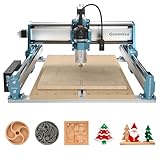


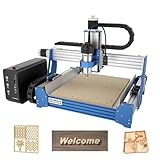
Best choices by situation
Best all-around wood CNC machine for home use: Shapeoko 5 Pro
The Shapeoko 5 Pro is a strong general-purpose choice because it offers useful cutting area without requiring the footprint of a full production machine. Its aluminum construction, supported rails, spoilboard system, and established Carbide 3D software ecosystem make it approachable for a first serious CNC.
It is particularly suitable for hardwood signs, boxes, relief carvings, joinery experiments, and furniture components. The open frame is also easy to repair and inspect. The tradeoff is noise: a router can produce roughly 85–95 dBA near the machine, depending on the bit, material, and speed. A shop vacuum adds more noise, so this is not a good choice for a bedroom, shared wall, or late-night operation.
Best for rigidity and frequent use: Onefinity Elite
The Onefinity Elite is appealing when you expect to use the machine several times a week and want a rigid, modular platform. Its rail-based design and controller options suit users who may later add a spindle, larger spoilboard, or rotary accessory. A spindle can reduce the high-pitched sound of a router, although cutting remains audible and dust extraction is still essential.
The Onefinity requires more deliberate setup than a small desktop CNC. You need a level, sturdy table, accurate squaring, and a sensible cable-management plan. It is a good fit for a garage or dedicated workshop, but its open construction does not solve household dust or ventilation by itself.
Best budget entry: Genmitsu 4040-PRO
A Genmitsu 4040-PRO-class machine makes sense for small projects and learners who want to understand workholding, toolpaths, feeds, and zeroing without committing to a large machine. Its roughly 16-by-16-inch work area handles coasters, plaques, small trays, control panels, and carving practice.
The smaller frame is easier to place, but it does not make the process quiet or clean. The supplied or compatible trim-router arrangement typically needs a dust shoe and vacuum. Budget machines also reward careful upgrades: better clamps, a flatter spoilboard, a more reliable touch probe, and improved cable routing can matter more than chasing a faster feed rate.
Best for an enclosed indoor setup: Carvera Air
The Carvera Air is a different kind of home CNC. Its enclosure helps contain chips and lowers perceived noise, while its compact work envelope favors small, detailed work. Automatic tool-changing capability and support for several materials reduce interruptions once the workflow is configured.
Its limitations are equally important: the cutting area is much smaller than a Shapeoko or Onefinity, and large furniture panels are out of scope. Enclosure fans and filtration are not a substitute for safe material choices or good ventilation. Avoid cutting unknown plastics, composites, or materials that may release hazardous dust or fumes.
How much room does a home CNC actually need?
Do not size the room from the cutting area alone. A practical planning formula is:
Required bench length = machine length + 12 inches for cables and access.
Required bench depth = machine depth + 12–18 inches for the dust hose and loading material.
For a machine occupying approximately 50 × 50 inches, that means planning roughly 62 × 68 inches before adding a vacuum. A compact 24 × 23-inch machine may still need a 36 × 36-inch operating zone. Keep at least 24 inches of accessible space on the side where you load stock, and do not place the emergency stop behind stored materials.
Full-sheet work is a separate problem. A 4-by-8-foot sheet cannot be safely supported by a small benchtop machine merely because the toolpath can be tiled. You need a rigid, flat support table, registration pins or a reliable indexing method, and enough clearance to handle the sheet without striking walls or shelves.
Noise, dust, electrical needs, and ventilation
- Noise: The cutting motor is only part of the sound. A router, vacuum, compressed-air blast, and vibration from an unstable table can combine into a loud setup. Hearing protection is sensible in any open-frame installation.
- Dust: A dust shoe connected to a high-airflow shop vacuum is the minimum practical arrangement for wood. A cyclone separator reduces filter loading and preserves suction.
- Electrical: Most hobby machines use ordinary household power, but the router and vacuum may draw from the same circuit. A typical 15-amp circuit can become crowded when a roughly 10-amp router and a powerful vacuum start together. Check nameplates, avoid daisy-chained extension leads, and use a dedicated circuit where possible.
- Ventilation: Wood dust should be captured at the cutter, not simply blown around the room. An open window does not replace extraction. Enclosed machines still need appropriate ventilation, especially for plastics, resins, painted stock, or unknown materials.
Software learning curve and ownership cost
Most home CNC workflows have four stages: draw or import geometry, create CAM toolpaths, send the job to the controller, and set work zero. Carbide 3D’s software is relatively approachable for Shapeoko owners. Onefinity users commonly choose software such as Carbide Create, Vectric products, or other compatible CAM programs. Smaller machines may be bundled with basic senders, but a bundled program is not necessarily the easiest long-term design tool.
A realistic first-project budget includes more than the machine. Allow roughly $100–$300 for bits, clamps, spoilboard material, a touch-probe solution or measurement tools, and workholding. Add approximately $150–$500 for dust extraction and separation, depending on what you already own. A spindle, enclosure, rotary axis, or premium CAM subscription can increase the total considerably.
For example, suppose a $1,500 machine and $300 of accessories produce 60 useful projects over two years. The equipment portion is $30 per project before electricity, material, and bits. If you use it for only ten projects, the same equipment costs $180 per project. This is why a smaller machine can be the better purchase for occasional users, even when a larger model offers more capability.
Decision matrix: which CNC fits your situation?
| Your situation | Most suitable choice | Why |
|---|---|---|
| Under roughly $1,000, small projects, beginner | Genmitsu 4040-PRO class | Lower entry cost and manageable work area; expect more manual setup |
| Regular woodworking, medium-sized parts, garage or workshop | Shapeoko 5 Pro | Good balance of area, support, software, and upgrade options |
| Frequent use and interest in a spindle | Onefinity Elite | Rigid platform with a strong path for refinement and expansion |
| Apartment or indoor room, small detailed projects | Carvera Air | Enclosure and compact footprint reduce—but do not eliminate—mess and noise |
| Large signs, cabinet parts, dedicated shop | X-Carve Pro 4 × 2 class | More useful sheet capacity, but it needs substantial floor and extraction space |
Setup and maintenance that prevent common failures
- Level and square the machine. A twisted frame produces inconsistent depths across a board, so verify diagonals and tram the router or spindle.
- Surface the spoilboard. A shallow surfacing pass creates a known plane. Recheck it whenever the machine is moved.
- Secure the stock mechanically. Loose work can damage the cutter, machine, and operator. Keep clamps below the toolpath and use screws, tape, or a vacuum table where appropriate.
- Calibrate motion and depth. Confirm travel, steps, probe offsets, and tool-length measurements before cutting expensive material.
- Clean after every session. Vacuum rails, screws, belts, and electronics openings. Do not let resinous dust accumulate around bearings or cooling vents.
- Replace consumables early. Dull bits burn wood and overload motors. Inspect collets, spoilboard fasteners, belts, V-wheels, and dust-shoe brushes periodically.
The most common beginner mistake is choosing the largest machine that fits on paper, then discovering that the vacuum, stock, noise, and software consume the room and the budget. For most homes, a well-supported mid-size CNC with disciplined dust control is more useful than a larger machine that is difficult to run safely. Choose the work envelope you will use repeatedly, reserve space for the entire workflow, and treat extraction and workholding as part of the machine purchase rather than optional accessories.