5 Best Bambu Lab 3D Printers for Makers (November 2026)
Compare five Bambu Lab 3D printers for home workshops, from the enclosed P1S Combo to the compact A1 mini Combo, and pick the model that fits your space.
Compare five Bambu Lab 3D printers for home workshops, from the enclosed P1S Combo to the compact A1 mini Combo, and pick the model that fits your space.
As an Amazon Associate I earn from qualifying purchases. This post may contain affiliate links at no extra cost to you.
Choosing a Bambu Lab printer comes down to two questions: how much room do you have, and how often will you print in more than one color. The brand’s lineup looks simple at first glance — a handful of models with similar names — but the differences that matter are the build style, whether an AMS multi-material unit is bundled, and how much desk space the machine needs. Get those three right and the rest mostly takes care of itself.
This roundup covers five Bambu Lab printers sold on Amazon, from the compact A1 mini Combo to the enclosed P1S Combo and the newer P2S Combo. Every pick below is a printer from Bambu Lab’s own lineup, chosen from the model names and bundle details on each Amazon listing, so you can compare enclosed and open-frame machines side by side and match one to the work you actually plan to do in your workshop.
Quick Picks
As an Amazon Associate we earn from qualifying purchases
Product
Best for
Key spec from title
Bambu Lab P1S Combo
Enclosed multi-color printing
Enclosed printer with AMS
Bambu Lab A1
First printer, single color
Open-frame printer, no AMS
Bambu Lab A1 mini Combo
Small spaces, multi-color
Compact printer with AMS Lite
Bambu Lab P2S Combo
Newest enclosed model
Enclosed printer with AMS
Bambu Lab A1 Combo
Open-frame multi-color
Open-frame printer with AMS Lite
How to Choose
Enclosed or open frame
An enclosed printer keeps heat and drafts away from the print, which matters most when you print materials that warp as they cool. The P1S Combo and the P2S Combo both use an enclosed frame, so they suit a garage or a cool room where drafts are a real problem. Open-frame machines such as the A1 and the A1 Combo are easier to reach into, simpler to maintain, and fine for everyday materials in a stable indoor room. If your workshop temperature swings with the seasons, lean enclosed; if you print common filaments in a heated room, an open frame saves money and hassle.
AMS or single material
The AMS is what lets a Bambu Lab printer switch between colors or materials mid-print without you standing over the machine. Combo models bundle one in: the P1S Combo and P2S Combo carry the full AMS, while the A1 mini Combo and A1 Combo carry the lighter AMS Lite. If most of your prints are one color, the plain A1 does the same core job for less, and you can add multi-material printing later only by moving to a Combo model. Buy the AMS up front if color changes are part of your plans from day one, because it is a bundle choice rather than an add-on.
Desk space and build area
Measure the desk before you buy, then measure it again with the filament spools and the AMS in mind, because the printer is only part of the footprint. The A1 mini Combo is the smallest machine here and fits a crowded bench, while the A1 and A1 Combo need more room and the enclosed P1S and P2S Combos need the most. Build area follows the same order: the mini handles small parts and prototypes, the full-size A1 models cover most hobby prints, and the P-series machines take the largest jobs. Match the machine to the biggest part you expect to print, not the average one.
What a higher tier buys you
Moving up the lineup buys enclosure, a bigger build area, or a bundled AMS — not a different brand of quality. The A1 is the entry point and prints the same core materials as its bigger siblings; the A1 Combo adds multi-color printing; the P1S Combo adds an enclosed chamber for trickier materials; the P2S Combo is the newest enclosed option. Spend more only when you can name the feature you need — enclosure for warp-prone prints, AMS for color, size for large parts. A feature you cannot name is a feature you will not miss, and the money is better kept for filament.
The 5 Best Options
Bambu Lab P1S Combo
Top Pick
Bambu Lab P1S Combo
Best for: Makers who print often and want enclosed, multi-color printing without manual filament swaps.
Model: P1S Combo
Configuration: enclosed printer bundled with AMS multi-material unit
Frame: enclosed chamber for draft and temperature control
Note: the standalone P1S is a variant of this same listing — confirm the Combo bundle on the product page
The P1S Combo is the enclosed workhorse of this roundup, pairing a closed chamber with the full AMS so multi-color prints run without babysitting. It suits a maker who prints often, works in a cool or drafty space, and wants color changes to happen on their own. The enclosed frame also helps with materials that shrink or warp in open air, which makes it the most versatile printer here for someone building a small print farm or a serious hobby setup. Its only real demand is space: the enclosure and the AMS need a bench that can hold both without crowding the work around them.
Watch out for: It needs the most bench space of the five; check the listing shows the Combo with AMS before ordering.
Bambu Lab A1
Runner-Up
Bambu Lab A1
Best for: First-time buyers who want a straightforward single-color printer.
Model: A1
Configuration: open-frame printer, single material out of the box
Frame: open bed-slinger design for easy access
AMS: not included — multi-color printing needs a Combo model
The A1 is the simplest way into Bambu Lab printing: an open-frame machine that does one material at a time and does it well. It suits a first-time buyer who wants reliable prints without paying for features they may never use, and it is the easiest of the five to reach into for maintenance. Single-color printing covers most practical parts, replacement pieces, and prototypes, so the plain A1 is enough for a large share of home workshops. If color printing becomes a priority later, the upgrade path is a Combo model rather than an add-on, so think ahead before settling on this one.
Watch out for: No AMS is bundled, so multi-color prints need a different model.
Bambu Lab A1 mini Combo
Bambu Lab A1 mini Combo
Best for: Small desks and small parts where multi-color printing still matters.
Model: A1 mini Combo
Configuration: compact printer bundled with AMS Lite
Frame: open bed-slinger design, smallest footprint here
The A1 mini Combo shrinks the A1 idea down to a bench-friendly size and adds the AMS Lite, so small multi-color prints are possible in very little space. It suits a crowded desk, a classroom corner, or a maker who prints small parts and figurines rather than large functional pieces. The compact frame is also the least intimidating machine here for a beginner, and the bundled AMS Lite means color printing is available from the first day. Its limit is size: anything larger than a small part needs one of the full-size models, and that limit will not change with settings.
Watch out for: The build area is the smallest here — large prints will not fit.
Bambu Lab P2S Combo
Bambu Lab P2S Combo
Best for: Buyers setting up fresh who want the current enclosed model with AMS.
Model: P2S Combo
Configuration: enclosed printer bundled with AMS multi-material unit
Frame: enclosed chamber for draft and temperature control
The P2S Combo is the newest enclosed printer in this roundup, pairing a closed chamber with the full AMS in the latest P-series package. It suits a buyer who wants the current generation rather than the previous one and prints often enough to use the enclosure and multi-material features. As the newest model here, it carries the least long-term track record of the five, so a cautious buyer may prefer the P1S Combo while the P2S builds its history. For a fresh setup with no existing printer, though, starting with the current model makes sense.
Watch out for: The ASIN comes from a single roundup outlink — confirm the listing on the product page before ordering.
Bambu Lab A1 Combo
Bambu Lab A1 Combo
Best for: Multi-color printing in a stable room where an enclosed chamber is not needed.
Model: A1 Combo
Configuration: open-frame printer bundled with AMS Lite
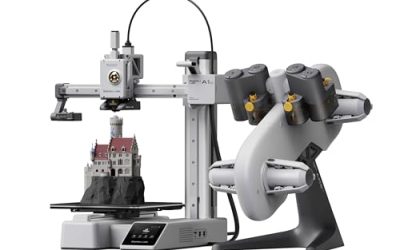
The A1 Combo takes the open-frame A1 and adds the AMS Lite, giving multi-color printing to the buyer who does not need an enclosed chamber. It suits a maker in a stable indoor room who prints in several colors but works mostly with everyday filaments that do not need draft protection. The open frame keeps maintenance simple and the machine easy to reach into, while the AMS Lite handles color changes on its own. It is the middle ground of this roundup: more capable than the plain A1, less sheltered than the enclosed Combos, and the right call for many home workshops.
Watch out for: Open-frame printing is exposed to drafts, so avoid placing it near open windows or vents.
Which One Fits Your Situation
Starting out with a first printer
The plain A1 is the right start when you have never owned a 3D printer. It prints single-color parts well, is easy to reach into, and leaves the multi-color question for later, when you know whether you actually need it. Buy the A1 Combo instead only if you already know color printing is part of your plans from the beginning.
Printing in several colors
Pick a Combo model. The P1S Combo and P2S Combo pair the full AMS with an enclosed chamber, while the A1 Combo and A1 mini Combo use the AMS Lite on an open frame. Choose enclosed when your room is drafty, open when it is stable, and the mini when space is tight.
Short on desk space
The A1 mini Combo is the only pick that truly fits a crowded bench, with the smallest footprint and the AMS Lite included. Measure the desk with the AMS Lite beside the printer, not just the printer alone, and leave room to reach the filament without moving other tools. Leave the filament path clear so swaps do not knock tools off the bench.
Wanting an enclosed machine
Choose between the P1S Combo and the P2S Combo. The P1S has the longer track record and the same enclosed-plus-AMS formula, while the P2S is the newer generation. Either one suits a cool or drafty workshop where open-frame prints would struggle with warping. Both machines use the same enclosed-plus-AMS formula, so the decision is about generation and track record rather than capability.
Common Mistakes
Buying a Combo for color printing and then never loading more than one spool.
Putting an open-frame printer beside a window or a vent and blaming the machine for warped prints.
Ordering the standalone P1S variant when the project needs the AMS bundle.
Choosing the A1 mini for large functional parts that need a full-size build area.
Ignoring bench space — the AMS and filament spools need room beside the printer, not just the printer’s own footprint.
Frequently Asked Questions
Why is the X1 Carbon not in this roundup?
The X1 Carbon has been retired and succeeded by a newer flagship, and current listings show it as discontinued. This roundup covers Bambu Lab printers still selling on Amazon, so the X1 Carbon is left out rather than listed with a dead link.
Do I need an AMS to print in more than one color?
Yes, for automatic color changes mid-print. The AMS or AMS Lite swaps filaments for you; without one, you would have to pause the print and change filament by hand. Combo models bundle the unit in, while the plain A1 prints one material at a time.
What is the difference between the A1 and the A1 mini?
The A1 mini is a smaller version of the A1 with a reduced build area and a smaller footprint. Both are open-frame printers, and both come in Combo versions with the AMS Lite. Choose the mini for small parts and tight desks, and the full-size A1 for larger prints.
Is the P2S Combo better than the P1S Combo?
It is the newer generation with the same enclosed-plus-AMS formula, so it suits a fresh setup. The P1S Combo has the longer track record and the same core capabilities. Either one works for enclosed multi-color printing; the choice is between the current model and the proven one.
J
JD's Woodworks Editorial Team
We compare specs, warranty terms, long-term owner feedback and street pricing before anything earns a spot. Rankings are never paid.
Affiliate disclosure. As an Amazon Associate we earn from qualifying purchases at no extra cost to you. Prices accurate as of the date shown.
Four hobby TIG welders compared for home shops: AC/DC picks for aluminum, a compact DC model for steel, listed specs, included gear and honest tradeoffs.
The best Creality Falcon engravers compared: Falcon A1 10W, CR-Laser Falcon 10W, Falcon2 Pro 22W and Falcon2 Pro S 40W, by power, work area and enclosure.
The best CNC machines for manufacturing compared: large-bed routers and closed-loop desktop mills with the work area, spindle and control for batch work.




 Bambu Lab P2S Combo
 Bambu Lab A1 Combo