5 Best Elegoo 3D Printers for Home Makers (November 2026)
Elegoo makes some of the most popular home 3D printers. We compare five Neptune, Saturn, and Mars models on detail, size, and ease of use for home makers.
Elegoo makes some of the most popular home 3D printers. We compare five Neptune, Saturn, and Mars models on detail, size, and ease of use for home makers.
As an Amazon Associate I earn from qualifying purchases. This post may contain affiliate links at no extra cost to you.
Elegoo has quietly become one of the most popular names in home 3D printing, and the reason is simple: the company covers the whole range, from affordable first printers to high-resolution resin machines that rival printers costing far more. Whether you print tabletop miniatures, functional parts, or prototypes for a workshop project, there is an Elegoo machine built for that job at a size and detail level that makes sense.
This guide compares five Elegoo printers across the Neptune, Saturn, and Mars lines, chosen from the models and specifications listed on their Amazon pages. Every pick below is an Elegoo 3D printer, and the guide explains which one fits your prints, your space, and your experience level. The five picks below range from an affordable first printer to the highest-resolution resin machine Elegoo sells.
Quick Picks
As an Amazon Associate we earn from qualifying purchases
Product
Best for
Key spec from title
Elegoo Neptune 4 Pro
Fast everyday FDM printing
Neptune 4 Pro FDM 3D printer
Elegoo Saturn 4 Ultra 12K
Detailed resin miniatures
Saturn 4 Ultra 12K resin printer
Elegoo Saturn 4 Ultra 16K
Highest detail resin prints
Saturn 4 Ultra 16K resin printer
Elegoo Mars 5 Ultra
Compact resin printing
Mars 5 Ultra resin printer
Elegoo Mars 5
Affordable first resin printer
Mars 5 resin 3D printer
How to Choose
Pick FDM or resin before anything else
The first decision is the printing technology, and it shapes everything after it. FDM printers like the Neptune 4 Pro melt plastic filament layer by layer, which suits functional parts, brackets, and large objects. Resin printers like the Saturn and Mars lines cure liquid resin with light, which captures far finer detail for miniatures, jewelry, and dental models. Resin needs ventilation, gloves, and a wash-and-cure routine, while FDM needs little more than a spool and a flat surface. Choose the technology that matches what you actually print. Resin smells stronger and needs gloves, while filament printing needs little more than a spool.
Match resolution to the detail you need
Resolution decides how fine a detail the printer can reproduce, and the numbers in the model names tell the story. A 12K resin printer captures crisp edges on a 28-millimeter miniature, while a 16K machine goes further for display pieces and fine textures. For functional brackets and workshop jigs, that extra resolution buys nothing visible. Spend on resolution when your prints are judged by eye at close range, and spend on build volume instead when your prints are judged by fit and strength. A larger screen also means fewer seams when a big model prints in one piece.
Check build volume against your largest print
Build volume is the maximum size of a single object, and it is the hardest limit to work around. A compact Mars printer handles miniatures and small parts beautifully but cannot print a helmet or a large vase in one piece. A Neptune FDM machine or a Saturn resin machine gives you room for bigger objects without splitting them into sections. Measure the largest thing you plan to print, then buy the volume that covers it with a little room to spare. Splitting a model into sections adds assembly time and visible seams, so volume matters.
Count the work after the print finishes
A printer’s real cost includes the steps after the print ends. Resin prints need washing, curing, and safe handling of liquid resin, which adds a wash station, a cure station, and consumables to the setup. FDM prints need support removal and sometimes sanding, but the workflow is simpler and the materials are easier to store. Be honest about how much post-processing you will actually do, because a printer that demands a routine you skip will sit unused. A wash station and a cure station turn that routine into a quick, repeatable habit.
The 5 Best Options
Elegoo Neptune 4 Pro
Top Pick
Elegoo Neptune 4 Pro
Best for: Functional parts, brackets, and prototypes where strength and size matter more than microscopic detail.
The Neptune 4 Pro is the FDM pick of this group, and it suits makers who print functional parts rather than display miniatures. It melts filament layer by layer, which makes it the right tool for brackets, enclosures, workshop jigs, and prototypes that need to hold up under use. FDM printing is also the friendliest starting point: the materials are easy to store, the workflow needs little post-processing, and a failed print costs a few grams of filament rather than a resin cleanup session. It also handles large prints that resin machines cannot fit in one piece.
Watch out for: FDM layer lines are visible on curved surfaces, so it is not the choice for display miniatures that need a smooth finish.
Elegoo Saturn 4 Ultra 12K
Runner-Up
Elegoo Saturn 4 Ultra 12K
Best for: Tabletop miniatures and detailed models where fine edges and textures matter.
The Saturn 4 Ultra 12K is the detail pick for miniature painters and model makers, and its 12K resolution is the reason. Resin printing captures edges, textures, and fine features that FDM cannot approach, and the Saturn’s build volume is large enough for a full squad of miniatures or a display piece in a single print. It sits in the middle of the Saturn line, which makes it the balanced choice: more detail than the smaller Mars machines, without the premium attached to the 16K model. The larger build area also suits batch printing for a whole gaming table.
Watch out for: Resin printing needs ventilation, gloves, and a wash-and-cure routine, so budget for the post-processing setup.
Elegoo Saturn 4 Ultra 16K
Elegoo Saturn 4 Ultra 16K
Best for: Display pieces and fine-detail work where the highest resolution pays off.
The Saturn 4 Ultra 16K is the highest-detail printer in this guide, and it exists for makers whose prints are judged at close range. The 16K resolution captures finer detail than the 12K model, which shows on display pieces, jewelry masters, and highly textured models. It shares the Saturn line’s generous build volume, so large detailed prints come out in fewer pieces. For most hobbyists the 12K model is enough, but if your work lives under a magnifier or in a display case, the extra resolution is visible. For jewelry masters and display models, that extra resolution is easy to see.
Watch out for: Use the US listing for this model; a different code circulates for the Indian marketplace and is not the US listing.
Elegoo Mars 5 Ultra
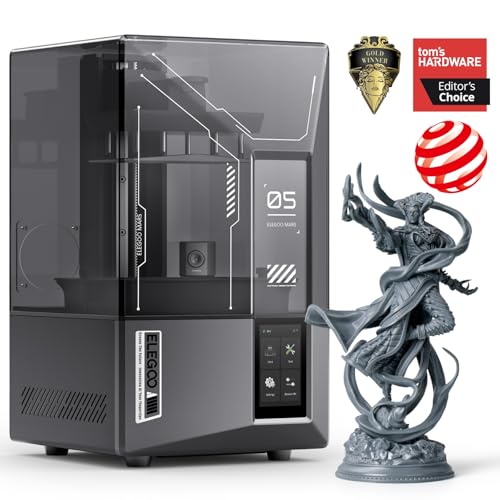
Elegoo Mars 5 Ultra
Best for: Small detailed prints in a compact space, from miniatures to jewelry.
The Mars 5 Ultra is the compact resin pick, built for makers who want resin detail without a large machine on the bench. It captures the fine detail that makes resin printing worth the effort, in a smaller footprint that fits a crowded desk or a shared workshop. It is the right size for miniatures, small parts, and jewelry, and its lower resin consumption per print keeps running costs down. If your prints are small and your space is smaller, this is the Saturn’s little sibling done right. Its smaller resin vat also means less resin wasted on a single small print.
Watch out for: The build volume is smaller than the Saturn line, so large objects will need to be split into sections.
Elegoo Mars 5
Elegoo Mars 5
Best for: A first resin printer, or a compact second machine for small jobs.
The Mars 5 is the entry point to resin printing, and it makes the most sense for a first resin machine. It delivers the core resin experience, fine detail and smooth surfaces, at the most accessible position in the Mars line. A beginner can learn the wash-and-cure routine on this machine without a large investment, and the skills transfer directly to a bigger Saturn later. Its low running cost also makes it cheap to keep experimenting with new resins. It is also the right pick for a second printer dedicated to small jobs while a larger machine handles the big ones.
Watch out for: The smaller build volume limits single-piece size, so plan to split larger models or step up to a Saturn.
Which One Fits Your Situation
First 3D printer ever
If you have never owned a printer, the Neptune 4 Pro is the easiest start: filament printing is forgiving, the materials store well, and a failed print costs little. The Mars 5 is the alternative if you already know you want resin detail, since it teaches the resin workflow at the lowest commitment in this guide. Either way, start with the technology that matches the objects you want to make.
Tabletop miniatures and gaming models
Resin is the only sensible choice for miniatures, and the Saturn 4 Ultra 12K is the sweet spot for most painters: enough resolution for crisp faces and textures, with a build volume that prints a whole squad at once. The Mars 5 Ultra covers the same ground in a smaller footprint when space is tight. A full build plate of miniatures prints overnight while you sleep.
Display pieces and fine detail
When a print will sit in a display case or under a magnifier, the Saturn 4 Ultra 16K earns its place with the finest detail in this guide. The 12K model is close enough for most display work, so choose the 16K when the finest textures are the whole point of the print. The 16K model earns its keep when a print will be photographed up close.
Functional parts and workshop jigs
Functional printing belongs to FDM, and the Neptune 4 Pro is the pick: strong layer adhesion, cheap materials, and a build volume that handles brackets and enclosures. Resin parts look better but stay more brittle, so keep the Neptune on the bench for anything that takes a load. A failed FDM print wastes a few grams of filament, not a resin cleanup.
Common Mistakes
Choosing resin for functional parts that need strength, when FDM would hold up far better under load.
Buying the highest resolution available when your prints are judged by fit, not by fine detail.
Ignoring build volume and discovering too late that your largest print must be split into sections.
Skipping ventilation and gloves for resin printing, which needs both from the first print.
Ordering from the wrong marketplace listing for the Saturn 4 Ultra 16K, where a different code circulates outside the US.
Frequently Asked Questions
Should a beginner start with FDM or resin?
FDM is the easier first step for most beginners: the materials are simple to store, the workflow needs little post-processing, and mistakes cost little. Resin gives finer detail but adds ventilation, gloves, and a wash-and-cure routine. Start with the Neptune 4 Pro for functional work, or the Mars 5 if you already know you want resin miniatures. Resin needs more setup, but the detail rewards the extra effort.
What does 12K or 16K mean on a resin printer?
The number describes the resolution of the screen that cures the resin, and a higher number means finer detail in each layer. A 12K printer captures crisp edges on miniatures, while a 16K printer goes further for display pieces. Higher resolution also means longer print times on very detailed models. The difference matters most at close range; for functional parts, build volume matters more than resolution.
Do I need a wash and cure station for resin printing?
Resin prints come out of the printer coated in uncured resin, so they need washing in alcohol and curing under UV light before handling. You can wash by hand and cure in sunlight, but a wash-and-cure station makes the routine faster, cleaner, and more consistent. A station also keeps the mess contained in one place. Budget for it when you buy your first resin printer.
Can one printer do both FDM and resin?
No, the two technologies use completely different hardware: FDM melts filament through a nozzle, while resin cures liquid with light. Elegoo sells both types, which is why this guide covers the Neptune FDM line alongside the Saturn and Mars resin lines. Pick the technology that matches your prints, not a machine that claims to do both. Each technology needs its own machine, so choose the one for your work.
J
JD's Woodworks Editorial Team
We compare specs, warranty terms, long-term owner feedback and street pricing before anything earns a spot. Rankings are never paid.
Affiliate disclosure. As an Amazon Associate we earn from qualifying purchases at no extra cost to you. Prices accurate as of the date shown.
Four hobby TIG welders compared for home shops: AC/DC picks for aluminum, a compact DC model for steel, listed specs, included gear and honest tradeoffs.
The best Creality Falcon engravers compared: Falcon A1 10W, CR-Laser Falcon 10W, Falcon2 Pro 22W and Falcon2 Pro S 40W, by power, work area and enclosure.
The best CNC machines for manufacturing compared: large-bed routers and closed-loop desktop mills with the work area, spindle and control for batch work.


 Elegoo Mars 5 Ultra
 Elegoo Mars 5