4 Best Routers and Gateways for Home (November 2026)
Compare the best routers and gateways for a cable or standalone setup: one DOCSIS 3.1 combo plus three fast standalone routers for busy homes and flats.
Compare the best routers and gateways for a cable or standalone setup: one DOCSIS 3.1 combo plus three fast standalone routers for busy homes and flats.
As an Amazon Associate I earn from qualifying purchases. This post may contain affiliate links at no extra cost to you.
Every home network starts with the same fork in the road: buy one gateway that handles both the internet connection and the Wi-Fi, or keep the modem and the router as separate boxes. A combo saves space, removes a rental fee from the bill, and means a single device to set up, while separate boxes let the router be upgraded alone when the household outgrows it. Neither route is right for every home, and the wrong choice usually shows up later as a gateway that cannot keep up or a router that cannot talk to the modem.
The four models in this guide cover both sides of that choice. One is a DOCSIS 3.1 cable modem router combo for households on cable internet, and the other three are standalone routers for homes that already have a modem or a fibre terminal. All four were picked from names and specifications on their Amazon pages, and they suit busy households, homes with many wired devices, and flats crowded by neighbouring networks.
Quick Picks
As an Amazon Associate we earn from qualifying purchases.
Product
Best for
Key spec from title
NETGEAR Nighthawk CAX30
A cable home with many devices
Wi-Fi 6 AX2700, DOCSIS 3.1 combo
TP-Link Archer AX6000
Large device-heavy homes
WiFi 6 AX6000, 8 streams
ASUS RT-AX88U Pro
Desks with many wired devices
Dual 2.5G ports, AX6000, 8 ports
TP-Link Archer AXE75
Newer devices that use the 6 GHz band
AXE5400 tri-band Wi-Fi 6E
How to Choose
Settle the Combo Question Before Comparing Models
The first fork is whether the home needs a modem at all. A household on cable internet without its own modem needs either a gateway with a DOCSIS modem built in or a separate modem plus a standalone router, while a home on fibre usually receives a terminal from the provider and needs only a router. A gateway suits a smaller home with a simple setup, because one box covers the whole flat. Separate boxes suit a larger home or a household that upgrades often, because a faster router can be added later while the modem stays in place. Confirm which connection enters the home first, then let that answer narrow the field.
Read the Speed Class as a Combined Figure
The biggest number on a router box is a combined total across bands, and no single device ever reaches it. What matters more is the processor inside, the number of streams, the antenna design, and the wired ports on the back. A quad-core processor keeps routing, security checks, and traffic shaping from becoming a bottleneck when many devices connect. Gigabit LAN ports matter when a console, a desktop, or a network drive is wired in, and a 2.5G port adds room for a faster connection later. Read the specification list for these details instead of judging by the headline alone.
Think About Where the Router Will Live
A router performs best in a central, open spot, raised off the floor and away from thick walls, metal shelves, and large appliances. Before buying, think about where the cable enters the home and whether that spot can serve the rooms that matter most. Some routers support mesh expansion, so a node can be added later if a far bedroom or a garden office stays weak. Built-in security features and parental controls are worth checking too, since they protect every device on the network without extra software on each gadget. A large flagship router also needs a wide, stable shelf, so measure the space before ordering.
Check Provider Approval and Security Features
A cable gateway is useless if the provider will not accept it, so check the provider’s approved modem list before ordering and keep the receipt in case the model is rejected. For standalone routers, the checks are different: look for WPA3 encryption, automatic security updates, and a guest network, and find out whether advanced protections need a subscription after any included trial ends. Lifetime security suites that run without a subscription are worth more over the years than a feature that quietly starts charging. These details decide how the network behaves long after the excitement of setup has faded.
The 4 Best Options
NETGEAR Nighthawk CAX30
Top Pick
NETGEAR Nighthawk CAX30
Best for: A busy cable household that wants one secure combo box.
For a cable household where the device count keeps climbing, the Nighthawk CAX30 puts the modem and the router in a single box. Its DOCSIS 3.1 modem works with Wi-Fi 6 AX2700 wireless that reaches up to 2.7 Gbps and covers up to 2,500 square feet, while support for 25 concurrent devices keeps phones, laptops, televisions, and smart gadgets running together. NETGEAR Armor watches the network for threats, and compatibility with Spectrum, Xfinity, and Cox means most cable homes can use it without paying a monthly rental fee. It is the one-box answer for a busy cable household that wants coverage and security together.
Watch out for: Check whether the security suite needs a subscription after any included trial period ends.
TP-Link Archer AX6000
Runner-Up
TP-Link Archer AX6000
Best for: Large households where many devices stream, game and call at the same time.
WiFi 6 (802.11ax) with combined speeds up to 5952 Mbps
8-stream MU-MIMO and OFDMA for simultaneous device traffic
8 Gigabit LAN ports plus 1 Gigabit WAN port
2 USB ports for storage sharing and media streaming
Homes where the device list never stops growing will get the most from the Archer AX6000. Eight streams and a strong processor sit at its centre, which is the pairing a crowded network leans on when video calls, downloads, and gaming all happen at once. Eight Gigabit LAN ports give wired gear plenty of room, so consoles, desktops, and network drives can plug in directly instead of sharing a switch. Two USB ports open up storage sharing and media streaming, and the router keeps simultaneous traffic moving without making one device wait on another. Its wide body means the shelf deserves a measure before ordering.
Watch out for: Its wide body needs more shelf space than a compact router.
ASUS RT-AX88U Pro
ASUS RT-AX88U Pro
Best for: Desks with many wired devices that all need a port.
A desk crowded with wired gear is where the RT-AX88U Pro earns its keep. Eight wired ports in total, including two 2.5G ports beside four gigabit LAN ports, take a gaming PC, a console, a streaming device, and network storage all at once with no separate switch in the middle. Adaptive QoS pushes game traffic ahead of downloads, WAN aggregation can join two internet links, and the security features run for the life of the product without a subscription. AiMesh support leaves the door open to joining a mesh system later if coverage needs to grow beyond one room.
Watch out for: The eight-port layout makes the unit wide, so measure the shelf before you buy.
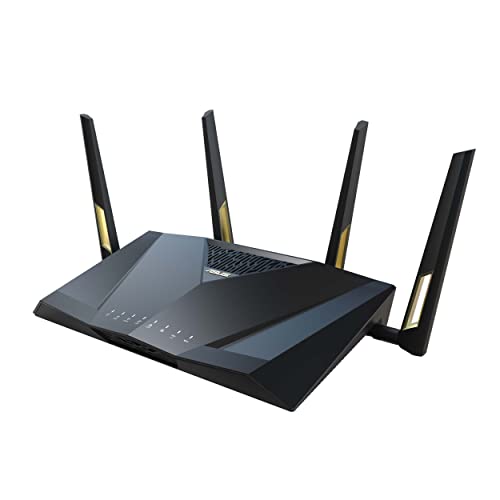
TP-Link Archer AXE75
TP-Link Archer AXE75
Best for: Dense neighbourhoods and households with newer Wi-Fi 6E devices.
AXE5400 tri-band Wi-Fi 6E with a dedicated 6 GHz band
1 Gigabit WAN port and 4 Gigabit LAN ports
USB 3.0 port for shared storage or a printer
OFDMA and MU-MIMO for serving many devices at once
Flats and dense streets are the natural home of the Archer AXE75, because its Wi-Fi 6E radio opens a 6 GHz band that newer phones, laptops, and headsets can use away from the neighbours. Where the 2.4 GHz and 5 GHz bands are crowded by dozens of nearby networks, that cleaner channel makes a real difference to newer devices. The tri-band layout leaves older gadgets on the familiar bands, and gigabit wired ports, a USB 3.0 port, and the HomeShield security suite round out the package. It fits buyers whose devices already speak Wi-Fi 6E, or who plan to add some soon.
Watch out for: Older devices cannot use the 6 GHz band, so the benefit depends on owning or buying Wi-Fi 6E hardware.
Which One Fits Your Situation
A Cable Home That Wants One Box
A cable home that wants to stop renting a gateway should pick the Nighthawk CAX30. Its DOCSIS 3.1 modem and Wi-Fi 6 router cover fast plans, its coverage reaches across a family home, and its approval for the major cable providers means it connects without a monthly rental fee. Check the provider’s approved list first, then set it up once and let it serve the whole household.
A Household Where Everyone Is Online at Once
When every person in the home carries a phone and a laptop, stream count matters more than headline speed. The Archer AX6000 gives eight streams room to serve them all, and its eight LAN ports cover anything the household would rather wire. If the flat is smaller, the AXE75 still handles a handful of active devices well and adds the 6 GHz band for newer gadgets.
A Desk Full of Wired Gear
Pick the ASUS RT-AX88U Pro when the whole desk shares one network. Its eight wired ports handle a console, a PC, a streaming box, and more without a switch, and adaptive QoS keeps the console smooth while others stream video. The lifetime security features protect every device on the network, and the extra ports mean the setup will not run out of room as it grows.
A Flat Surrounded by Neighbouring Networks
The TP-Link Archer AXE75 is the pick for a flat in a dense building. Its 6 GHz band gives newer devices a clean channel away from the crowded 2.4 GHz and 5 GHz bands, which is exactly the problem in apartment blocks where every neighbour runs their own router. Older devices simply stay on the familiar bands, so nothing in the household loses its connection.
Common Mistakes
Buying a standalone router when the home still needs a modem, then discovering a second box is required before anything connects.
Ordering a cable gateway without checking the provider’s approved modem list, and finding the provider will not activate it.
Judging a router by its headline speed alone while ignoring streams, processor, ports, and antenna design.
Placing the router in a cupboard or behind a television, then blaming the hardware for weak coverage in far rooms.
Assuming the security suite is free forever without checking whether it needs a subscription after the included trial ends.
Frequently Asked Questions
Do I need a modem as well as a router?
It depends on the connection. Cable internet needs a DOCSIS modem, either built into a gateway such as the Nighthawk CAX30 or as a separate box in front of a standalone router. Fibre homes usually receive a terminal from the provider and only need a router. Check what equipment the provider already supplies before buying anything.
What is the difference between a gateway and a router?
A gateway combines a modem and a router in one box, so it connects to the internet line and shares it over Wi-Fi by itself. A standalone router only shares the connection, and it needs a modem or a fibre terminal in front of it. Gateways save space and setup time, while separate boxes let the router be upgraded alone.
Will a Wi-Fi 6E router help if my devices are older?
Only partly. Older devices cannot use the 6 GHz band, so they stay on the familiar 2.4 GHz and 5 GHz bands, where the AXE75 still works as a Wi-Fi 6 router. The 6 GHz benefit arrives as newer phones, laptops, and headsets join the household, so the router is partly bought for devices the owner expects to add.
Can I add mesh nodes to one of these routers later?
Some of these routers support mesh expansion, so coverage can grow without replacing the main unit. The RT-AX88U Pro supports AiMesh, which lets it join with other ASUS routers, and the AXE75 supports EasyMesh. Check the exact mesh system before buying extra nodes, since mesh units from different brands do not work together.
J
JD's Woodworks Editorial Team
We compare specs, warranty terms, long-term owner feedback and street pricing before anything earns a spot. Rankings are never paid.
Affiliate disclosure. As an Amazon Associate we earn from qualifying purchases at no extra cost to you. Prices accurate as of the date shown.
Four hobby TIG welders compared for home shops: AC/DC picks for aluminum, a compact DC model for steel, listed specs, included gear and honest tradeoffs.
The best Creality Falcon engravers compared: Falcon A1 10W, CR-Laser Falcon 10W, Falcon2 Pro 22W and Falcon2 Pro S 40W, by power, work area and enclosure.
The best CNC machines for manufacturing compared: large-bed routers and closed-loop desktop mills with the work area, spindle and control for batch work.


 TP-Link Archer AXE75