As an Amazon Associate I earn from qualifying purchases. This post may contain affiliate links at no extra cost to you.
The real decision behind a low ping router is not raw speed. A fast plan and a headline wireless rate do nothing for the moment that actually ruins a match: the spike that hits when someone else in the house starts a large download, a cloud backup or a video call while you are mid-round. What keeps ping steady is how the router queues traffic under load, whether game packets can jump ahead of bulk traffic, and whether a wired gaming port or a dedicated gaming band exists to keep your machine out of the general scramble. Buyers who shop by the biggest number on the box often end up with plenty of bandwidth and the same jitter they started with.
This guide is for competitive players on busy shared connections, for households where one person games while others stream and work, and for anyone replacing an ageing router that falls apart under load. Every model below was chosen from its Amazon product name and listing details, focusing on the features the listing itself ties to latency: gaming QoS systems, dedicated gaming ports or bands, game acceleration tools and current WiFi generations. No ping figure is promised anywhere in this guide, because no router can control the route between your home and a game server.
Quick Picks
As an Amazon Associate we earn from qualifying purchases
Product
Best for
Key spec from title
NETGEAR Nighthawk Pro Gaming XR1000
Players who want gaming-first queue software
AX5400 WiFi 6 with DumaOS 3.0
ASUS RT-AX86U Pro
Console and PC players who want a dedicated gaming port
AX5700 WiFi 6 with 2.5G port and gaming port
TP-Link Archer GX90
Homes that want a separate band reserved for games
AX6600 tri-band WiFi 6 gaming router
ASUS ROG Rapture GT-AX11000 Pro
Larger setups with fast wired backhaul needs
Tri-band WiFi 6 with 10G and 2.5G ports
How to Choose
Queue Management Matters More Than Headline Speed
Ping rises when packets wait in line, and packets wait in line when the connection is busy. A router with a gaming-aware queue can place small, time-sensitive game packets ahead of a large download instead of letting them sit behind it. Look for a named system in the listing rather than a vague promise: DumaOS on the NETGEAR model, adaptive QoS on the ASUS routers, and a game accelerator on the TP-Link. Then check how much control that system gives you. The useful versions let you prioritise a device or an application, cap how much bandwidth bulk traffic may take, and see which device is currently loading the connection.
A Wired Gaming Port Is the Shortest Path
Wireless convenience is real, but the lowest and steadiest latency in a home still comes from a cable. Two models here go further than ordinary LAN sockets. The ASUS RT-AX86U Pro lists a dedicated gaming port, which prioritises whatever is plugged into it, while the GT-AX11000 Pro adds both a 10G port and a 2.5G port for fast wired links. If your gaming PC or console sits near the router, a model with a prioritised wired port removes WiFi contention from the equation entirely. If the machine sits in another room, weigh the cost of running a cable against what a stronger wireless gaming feature set can do.
Tri-Band Layouts Give Games a Lane of Their Own
On a dual-band router, your game shares the 5 GHz band with every phone, laptop and television in the house. A tri-band design adds a second 5 GHz band, and gaming models can reserve that extra band for play. The TP-Link Archer GX90 is built around exactly that idea, with a dedicated gaming band inside its AX6600 tri-band layout, and the ASUS GT-AX11000 Pro is also tri-band. Choose tri-band when several people use the network at the same time as you play. A single player in a quiet flat gains less from the extra band and may be better served by stronger queue software on a dual-band model.
Match the Router to Your Internet Connection
A gaming router can only manage the traffic that passes through it, so its WAN side has to keep up with your plan. Check the listing for the port that connects to your modem or fibre terminal. The RT-AX86U Pro and the Archer GX90 each list a 2.5 Gbps port, which suits faster cable and fibre tiers, while the GT-AX11000 Pro lists 10G and 2.5G ports for the fastest home connections and local transfers. Also confirm the basics before ordering: your connection type, whether your provider requires a specific login method, and whether the new router replaces your current unit or sits behind it, because running two routers in series can undo the queue control you are paying for.
The N Best Options
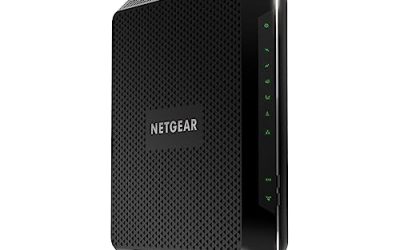
NETGEAR Nighthawk Pro Gaming XR1000
Top Pick
NETGEAR Nighthawk Pro Gaming XR1000
Best for: Shared homes where downloads and streams compete with ranked play
This is the pick for players whose main problem is a busy household rather than weak coverage. Its listing leads with DumaOS 3.0, software described as optimising lag-free server connections, which puts queue control and connection management at the centre of the product instead of treating gaming as a side mode. The AX5400 WiFi 6 platform covers a typical home, and the four gigabit Ethernet ports leave room for a console, a PC and a streaming box on cables. Choose it when several people share your connection and you want the router itself to referee whose traffic goes first during a match.
ASUS RT-AX86U Pro
Runner-Up
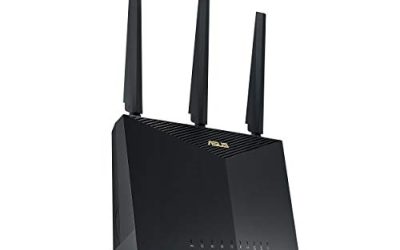
ASUS RT-AX86U Pro
Best for: One main gaming machine that can sit on a cable, plus phone gaming
Brand: ASUS
Model name: RT-AX86U PRO
Wireless class: AX5700 dual-band WiFi 6, up to 5700 Mbps
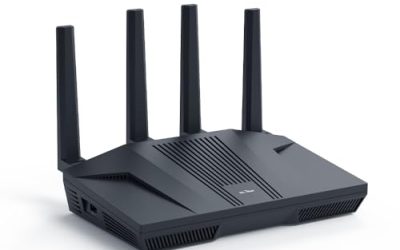
ASUS aims this model squarely at players who can run one cable. The listing names a dedicated gaming port alongside a 2.5G port, so the machine that matters most gets both a fast link and priority treatment, while Mobile Game Mode extends similar prioritisation to phone gaming through the ASUS Router app. Adaptive QoS, port forwarding tools and subscription-free network security round out a listing that covers wired, wireless and phone play in one box. It is also AiMesh compatible, so coverage can grow later by adding another ASUS unit rather than replacing this one.
TP-Link Archer GX90
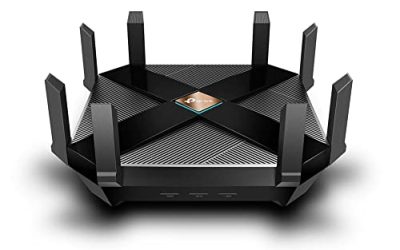
TP-Link Archer GX90
Best for: Wireless gaming in a busy multi-device home
Brand: TP-Link
Model: Archer GX90
Wireless class: AX6600 tri-band WiFi 6, combined speed up to 6579 Mbps per brand listing information
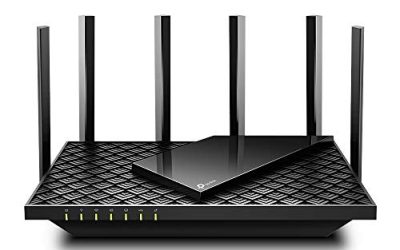
The GX90 takes the opposite approach to the ASUS above: instead of prioritising one wired socket, it reserves wireless space. Its tri-band AX6600 layout includes a dedicated gaming band, so game traffic can sit on a band that the rest of the household is not using for downloads and streaming. The listing also names a 2.5 Gbps port for a fast wired feed, MU-MIMO support and smart VPN router functions. Eight-stream wireless capacity suits homes with many active devices. Pick this model when your gaming machine cannot be cabled and the house stays busy while you play.
ASUS ROG Rapture GT-AX11000 Pro
ASUS ROG Rapture GT-AX11000 Pro
Best for: Fast fibre homes with a wired rig and local network storage
This is the heavyweight option for homes that combine gaming with fast local networking. The listing pairs tri-band WiFi 6 with both a 10G port and a 2.5G port, a combination aimed at fast fibre connections, quick transfers to local storage and a wired gaming rig that never waits on a gigabit ceiling. Triple-level game acceleration is the headline gaming feature, and ASUS RangeBoost Plus is listed for coverage. Subscription-free network security and AiMesh compatibility are also named. Choose it when the router will anchor a larger setup rather than serve a single desk.
Which One Fits Your Situation
You Play Ranked Matches While Family Streams
Start with the NETGEAR XR1000. Your problem is contention, not coverage, and DumaOS 3.0 exists to manage exactly that contention by deciding which traffic goes first. If your gaming machine can also take a cable, the ASUS RT-AX86U Pro becomes a strong alternative, because its gaming port gives your matches a permanently prioritised path that does not depend on software settings surviving a busy evening.
Your Gaming Room Has No Cable Run
Look at the TP-Link Archer GX90 first. The dedicated gaming band gives wireless play its own space away from the household traffic that causes spikes, which is the closest wireless equivalent of running a cable. The GT-AX11000 Pro is the step up if the house is large or the walls are heavy, thanks to its tri-band layout and RangeBoost Plus positioning, but the GX90 covers most uncabled rooms with less router than that.
You Have Fast Fibre and a Wired Desk Setup
The ASUS ROG Rapture GT-AX11000 Pro fits best here. Its 10G and 2.5G ports make use of a fast connection and quick local transfers, and triple-level game acceleration handles prioritisation on top. The RT-AX86U Pro is the simpler version of the same idea: its 2.5G port and gaming port cover a fast plan and one main machine without the extra wired capacity you may never use.
You Mostly Game on a Phone or Tablet
The ASUS RT-AX86U Pro is the natural starting point because its listing names Mobile Game Mode, designed to cut lag for phone gaming through the router app. Any of the four will carry phone traffic, but a named mobile gaming mode plus adaptive QoS gives you a direct tool for the device you actually play on, instead of settings built only around PCs and consoles.
Common Mistakes
Buying by headline wireless speed and ignoring queue management, which is the feature that actually holds ping steady under load.
Leaving the gaming machine on a crowded band while a dedicated gaming band or gaming port sits unused in the settings.
Running the new router behind an old provider router, so traffic passes through two queues and the gaming features never take full control.
Blaming the router for a distant game server, when server location and the provider route sit outside anything a home router can change.
Skipping the firmware update and the QoS setup after installation, leaving the router in its plain out-of-box behaviour.
Frequently Asked Questions
Can a router lower my ping to a game server?
Only partly. A router controls the stretch inside your home: queueing, prioritisation and local wireless contention. It cannot shorten the route between your provider and the server or move the server closer. Expect steadier ping and fewer spikes under load rather than a dramatically smaller number on an empty connection, and choose servers in your region whenever the game allows it.
Is wired always better than wireless for gaming?
A cable removes wireless contention and interference, which makes it the most predictable option, and two routers here add a prioritised gaming port to make that cable count even more. Wireless on a dedicated gaming band, like the Archer GX90 offers, narrows the gap considerably. If a cable run is practical, take it; if not, a tri-band gaming model is the sensible fallback.
Do I need WiFi 6E or WiFi 7 for low ping?
Not for latency alone. The features that stabilise ping are queue management, prioritisation and band separation, and all four routers here deliver those on WiFi 6. Newer generations mainly add capacity and a less crowded band in some regions. Buy them for future-proofing or many-device homes, not because the generation number itself promises steadier matches.
Why does my ping spike when someone starts a download?
Because the download fills the queue at your connection, and your small game packets wait behind large file packets. That effect is often called bufferbloat. A gaming QoS system fixes it by holding bulk traffic back slightly and letting game packets pass first, which is why the queue software in these listings matters more than their top wireless speeds.
J
JD's Woodworks Editorial Team
We compare specs, warranty terms, long-term owner feedback and street pricing before anything earns a spot. Rankings are never paid.
Affiliate disclosure. As an Amazon Associate we earn from qualifying purchases at no extra cost to you. Prices accurate as of the date shown.
Find the best wpa 3 routers for safer home Wi-Fi, with Wi-Fi 6 and Wi-Fi 6E models that protect every device on the network for families and small offices.
Compare 4 wireless routers that pair well with Excede satellite internet, from Wi-Fi 7 standalones to a mesh kit for wide rural homes and busy families.
Looking for the best wifi routers 1gb? Compare four gigabit routers for home internet, with Wi-Fi speed, ports, and coverage for each model and every home.
Looking for the best twc modems routers? Compare three modem-router combos approved for Spectrum cable, with DOCSIS, Wi-Fi, and ports explained for every home.
Looking for the best routers with verizon fios? Compare three routers that work with a FiOS connection, with Wi-Fi speed, ports, and coverage for every home.
Compare the best routers for wireless internet at home by band, coverage, device handling and mesh options, using only the specs stated on each Amazon listing.
Compare the best routers for security by VPN support, named protection services, guest networks and update handling, taken from the wording of each Amazon listing.
Compare the best routers for schools and classrooms by device capacity, mesh expansion, central app management and content controls named on each Amazon listing.
Compare the best routers for a homelab by VLAN support, multi-gig wired ports, VPN throughput and expansion options, with specs taken from each Amazon listing.




 ASUS ROG Rapture GT-AX11000 Pro