Our Short List of 3
All 3 Picks at a Glance
| Product | Specs | Action |
|---|---|---|
 xTool S1 40W Laser Engraver and Cutter Machine – Basic Bundle | Check price on Amazon | |
 OMTech Polar Lite 55W CO2 Laser Engraver and Cutter | Check price on Amazon | |
 ATOMSTACK A20 Pro V2 20W Laser Engraver | Check price on Amazon |
Our Top Picks
What's inside
As an Amazon Associate I earn from qualifying purchases. This post may contain affiliate links at no extra cost to you.
The phrase best tool laser engraver can be read two ways, so this guide states its reading plainly. It is not about a hand tool that happens to carry a laser, and it is not about one wattage class. This guide reads it as a laser engraver machine used as a workshop tool: a machine that sits on a bench in a woodworking shop and marks or cuts wood, acrylic, leather, and coated metal. Every pick below is a complete laser engraver machine sold on Amazon US, and each is a different kind of machine.
That spread matters because laser engravers are not one machine. A 5W desktop unit engraves fine detail on small blanks and coasters. A 20W open-frame machine cuts thin plywood and signs. A 40W enclosed diode machine runs batch work at a craft bench. A 55W CO2 machine cuts clear acrylic and thick sheet goods that diode beams cannot touch. Picking by wattage alone misses the real differences: bed size, enclosure, air assist, and software shape the work far more than the number on the module.
This guide differs from the other laser guides on this site, which are tied to one wattage, such as the 5W and 40W guides, or to one material, such as the fabric and cup guides. This guide is the general one: five laser engraver machines for a woodworking shop, compared side by side. The numbers here come from the maker listing or the machine manual, and where sources disagree, the guide says so.
What to look for
Laser type comes first. Diode machines use a blue beam, run from a compact module, and engrave wood, leather, paper, and coated metal with ease. They cut thin wood and dark acrylic well, but a diode beam passes through clear acrylic instead of cutting it, so clear acrylic belongs on a CO2 machine. CO2 machines use a glass tube, cut clear acrylic and thicker sheet goods, and cost more per watt. Fiber machines engrave bare metal deeply, but they are a different class and do not appear in this guide.
Optical output is the number that matters, not the number on the power brick. A machine sold as a 60W or 120W unit may carry only a 10W or 20W laser module, with the larger figure describing the whole machine power draw. This guide names optical output for every pick: 5W, 10W, 20W, 40W, and 55W. Treat cut-depth claims with the same care: makers quote single-pass cuts in soft, thin stock.
Bed size sets the largest piece you can work in one job. A 125 by 125 mm desktop unit suits coasters and tags. A 400 by 400 mm open-frame bed suits signs and plaques. The enclosed 40W machine in this guide has a 23.93 by 15.16 inch bed, the largest diode bed here, and the CO2 machine has a 20.1 by 11.8 inch bed with pass-through doors for longer stock. Measure your usual work before you buy.
Enclosure and safety decide where the machine can live. Open-frame machines are Class 4, which means the beam is exposed while the machine runs. They need laser safety glasses, a ventilated room, and a habit of never leaving a job unattended. Enclosed machines are built as Class 1 systems, with a cabinet, a lid interlock, and a fan that pulls smoke out of the work area. They fit a shared room, a craft desk, or a shop with children nearby in a way an open frame never will. Flame detection, motion detection, tilt sensors, and an emergency stop are worth having on any machine.
Air assist is a stream of air blown at the cut point. It keeps smoke and resin off the lens, cools the cut edge, and reduces charring on wood. Some machines include it in the box, some bundle it in one variant and not another, and some leave it out entirely. Plan to add air assist if your pick has none.
Software and control shape daily use. Most diode machines run LightBurn or LaserGRBL, and some add a phone app, a touchscreen, or offline work from a memory card. A touchscreen runs a job without a laptop beside the machine, and WiFi sends a job from another room. Check whether the rotary attachment you want is included or sold apart.
Weight and assembly matter too. The desktop machine here weighs about 7 lb and needs no assembly. The open-frame machines weigh about 10 to 14 lb and take 20 to 40 minutes to put together. The enclosed diode machine weighs 44 lb and the CO2 machine weighs about 90 lb, so both need a permanent bench and a second pair of hands to lift.
xTool S1 40W Laser Engraver and Cutter Machine – Basic Bundle
xTool S1 40W Laser Engraver and Cutter Machine – Basic Bundle
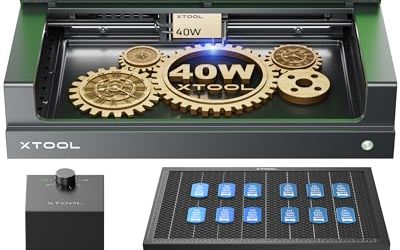
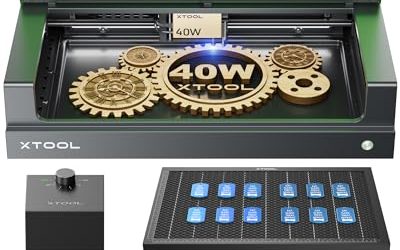
The xTool S1 is the enclosed diode machine in this guide, and it is the pick for batch work at a craft bench. Its 40W diode module is the strongest diode output here, and the maker states it cuts 18 mm cherry wood in one pass. The bed measures 23.93 by 15.16 inches, the largest diode bed here, and the machine engraves at up to 600 mm per second. The Basic Bundle behind this ASIN includes smart air assist and a honeycomb panel.
The enclosure is what sets the S1 apart. It is built as a Class 1 system, with a cabinet that contains the beam and the smoke, an auto-focus head, and Pin-point Positioning, which is xTool patented camera-free positioning that lines a design up on the work piece. The frame is 3 mm aerospace-grade aluminum, and the machine weighs 44 lb, so it stays put on a bench. The machine runs xTool Creative Space software, which carries hundreds of material presets, so a beginner can load a design and run a first job the same day the box arrives.
The S1 also takes four switchable laser modules: 10W, 20W, 40W, and a 2W infrared module for metal marking. That matters because the 40W module is a cutting module, while the infrared module marks bare metal and plastic in a way a blue diode cannot. The rotary bundle and the conveyor feeder are separate variants, so check the bundle name on the listing before you buy, because the Basic Bundle here has no rotary attachment. One honest note: some crawls of the listing show a part number field naming a 10W kit while the size field names 40W. The listing title, the size field, and the maker spec all agree on 40W for this ASIN, and that is the figure this guide uses.
OMTech Polar Lite 55W CO2 Laser Engraver and Cutter
OMTech Polar Lite 55W CO2 Laser Engraver and Cutter
The OMTech Polar Lite is the CO2 machine in this guide, and it is the pick for clear acrylic and thicker sheet goods. Its 55W CO2 glass tube cuts materials a diode beam cannot touch, including clear acrylic, and it engraves wood, glass, leather, and stone. The work area measures 20.1 by 11.8 inches, and front and rear pass-through doors let longer stock slide through for big panels. One-click autofocus sets the head height, and built-in air assist keeps the lens clear.
The Polar Lite is built as a desktop all-in-one. The water tank, air pump, and exhaust fans sit inside the cabinet, so there is no external chiller to plumb and no separate compressor on the floor. The machine weighs about 90 lb, light enough to move between a garage and a shop, though it still needs a second pair of hands. Some listings show a packed weight near 165 lb, which is the carton and packing, not the machine itself; the 90.4 lb figure is the machine weight from the maker spec. The listing states the machine is not discontinued by the maker.
ATOMSTACK A20 Pro V2 20W Laser Engraver
ATOMSTACK A20 Pro V2 20W Laser Engraver
The ATOMSTACK A20 Pro V2 is the 20W open-frame machine in this guide, and it is the pick for a hobbyist who wants real cutting power without an enclosed cabinet. Its 20W diode module cuts 5 mm plywood in one pass per the maker, and it engraves at up to 400 mm per second across a 400 by 365 mm bed. The 0.08 by 0.1 mm spot keeps engraved lines sharp.
The frame uses linear guide rails instead of wheels, which keeps the gantry motion smooth over long jobs, and the machine weighs 13.67 lb. Safety gear is a strong point here: the listing names a tilt sensor, limit switches, an eye shield, and safety glasses, plus flame detection and a tip-over alarm. The bundle behind this ASIN includes an R8 rotary chuck for tumblers and rings. The machine runs LightBurn out of the box and works with LaserGRBL.
Air assist is the gap. The A20 Pro V2 does not include an air pump, and current guides note that buyers should budget for one. Without it, smoke settles on the lens and char builds up on cut edges, so the machine performs below its wattage until air assist is added. The machine is also open-frame Class 4, so it needs laser safety glasses, a ventilated room, and a habit of staying near the machine while it runs.
SCULPFUN iCube Pro 5W Laser Engraver
SCULPFUN iCube Pro 5W Laser Engraver
The SCULPFUN iCube Pro is the small desktop machine in this guide, and it is the pick for a first laser or a desk that has no room for a gantry. Its 5000 mW diode module uses a 0.06 mm laser focus, and the maker states it cuts 10 mm soft wood and 6 mm black acrylic. The engraving area measures 125 by 125 mm, though some mirrors list 130 by 130 mm; the listing behind this ASIN names 125 by 125 mm, and that is the figure this guide uses. The machine engraves at up to 10,000 mm per minute and holds 0.01 mm carving precision per the maker.
The iCube Pro needs no assembly. It arrives as a closed box that sits on a desk, and it runs from a phone app over Bluetooth or from a computer over a Type-C cable. It works with LightBurn and LaserGRBL. The built-in smoke filtration system is the feature that makes a desktop machine livable: it filters the smoke from engraving without a vent hose or an exhaust box. At 262 by 300 by 226 mm and 7.05 lb, it moves from a desk to a shelf when the job is done.
The small bed is the real limit. A 125 by 125 mm area suits coasters, tags, key chains, and small blanks, but it cannot take a sign or a plaque in one job. The 5W module also cuts slowly compared with the 10W and 20W machines here. What it gives in return is the lowest barrier to beginning: no assembly, no separate filter, and no laptop tether.
Ortur Laser Master 3 10W Laser Engraver
Ortur Laser Master 3 10W Laser Engraver
The Ortur Laser Master 3 is the 10W open-frame machine in this guide, and it is the pick for a budget bench that still needs a large bed. Its 10W diode module combines two 5.5W diodes into one beam with a 0.05 by 0.1 mm spot, and the maker states it cuts 12 mm plywood and 10 mm black acrylic in one pass. The work area measures 400 by 400 mm, the largest open-frame bed here, and the machine engraves at up to 20,000 mm per minute.
The Laser Master 3 carries the most complete safety package of any open-frame machine in this guide. The maker names eight protections, including flame detection, motion detection, tilt detection, an emergency stop, a safety lock, an exposure time limit, and a voltage control system. It runs by WiFi, phone app, TF card, or USB, so a job can begin without a laptop beside the machine, The laser module is swappable, with 10W, 20W, and 40W modules available, so the frame can grow with the work instead of being replaced.
The evidence for this ASIN is the thinnest in this guide, so confirm it live before buying. A fresh mirror read two days before this guide was written shows the listing in stock, and current guides name the Laser Master 3 as the budget open-frame pick for 2026. Older crawls show a small remaining count, and some import mirrors show it out of stock, so check the buy box on the day of purchase. The machine is open-frame Class 4, so it needs laser safety glasses and ventilation. It ships with an air assist nozzle in some bundles and not in others, so check the bundle contents on the listing.
Comparison table
| Machine | Laser | Work area | Enclosure | Air assist | Best for |
|---|---|---|---|---|---|
| xTool S1 40W | 40W diode | 23.93 x 15.16 in | Enclosed, Class 1 | Included | Batch work at a craft bench |
| OMTech Polar Lite 55W | 55W CO2 | 20.1 x 11.8 in | Enclosed cabinet | Built in | Clear acrylic, thick sheet goods |
| ATOMSTACK A20 Pro V2 | 20W diode | 400 x 365 mm | Open frame, Class 4 | Not included | Cutting in a ventilated shop |
| SCULPFUN iCube Pro 5W | 5W diode | 125 x 125 mm | Desktop box | Not applicable | First laser, small desk |
| Ortur Laser Master 3 10W | 10W diode | 400 x 400 mm | Open frame, Class 4 | Varies by bundle | Budget bench, large bed |
Frequently asked questions
Can a diode laser engraver cut clear acrylic?
No, and this is the most common misunderstanding in laser work. A blue diode beam passes through clear acrylic instead of being absorbed by it, so the beam does not cut or engrave the material. Dark acrylic cuts well on a diode machine, because the dark color absorbs the beam. Clear acrylic needs a CO2 machine, such as the OMTech Polar Lite in this guide, whose infrared beam is absorbed by clear acrylic. A diode machine marks glass with help from a marking compound, but it does not cut glass. If clear acrylic is a regular material in your shop, buy CO2.
Do I need an enclosed machine, or is an open frame enough?
It depends on where the machine lives. An enclosed Class 1 machine contains the beam and pulls smoke through a fan, so it fits a shared room, a craft desk, or a shop with children nearby. An open-frame Class 4 machine needs laser safety glasses for everyone in the room, a ventilated space, and a habit of staying near the machine while it runs. Open frames cost less per watt and suit a dedicated shop with good ventilation. Enclosed machines remove the two biggest daily chores: glasses and smoke. If the machine will sit in a living space or a shared workshop, buy enclosed.
Can these machines engrave bare metal?
Not deeply, and the listings are easy to misread on this point. A blue diode beam marks coated and anodized metal, and it marks bare metal with help from a marking compound. It does not cut into bare steel or aluminum the way it cuts wood. A 2W infrared module, such as the one the xTool S1 can swap in, marks bare metal and plastic directly. A fiber laser engraves bare metal deeply, but fiber machines are a different class and do not appear in this guide. If your work is mostly metal tags and tools, look at fiber machines or an infrared module, not a bigger diode.
How to choose
Begin with the material, not the wattage. If clear acrylic or glass is a regular material, buy the CO2 machine, because no diode in this guide cuts clear acrylic. If the work is wood, leather, paper, and coated metal, a diode machine does the job for less money.
Next, measure the work. A 125 by 125 mm desktop unit suits tags and coasters and nothing larger. A 400 by 400 mm open-frame bed suits signs and plaques. The enclosed 40W machine has the largest diode bed here. Buy the bed your usual work needs.
Then weigh the room against the machine. An enclosed machine fits a shared room and needs no glasses routine. An open-frame machine needs glasses, ventilation, and attention while it runs, but it gives more bed and more watts for the money. Budget for air assist either way.
Finally, confirm the listing on the day you buy. Check the bundle name, because rotary attachments, air assist, and riser bases move between variants of the same machine. Check that the seller is the maker official store or a fulfilled-by-Amazon listing. The right machine is the one whose bed, enclosure, and laser type match the work you actually do.
Disclosure: As an Amazon Associate, we may earn a commission from qualifying purchases made through links in this article, at no additional cost to you.
Related guides
More from Amazon
Programs that pair well with the guide above. Offers and eligibility are set by Amazon and may change.
A free business account with business pricing and bulk-buying tools for work, shop or home office.
Create a business accountFree shipping on eligible items, Prime Video and more. Eligible new members can start with a free trial.
Start a Prime free trialAudiobooks and podcasts to listen to on the go. Eligible new members can start with a free trial.
Try Audible freeAd-free music streaming. Eligible new subscribers can start with a free trial.
Try Music Unlimited freeAs an Amazon Associate we earn from qualifying purchases.