3 Best Modems and Routers for Home (November 2026)
Compare the best modems and routers for home on a DSL line: three modem-router combos for ADSL and VDSL, with setup, ports and line-type checks explained.
Compare the best modems and routers for home on a DSL line: three modem-router combos for ADSL and VDSL, with setup, ports and line-type checks explained.
As an Amazon Associate I earn from qualifying purchases. This post may contain affiliate links at no extra cost to you.
For a household whose internet arrives over a phone line, the gateway by the wall socket does two jobs: sync with the DSL signal and spread it around the home on Wi-Fi. Shoppers often start with wireless speeds, yet the number on the box rarely decides anything, because the copper line feeding the house is slower than any modern Wi-Fi radio. What decides whether the purchase works is the modem inside, and a unit built for the wrong DSL standard will sit blinking while nothing connects.
The three combos below were picked from names and specifications on their Amazon pages, and each suits a different line type and household. They suit families still on a phone-line service, renters who want to hand back a provider-supplied gateway, and anyone replacing an ageing modem router that keeps dropping the connection. All three are DSL modem routers, so a home on cable or fibre needs a different modem entirely; a DSL unit cannot sync with a coaxial feed or fibre line.
Quick Picks
As an Amazon Associate we earn from qualifying purchases.
Product
Best for
Key spec from title
Motorola MD1600
Faster DSL plans with dual-band Wi-Fi
AC1600 Wi-Fi, VDSL2/ADSL2+ modem
Actiontec GT784WN
Basic ADSL lines on a simple setup
300 Mbps Wireless-N, ADSL modem router
NETGEAR DGN2200
Wired devices and USB file sharing
N300 Wi-Fi, ADSL2+ modem router
How to Choose
Find Out Which DSL Standard the Line Uses
The single most useful fact a buyer can gather is the line type: ADSL, ADSL2+, or VDSL, along with whether the line is bonded or uses vectoring. Each modem router only syncs with the standards its hardware understands, so a box made for plain ADSL will never connect to a VDSL service, however good its Wi-Fi looks. A dual-standard model covers both ADSL and VDSL, which also protects the purchase if the provider upgrades the line in a year or two. Ring the provider or check the account paperwork before ordering, and write the answer down, because every other comparison in this guide depends on getting that detail right first.
Let the Household Set the Wi-Fi Standard
On a basic ADSL plan, single-band Wireless-N at 300 Mbps already outpaces the line itself, so it covers browsing, streaming, and video calls without strain. Dual-band AC becomes worth having when many devices share the network, since the extra 5 GHz band spreads traffic and takes pressure off the busy 2.4 GHz band. Big houses with thick walls gain more from antenna design and dual-band support than a small flat does. Weigh the room count, the wall thickness, and the number of phones, laptops, and televisions that will be online together, then choose the wireless class that matches that picture instead of the largest number on the shelf.
Look at Ports and Sharing Before You Buy
Much home networking still happens over a cable, and a desktop, console, or smart television all run more steadily plugged in than on Wi-Fi. Gigabit ports shift files between devices on the local network faster than older 10/100 ports, though both are quick enough for the internet speeds most DSL plans deliver. A USB socket turns an attached drive or printer into a shared resource for the whole household. Tally the gadgets that will need a cable, then make sure the chosen box has that many ports with one to spare, because a separate switch later means another device, another cable, and another power socket.
Sort Out Compatibility and Login Details Early
Modem routers are pickier than ordinary routers about who they work for. The listing normally names the providers and line configurations a model supports, and a unit built for one carrier or for a non-bonded line can fail outright on a different setup. Setup also calls for the connection login, usually a PPPoE username and password that only the provider can supply. Collecting the compatibility note and those login details before the parcel arrives means the install takes minutes rather than an afternoon of calls to support, and it also confirms early on whether the model is approved for the line at all.
The 3 Best Options
Motorola MD1600
Top Pick
Motorola MD1600
Best for: Homes on a faster DSL plan that may switch from ADSL to VDSL.
VDSL2/ADSL2+ modem with AC1600 dual-band Wi-Fi
Four Gigabit Ethernet ports
DSL speeds up to 100 Mbps
Firewall with WPA/WPA2 wireless security and VPN capability
Homes on a faster DSL plan that may switch from ADSL to VDSL.
Watch out for
Bonded VDSL, bonded ADSL, and VDSL vectoring are not supported, and the unit never works with Verizon, AT&T, or cable services, so verify the line type first.
Households on a quicker DSL plan get the most from the Motorola MD1600, which pairs a VDSL2 and ADSL2+ modem with dual-band AC1600 Wi-Fi and gigabit wired ports in a single box. Because it understands both DSL standards, it keeps working if the provider moves the line from ADSL to VDSL, so the purchase is not wasted by an upgrade. Four gigabit ports cover wired gear at full local speed, while the built-in firewall and VPN pass-through add a layer of protection for the home network. It is the pick for a household that wants one gateway to survive a service change.
Watch out for: Bonded VDSL, bonded ADSL, and VDSL vectoring are not supported, and the unit never works with Verizon, AT&T, or cable services, so verify the line type first.
Actiontec GT784WN
Runner-Up
Actiontec GT784WN
Best for: Straightforward ADSL lines where a compact gateway is enough.
Full-rate ADSL2+ modem with 300 Mbps Wireless-N router
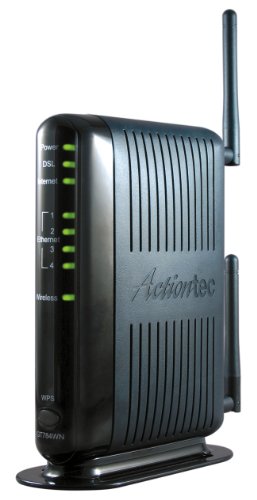
For a plain ADSL household, the Actiontec GT784WN keeps things simple. One vertical black unit holds a full-rate ADSL2+ modem, a four-port switch, and a 300 Mbps Wireless-N router, so the whole gateway is a single device on a single power socket. That wireless speed is ample for browsing, streaming, and video calls on a standard ADSL plan, and the twin antennas give steady coverage across a small to medium home. It makes a sensible swap for a provider-supplied gateway on a straightforward ADSL service, without paying for performance the line cannot deliver.
Watch out for: This is an ADSL-only unit with no VDSL support, so a provider move to VDSL would mean buying a different gateway.
NETGEAR DGN2200
NETGEAR DGN2200
Best for: Households with several wired devices plus a shared USB drive or printer.
N300 wireless ADSL2+ modem router with ReadySHARE USB port
Four 10/100 Mbps Ethernet LAN ports
ADSL2+ support with Annex A, ADSL2, and ADSL2+ standards
2.4 GHz wireless band with 300 Mbps wireless speed
The NETGEAR DGN2200 is the choice for a home where cables still do a lot of the work and files or a printer need sharing. Its ADSL2+ modem and N300 wireless router sit alongside a ReadySHARE USB port, so a drive or printer plugged into the unit becomes available to every device on the network. Four wired ports take a desktop, a console, and a television at the same time, and the NETGEAR Genie app handles network management from a phone or computer. It is a dependable all-round gateway for a mixed wired and wireless household on an ADSL2+ line.
Watch out for: Wireless-N and 10/100 ports make it an older design, so large transfers between wired devices run slower than on a gigabit model.
Which One Fits Your Situation
A Small Flat on a Basic ADSL Plan
In a small flat, the Actiontec GT784WN is the obvious match. Its wireless speed already exceeds what the line can deliver, its four wired ports cover the few devices that need a cable, and its upright shape tucks neatly beside the phone socket. Spending more on dual-band Wi-Fi or gigabit ports buys nothing when the connection itself is the bottleneck.
A Household Expecting a VDSL Upgrade
When the provider may move the line from ADSL to VDSL, the Motorola MD1600 earns its place. Its modem understands both standards, so the same gateway carries on working after the upgrade instead of heading for a drawer. Dual-band AC1600 Wi-Fi and four gigabit ports also leave room for the household to add devices over the years.
A Home Office With Cables and Shared Files
A home office where a desktop, a printer, and a shared drive all need to sit on one network suits the NETGEAR DGN2200. The ReadySHARE USB port puts an attached drive or printer within reach of every device, while the four wired ports keep the main work machines on steady cable connections and the laptops on Wi-Fi.
A Renter Handing Back a Provider Gateway
Renters on a plain ADSL service can swap in the Actiontec GT784WN and stop using the provider’s box. It is compact enough to pack when moving and straightforward to set up once the provider login details are in hand. Renters on a faster line, or one that may become VDSL, should take the Motorola MD1600 instead for its dual-standard modem.
Common Mistakes
Ordering a modem router without first finding out whether the line is ADSL, ADSL2+, or VDSL, which can leave the unit unable to sync at all, and the household offline until a replacement arrives.
Picking a router-only box with no modem inside, then realising a separate modem is still needed for the phone line, and another purchase before anything connects.
Reading the wireless speed on the packaging as the internet speed, when the DSL line is usually far slower than the Wi-Fi link, and the real bottleneck sits outside the house.
Skipping the provider compatibility note and buying a unit built for a different carrier or a bonded line that will never sync with the service.
Starting setup without the PPPoE username and password from the provider, which brings installation to a halt halfway through, and leaves the gateway blinking while nothing connects.
Frequently Asked Questions
Can an ADSL modem router work with a cable internet connection?
No, an ADSL modem router cannot work with cable internet, because it is designed to sync with a DSL signal over a phone line rather than a coaxial cable feed. Cable service needs a DOCSIS modem, while ADSL needs a modem that understands ADSL standards, so find out which service enters the home before buying anything.
Do I need a separate modem with one of these models?
No, every model in this guide combines the modem and the router in one box, so no separate modem is needed on a compatible DSL line. Plug the phone cable into the DSL port, enter the provider login details during setup, and the unit handles both the internet connection and the home Wi-Fi network.
How do ADSL and VDSL differ?
ADSL and VDSL both run over copper phone lines, but VDSL supports faster speeds over shorter distances from the street cabinet. A modem router that supports both standards, such as the Motorola MD1600, works on either line, while an ADSL-only unit cannot connect to a VDSL service at all.
Will faster Wi-Fi make my ADSL internet faster?
No, a faster Wi-Fi standard cannot speed up the internet connection itself, because the DSL line sets the maximum download speed. Quicker Wi-Fi helps devices communicate with each other on the home network and eases congestion when many devices are connected, but downloads still run at the speed of the DSL plan.
J
JD's Woodworks Editorial Team
We compare specs, warranty terms, long-term owner feedback and street pricing before anything earns a spot. Rankings are never paid.
Affiliate disclosure. As an Amazon Associate we earn from qualifying purchases at no extra cost to you. Prices accurate as of the date shown.
Four hobby TIG welders compared for home shops: AC/DC picks for aluminum, a compact DC model for steel, listed specs, included gear and honest tradeoffs.
The best Creality Falcon engravers compared: Falcon A1 10W, CR-Laser Falcon 10W, Falcon2 Pro 22W and Falcon2 Pro S 40W, by power, work area and enclosure.
The best CNC machines for manufacturing compared: large-bed routers and closed-loop desktop mills with the work area, spindle and control for batch work.